
1. Introduction
This manual provides essential information for the installation, testing, and maintenance of your Genuine OEM Samsung Heating Element (DC47-00019A). This component is designed to generate the heat required for your dryer's operation. It is rated at 240V/5300W and features two terminal connections. Understanding the proper handling and care of this part will ensure optimal performance and longevity of your appliance.
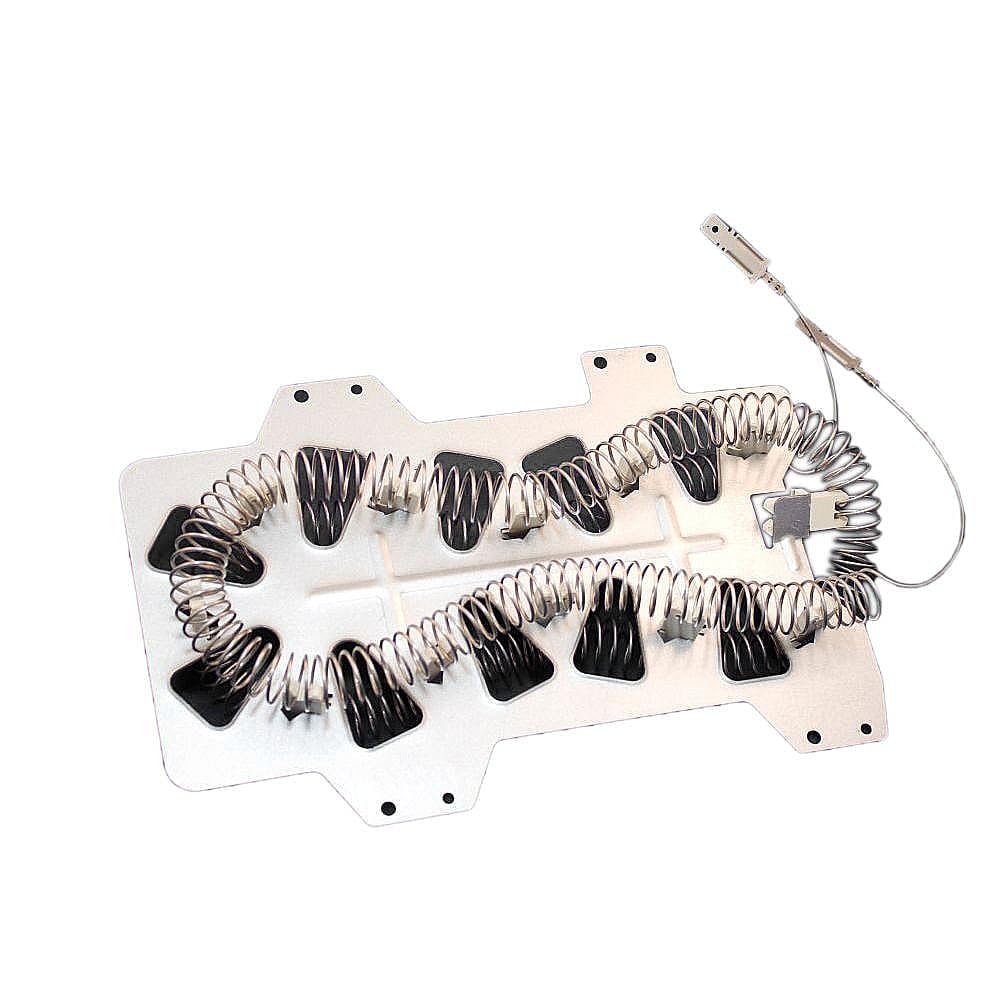
Figure 1: Samsung DC47-00019A Dryer Heating Element.
Key Features:
- Genuine OEM Part: Designed and engineered to exact specifications for Samsung appliances.
- Heat Generation: Crucial component responsible for producing heat in your dryer.
- Electrical Rating: Operates at 240V/5300W with two terminal connections.
- Durable Construction: Manufactured with premium materials for reliability and precise fit.
2. Safety Information
WARNING: Always disconnect the appliance from all utilities (power, gas, water) prior to installation, maintenance, or troubleshooting. Failure to do so can result in serious injury, electric shock, or fire. If you are unsure about any step, consult a qualified technician.
- Wear appropriate personal protective equipment, such as gloves, to prevent cuts from sharp edges.
- Ensure the work area is well-lit and clear of obstructions.
- Keep children and pets away from the appliance during service.
- Follow all instructions in your dryer's owner's manual in conjunction with this guide.
3. Product Overview
The Samsung DC47-00019A Heating Element is a critical component for electric dryers, responsible for generating the necessary heat for drying clothes. It consists of a coiled resistance wire mounted on a metal frame, designed to heat air as it passes through. This element works in conjunction with other dryer components, such as the thermal fuse and thermostat, to maintain safe operating temperatures.
Specifications:
| Attribute | Detail |
|---|---|
| Brand | Samsung |
| Model Name | Dryer Heating Element DC47-00019A |
| Item Type Name | Dryer Heating Element |
| Electrical Rating | 240V/5300W |
| Included Components | Heating Element |
| Color | Silver |
| Item Weight | 0.01 Pounds |
| UPC | 191175006079, 885109815034 |
4. Installation
Replacing a dryer heating element requires careful attention to detail. It is recommended to consult your specific dryer model's service manual or a qualified technician for detailed installation steps. The general process involves accessing the heating element housing, disconnecting electrical connections, removing the old element, and installing the new one.
General Steps (Consult your dryer's service manual for specifics):
- Disconnect Power: Ensure the dryer is unplugged from the electrical outlet or the circuit breaker is turned off.
- Access Rear Panel: Depending on your dryer model, you may need to remove the rear access panel to reach the heating element assembly.
- Locate Heating Element: Identify the heating element housing, typically found at the bottom rear of the dryer drum.
- Disconnect Wires: Carefully disconnect the electrical wires connected to the heating element and any associated thermal fuses or thermostats. Take photos if necessary to remember connections.
- Remove Old Element: Unfasten the screws or clips holding the heating element assembly in place and carefully remove it.
- Inspect for Lint Buildup: While the dryer is open, thoroughly clean any lint buildup around the fan, exhaust pipe, and other internal areas. Restricted airflow is a common cause of heating element failure.
- Install New Element: Position the new Samsung DC47-00019A Heating Element into the housing, ensuring it is securely seated and the ceramic insulators are holding the coils correctly without touching the metal frame.
- Reconnect Wires: Reattach all electrical connections, ensuring they are tight and correct.
- Reassemble Dryer: Replace any panels or covers removed during the process.
- Restore Power and Test: Plug the dryer back in or turn on the circuit breaker. Run a short cycle to confirm proper heating and operation.
5. Testing the Heating Element
Before or after installation, you can test the heating element and thermal fuse for continuity using a multimeter. This helps confirm if the component is functioning correctly.
Testing Procedure:
- Set Multimeter: Set your multimeter to the continuity (beeping) mode or the lowest ohms (Ω) setting.
- Test Heating Element Coils:
- Place one probe on each of the two terminals of the heating element.
- A working element should show continuity (a beep or a low resistance reading, typically between 8-12 ohms). No continuity indicates a broken coil.
- Visually inspect the coils to ensure they are not broken or touching the metal frame.
- Test for Ground Fault (Short to Frame):
- Keep one probe on a heating element terminal.
- Touch the other probe to the metal frame of the heating element assembly.
- There should be NO continuity (no beep, "OL" or infinite resistance). If there is continuity, the element is shorted to the frame and is faulty. Repeat for the other terminal.
- Test Thermal Fuse (if applicable):
- Place one probe on each terminal of the thermal fuse.
- A good thermal fuse should show continuity (a beep or a very low resistance reading). No continuity indicates a blown fuse, which needs replacement.
Video 1: Demonstrates how to test a Samsung heating element for continuity and shorts.
6. Maintenance
Proper maintenance is crucial to prevent premature failure of your heating element and other dryer components. The most common cause of heating element and thermal fuse failure is restricted airflow due to lint buildup.
Recommended Maintenance:
- Clean Lint Filter: Clean the lint filter before or after every load.
- Inspect and Clean Dryer Vent: Regularly inspect and clean the entire dryer vent system, from the dryer to the exterior exhaust. Lint can accumulate in the vent hose, especially at bends or where it exits the house. A clogged vent restricts airflow, causing the dryer to overheat and potentially damaging the heating element or thermal fuse.
- Check for Kinks: Ensure the dryer exhaust hose is not kinked or crushed, which can impede airflow.
- Professional Cleaning: Consider professional dryer vent cleaning annually, especially for long or complex vent runs.
7. Troubleshooting
If your dryer is experiencing issues related to heating, the heating element or associated components may be at fault. Always perform safety checks before troubleshooting.
Common Issues and Solutions:
- Dryer Not Heating:
- Check the heating element for continuity using a multimeter (refer to Section 5). A lack of continuity indicates a faulty element.
- Test the thermal fuse for continuity. A blown thermal fuse will prevent the element from heating.
- Ensure the dryer is receiving proper 240V power.
- Dryer Overheating or Clothes Taking Too Long to Dry:
- This is often a sign of restricted airflow. Inspect and clean the lint filter and the entire dryer vent system thoroughly (refer to Section 6).
- Check the thermal cut-off and thermostat for proper operation.
- Burning Smell:
- A burning smell can indicate lint buildup burning on the heating element or other hot components. Immediately disconnect power and clean the dryer thoroughly.
- A new heating element might produce a slight burning odor during its first few uses as manufacturing residues burn off. Ensure adequate ventilation.
8. Warranty and Support
For specific warranty information regarding your Samsung DC47-00019A Heating Element, please refer to the documentation provided with your purchase or contact Samsung customer support directly. Genuine Samsung parts are typically covered by a manufacturer's warranty against defects.
For technical assistance or further inquiries, please visit the official Samsung support website or contact their customer service line.


