
1. Introduction
The Technoline WS 7394-IT Weather Station is designed to provide accurate and comprehensive weather information for your home. This device features a weather forecast with symbols, trend and air pressure display, and air pressure history. It also includes a radio-controlled clock with date and calendar display, indoor and outdoor temperature readings in Celsius or Fahrenheit, a battery level indicator, and an indoor comfort level and humidity indicator. The outdoor sensor utilizes IT+ technology for extended range.
2. Safety Information
- Do not expose the unit to extreme temperatures, direct sunlight, or high humidity.
- Avoid dropping the unit or subjecting it to strong impacts.
- Do not immerse the unit in water.
- Use only the specified battery types. Ensure correct polarity when inserting batteries.
- Keep batteries out of reach of children.
- Do not mix old and new batteries or different types of batteries.
- Dispose of used batteries according to local regulations.
3. Package Contents
Please check that all components are present and in good condition:
- Technoline WS 7394-IT Main Unit
- IT+ Outdoor Sensor (supports up to 3 external sensors, one included)
- User Manual
Note: 4 AA batteries are required for operation and are not included in the package.
4. Setup
4.1 Battery Installation
Insert batteries into both the main unit and the outdoor sensor. Ensure correct polarity (+/-).
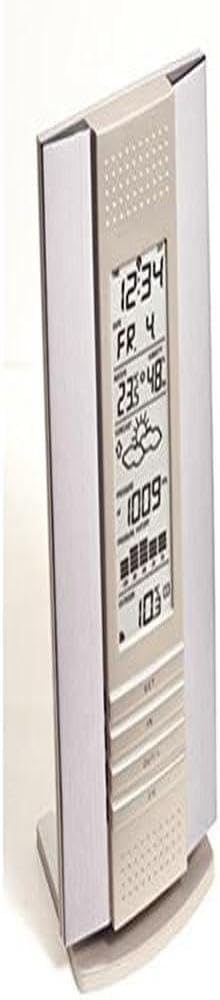
Image: Technoline WS 7394-IT Main Unit. This image shows the front of the weather station, where the display and control buttons are located. Batteries are inserted into the back of the unit.

Image: Technoline IT+ Outdoor Sensor. This image displays the compact outdoor sensor, which transmits temperature and humidity data to the main unit. Batteries are inserted into this unit as well.
4.2 Sensor Placement
Place the outdoor sensor in a shaded, dry location, protected from direct sunlight and rain, to ensure accurate temperature and humidity readings. The IT+ technology provides an extended range, typically up to 100 meters in open areas.
4.3 Initial Synchronization
After inserting batteries, the main unit will automatically search for the outdoor sensor and the DCF-77 radio signal for time synchronization. This process may take a few minutes. Ensure the main unit is placed away from electronic interference.
4.4 Units Selection
Use the designated button (refer to the display overview in Section 5) to switch between Celsius (°C) and Fahrenheit (°F) for temperature display.
5. Operating Instructions
5.1 Display Overview
The main unit's display is divided into several sections, providing various pieces of information:

Image: Technoline WS 7394-IT Display with Labels. This image highlights different sections of the weather station's display, indicating where the time, date, indoor temperature, outdoor temperature, weather forecast, and air pressure are shown.
- Top Section: Displays the radio-controlled time, date, and day of the week.
- Middle Section: Shows the weather forecast symbols, air pressure trend, current air pressure, and air pressure history.
- Lower Section: Indicates indoor temperature, indoor humidity, comfort level, outdoor temperature, and outdoor humidity (if applicable).
5.2 Weather Forecast
The weather station analyzes air pressure changes to predict upcoming weather conditions. Symbols such as sunny, partly cloudy, cloudy, rainy, or snowy will be displayed in the middle section of the screen.
5.3 Temperature and Humidity Display
The indoor temperature and humidity are measured by the main unit. The outdoor temperature and humidity are transmitted by the IT+ outdoor sensor. You can switch between Celsius and Fahrenheit as described in Section 4.4.
5.4 Air Pressure Display and History
The current air pressure is displayed, along with a trend indicator (rising, falling, stable). The station also maintains a history of air pressure readings, which contributes to the weather forecast.
5.5 Radio-Controlled Clock
The clock automatically synchronizes with the DCF-77 radio signal, ensuring accurate time, date, and calendar display. Time zones (± 12 hours) can be adjusted if needed.
5.6 Comfort Level Indicator
The indoor comfort level indicator provides a quick visual reference to the current indoor climate based on temperature and humidity, helping you maintain an optimal environment.
6. Maintenance
6.1 Battery Replacement
When the battery level indicator appears on the display, replace the batteries in both the main unit and the outdoor sensor. This ensures continuous and accurate operation.
6.2 Cleaning
Clean the unit with a soft, damp cloth. Do not use abrasive cleaners or solvents, as these may damage the display or casing.
7. Troubleshooting
| Problem | Possible Cause | Solution |
|---|---|---|
| No outdoor temperature/humidity reading | Outdoor sensor out of range or batteries low. Interference. | Move sensor closer to the main unit. Replace sensor batteries. Relocate units away from electronic devices. |
| Incorrect time display | Poor DCF-77 signal reception. Incorrect time zone setting. | Relocate the main unit to a window or open area. Manually adjust time zone. |
| Inaccurate weather forecast | Station still learning local air pressure patterns. Sudden, localized weather changes. | Allow 24-48 hours for the station to calibrate. Forecasts are based on air pressure trends and may not always match immediate local conditions. |
| Display is dim or blank | Main unit batteries are low or depleted. | Replace batteries in the main unit. |
8. Specifications
- Brand: techno line
- Model: WS 7394-IT
- Power Source: Battery Powered (4 AA batteries required, not included)
- Special Features: DCF-77 radio-controlled, Time Zones (± 12 h), IT+ technology
- Material: Aluminium
- Connectivity Technology: 433 MHz, 868 MHz
- Temperature Accuracy: ±1 °C
- Display Type: Digital Display
- Recommended Uses: Home, Temperature monitoring
- Item Form: Rectangular dome
- Manufacturer: Technotrade
- Country of Origin: Germany
9. Warranty Information
This product comes with a standard manufacturer's warranty. Please refer to the warranty card included in your original packaging or contact your retailer for specific details regarding warranty duration and terms. The warranty typically covers defects in materials and workmanship under normal use.
10. Support
For technical support, troubleshooting assistance, or inquiries about your Technoline WS 7394-IT Weather Station, please contact the retailer where you purchased the product or visit the official Technoline website for contact information. Please have your model number (WS 7394-IT) and purchase details ready when contacting support.


