Introduction
This manual provides instructions for the proper use and application of Fellowes CRC00271 Storage Box Labels. These labels are designed to help organize and identify the contents of your storage boxes efficiently. Each pack contains 20 assorted labels, sized 10 1/4 x 3 inches, on 8-1/2 x 11 inch sheets, compatible with inkjet printers.
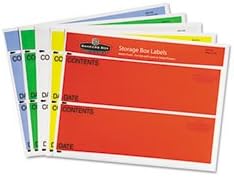
Image: A stack of assorted Fellowes Storage Box Labels, showing different colors (red, yellow, green, blue) and pre-printed fields for 'CONTENTS' and 'DATE'.
Setup
- Printer Compatibility: Ensure your printer is an inkjet model. These labels are specifically designed for inkjet printer use.
- Software and Templates: For optimal results, download pre-set label formats from the Fellowes website (if available) or use standard label software. This ensures correct alignment and print quality.
- Loading Labels: Load the label sheets into your printer's paper tray according to your printer's instructions for specialty media. Ensure the correct side is facing up for printing.
Operating Instructions
- Printing Content: Design your label content using your chosen software or template. Include information such as "CONTENTS," "DATE," or any other relevant details for your storage boxes. Print a test page on plain paper first to verify alignment.
- Hand-Writing Option: If a printer is not available, the labels can be filled out by hand using a permanent marker or pen. Allow ink to dry completely before handling.
- Applying Labels: Carefully peel a printed or hand-written label from its backing sheet. Position the label on the desired surface of your storage box. Press firmly from the center outwards to ensure full adhesion and remove any air bubbles.
- Reusing Boxes: The non-transparent design of these labels allows them to cover existing writing or old labels on storage boxes, facilitating reuse and maintaining a neat appearance.
Maintenance
- Storage: Store unused label sheets in their original packaging in a cool, dry place away from direct sunlight and extreme temperatures to prevent curling or damage to the adhesive.
- Handling: Avoid touching the adhesive side of the labels to maintain optimal stickiness.
Troubleshooting
- Printer Jams: Ensure labels are loaded correctly and are not bent or damaged. Check your printer's manual for specific media loading instructions.
- Poor Print Quality: Verify that your printer's ink cartridges are not low and that the print settings are appropriate for label paper. Use the recommended templates for proper alignment.
- Labels Not Sticking: Ensure the surface of the storage box is clean, dry, and free of dust or grease. Apply firm, even pressure across the entire label.
Specifications
| Model Number | CRC00271 |
| Brand | Fellowes |
| Label Dimensions | 10 1/4 x 3 inches (26.04 x 7.62 cm) |
| Sheet Dimensions | 8-1/2 x 11 inches (21.59 x 27.94 cm) |
| Quantity per Pack | 20 labels |
| Color | Assorted |
| Printer Compatibility | Inkjet Printers |
| Adhesive Type | Permanent Self-Adhesive |
| Feature | Non-transparent design for covering existing writing |
Warranty and Support
For product support, warranty information, or to download templates, please visit the official Fellowes website or contact Fellowes customer service directly. Keep your purchase receipt for any warranty claims.
Fellowes Website: www.fellowes.com


