
1. Product Overview
The Opteka 650-1300mm f/8 Super Telephoto Zoom lens is designed for long-range photography, offering a versatile focal length range that can be extended to 1300-2600mm with the included 2X teleconverter. This lens features an optimized optical design with 6 elements in 5 groups, including one SD super-low dispersion element, to minimize aberrations and enhance image quality. Its robust full metal body ensures durability, while the integrated tripod collar provides stability for sharp images.
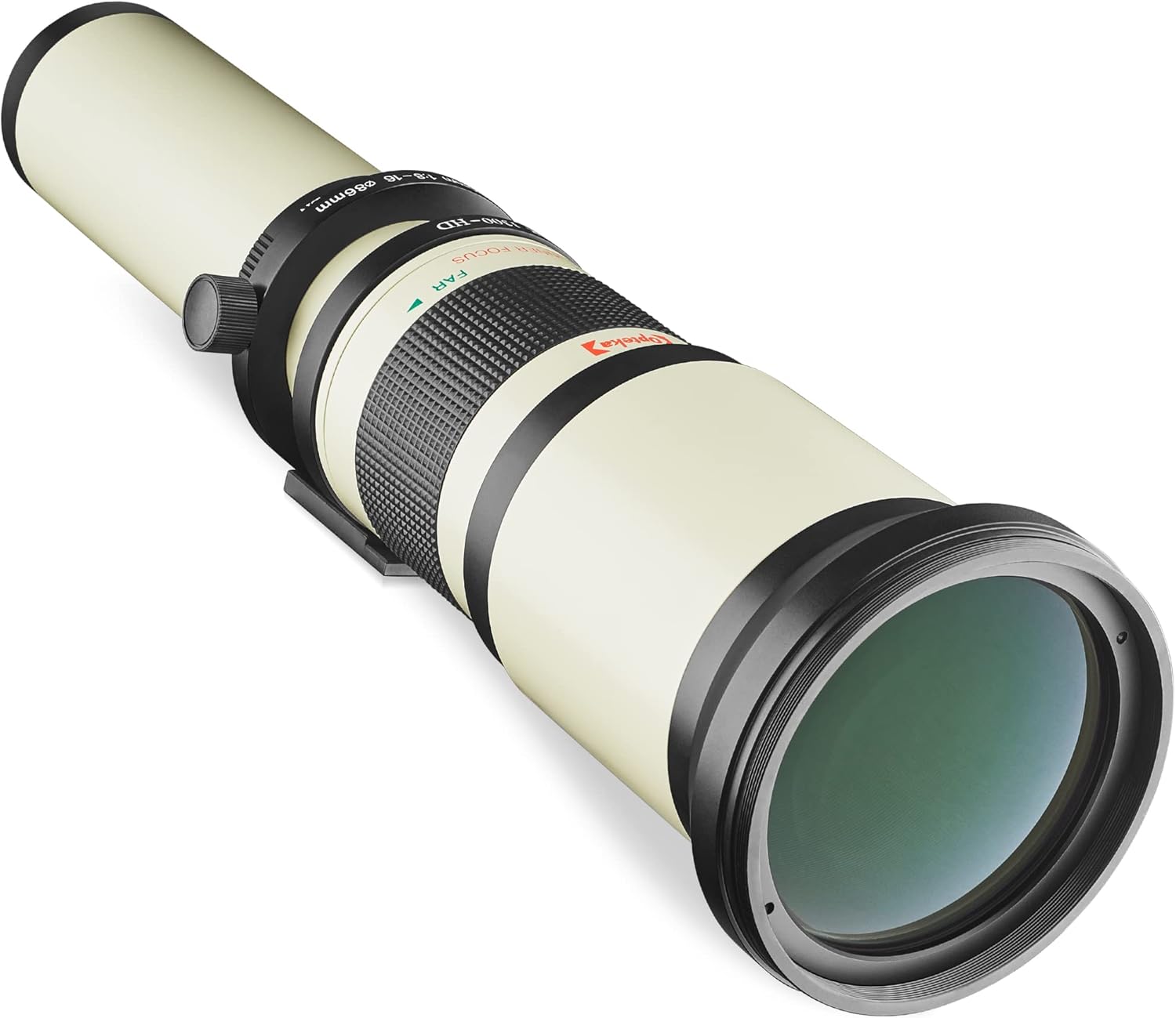
Image: The Opteka 650-1300mm Telephoto Zoom Lens, showcasing its long barrel and optical elements.
2. Package Contents
Verify that all items are present in your package:
- Opteka 650-1300mm Telephoto Zoom Lens
- 2X Teleconverter
- T-Mount Adapter
- Front and Rear Lens Caps
- Soft Carrying Case
- 10 Year Warranty Card

Image: The Opteka 650-1300mm lens with its included accessories, including the carrying case, lens caps, and 2X teleconverter.
3. Safety Information
- Do not look directly at the sun or other bright light sources through the lens, as this can cause permanent eye damage.
- Keep the lens away from extreme temperatures, humidity, and dust.
- Avoid dropping or subjecting the lens to strong impacts.
- Store the lens with caps on when not in use to protect the optical elements.
4. Setup
4.1 Attaching the Lens to Your Camera
- Ensure your camera is turned off.
- Attach the T-mount adapter to your camera's lens mount by aligning the red dots on both the adapter and the camera body, then rotating clockwise until it clicks into place.
- Screw the Opteka 650-1300mm lens onto the T-mount adapter. Ensure it is securely fastened.

Image: Close-up view of the durable aluminum alloy lens mount and T2 adapter connection point.
4.2 Using the Tripod Collar
Due to the lens's size and weight, an integrated tripod collar is provided to minimize motion blur and provide stability. Attach your tripod or monopod to the tripod collar's mounting screw.
- The collar rotates, allowing you to adjust the camera's orientation (landscape or portrait) without repositioning the tripod. Loosen the knob on the side of the collar to rotate, then tighten to secure.
- For optimal balance, especially with heavier camera bodies, consider using a second support for the camera body itself, or adjust the lens's position within the collar for better weight distribution.

Image: The integrated tripod collar on the Opteka lens, designed for stability and rotational adjustment.
5. Operating the Lens
This is a fully manual lens, requiring manual focus and exposure settings on your camera.
5.1 Manual Focusing
The lens features a wide, non-slip rubber manual focus ring. Rotate this ring to achieve sharp focus. The lens uses an inner focus mechanism, meaning its length does not change during focusing, which helps prevent accidental focus shifts.

Image: Close-up of the inner focus ring, indicating 'NEAR' and 'FAR' focus directions.
5.2 Adjusting Focal Length and Aperture
The lens uses a locking push/pull zoom mechanism to set both focal length and corresponding aperture. An index for distance and diaphragm scale is inscribed on the lens barrel.
- To adjust, unlock the mechanism by rotating the ring labeled 'LOCK/OPEN'.
- Push or pull the lens barrel to select your desired focal length (650mm to 1300mm). The aperture will automatically correspond to the selected focal length (e.g., f/8 at 650mm, f/16 at 1300mm).
- Once the focal length is set, rotate the ring back to 'LOCK' to prevent accidental changes.

Image: The lens barrel showing focal length markings (650mm to 1300mm) and the push/pull zoom mechanism with lock/open indicator.
5.3 Using the 2X Teleconverter
The included 2X teleconverter doubles the effective focal length of the lens, extending the range to 1300-2600mm. This is ideal for extreme telephoto applications.
- To attach, remove the lens from your camera.
- Mount the 2X teleconverter between the lens and the T-mount adapter.
- Note that using the teleconverter will reduce the effective aperture by two stops (e.g., f/8 becomes f/16, f/16 becomes f/32).

Image: A close-up of the 2X teleconverter, illustrating its function by showing a magnified butterfly image.
5.4 Exposure Settings
Since this is a manual lens, you will need to set your camera to either Manual (M) exposure mode or Aperture-Priority (A) mode. In M mode, you control both shutter speed and ISO. In A mode, the camera will automatically select the shutter speed based on your chosen aperture and ISO. With some exposure knowledge, Shutter Priority (S) mode can also work in many daylight situations with Auto ISO enabled.

Image: An example of the lens's telephoto capability, showing a distant tower magnified to 1300mm, with a map indicating the distance of 1.97 miles.
6. Compatibility
The Opteka 650-1300mm Telephoto Zoom Lens is compatible with all Pentax APS-C and full-frame Digital SLR cameras, including but not limited to:
- Pentax K-70, K-50, K-3 II, KP, K-1
- Pentax K-S2, K-S1, K-500, K-30
- Pentax K5 IIs, K-7, K-5, K-2, K-r, K-x, K-m
- Pentax K20D, K200D, K100D, K110D, K10D
7. Maintenance
7.1 Cleaning the Lens
- Use a soft, lint-free cloth or a lens brush to remove dust from the lens surfaces.
- For smudges or fingerprints, apply a small amount of lens cleaning solution to a microfiber cloth (never directly to the lens) and gently wipe in a circular motion from the center outwards.
- Avoid using abrasive materials or harsh chemicals.
7.2 Storage
- Always attach the front and rear lens caps when the lens is not in use.
- Store the lens in its provided carrying case in a cool, dry place, away from direct sunlight and extreme temperatures.
- If storing for extended periods, consider using desiccant packets to prevent moisture buildup.
8. Troubleshooting
8.1 Difficulty Achieving Sharp Focus
- Manual Focus Technique: This lens requires precise manual focusing. Use your camera's Live View mode with magnification to assist in achieving critical focus. Take multiple shots and review them on a larger screen.
- Stability: At such long focal lengths, even minor vibrations can cause blur. Always use a sturdy tripod or monopod. Consider using a remote shutter release or your camera's self-timer to avoid camera shake.
- Atmospheric Conditions: Heat haze or air currents over long distances can significantly degrade image sharpness. This is more noticeable at higher magnifications.
8.2 Purple Fringing / Chromatic Aberration
- Purple fringing can occur in high-contrast areas, especially with backlit subjects. This is a common characteristic of telephoto lenses.
- Post-Processing: Chromatic aberration can often be corrected in image editing software.
- Shooting Conditions: Try to avoid shooting directly into strong light sources or scenes with extremely high contrast if fringing is a significant issue.
8.3 Weight Distribution Issues on Tripod
- The lens is front-heavy. Ensure your tripod head is rated for the combined weight of the lens and camera.
- Adjust the lens's position within the tripod collar to find the center of gravity for better balance.
- For maximum stability, especially with the 2X teleconverter, consider using a dual-tripod setup: one for the lens and one for the camera body.
9. Specifications
| Feature | Specification |
|---|---|
| Product Dimensions | 18.5 x 4.1 x 4.1 inches |
| Item Weight | 4.4 pounds |
| ASIN | B001GKRR8Q |
| Item Model Number | OPT-650-2600-PEN |
| Manufacturer | Opteka |
| Focal Length Description | 650-1300 millimeters |
| Lens Type | Telephoto |
| Compatible Mountings | Pentax KAF |
| Optical Elements | 6 elements in 5 groups (1 SD super-low dispersion) |
| Coating | High definition anti-reflective coating |
10. Warranty and Support
10.1 Warranty Information
This Opteka lens comes with a 10-Year Warranty. Please refer to the warranty card included in your package for specific terms and conditions. Retain your proof of purchase for warranty claims.
10.2 Customer Support
For technical assistance, troubleshooting, or warranty inquiries, please contact Opteka customer support through their official website or the contact information provided with your product documentation.