
1. Product Overview
The OttLite 508 Illumination 25-Watt Self-Ballasted Swirl Bulb (Model H34J3K) is a high-quality replacement bulb designed to provide exceptional lighting for specific 25W OttLite lamps. This bulb delivers a unique blend of brightness and contrast, ensuring true color representation and comfortable clarity, which helps reduce eyestrain during extended use.
Key features of this bulb include:
- Exclusive Compatibility: Designed specifically for 25W OttLite lamps.
- Advanced Lighting: Utilizes Type P bulb technology for true-to-life colors, clearer details, and reduced glare.
- Energy Efficient: A 25-watt OttLite bulb provides illumination equivalent to a 100-watt incandescent bulb, using 75% less energy and generating 75% less heat.
- Long Lifespan: Lasts up to 10 times longer than standard incandescent bulbs.
- Natural Daylight Simulation: Engineered to bring the benefits of natural daylight indoors, enhancing visual clarity and comfort.
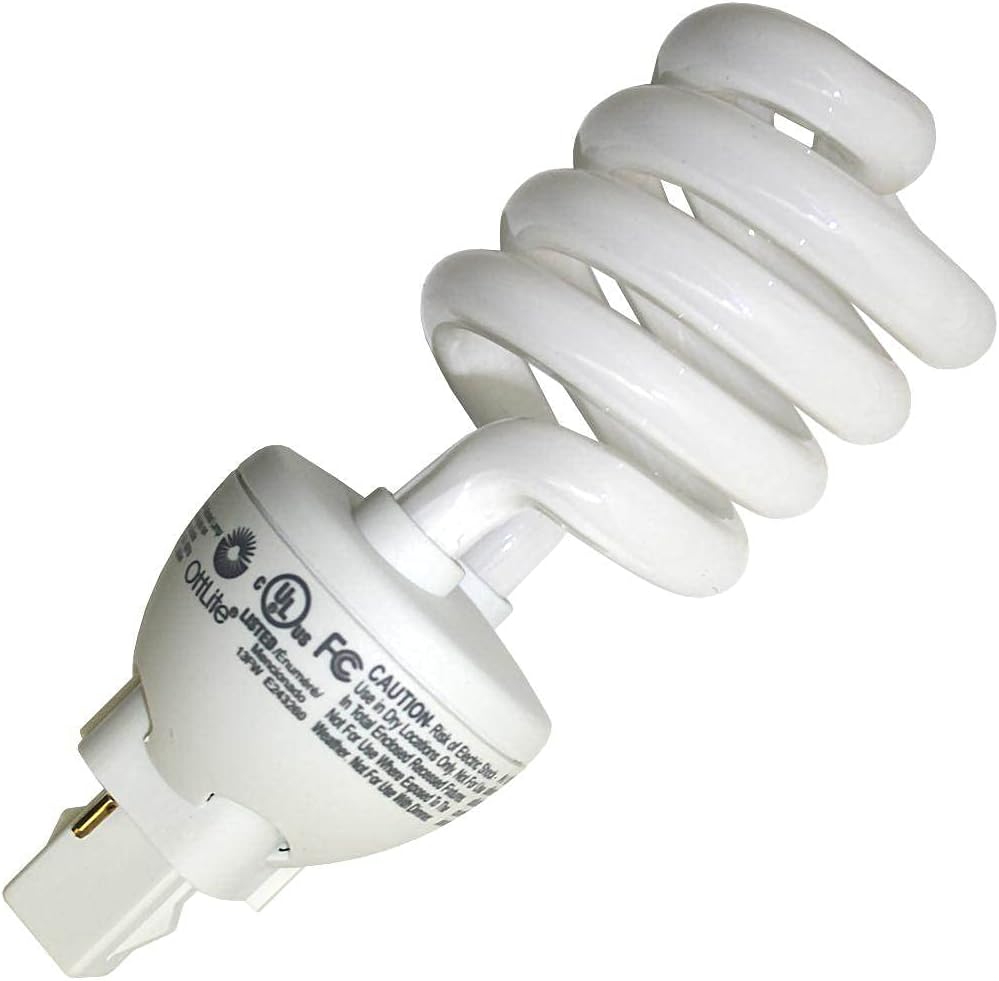
Image 1.1: OttLite 25-Watt Self-Ballasted Swirl Bulb, front view.
2. Setup and Installation
This replacement bulb is intended for use only with specific 25W OttLite lamps. Please verify your lamp's wattage and bulb type before installation. Compatible SKU's include B34J34-CA, H34J3K, 25H59K, H3400K, and SB25-P.
Installation Steps:
- Ensure Power is Off: Before handling the bulb, always turn off the lamp and unplug it from the power outlet to prevent electrical shock.
- Allow to Cool: If the previous bulb was in use, allow it to cool completely before touching it.
- Remove Old Bulb: Carefully grasp the old bulb and gently pull it straight out from the lamp socket. Avoid twisting if it's a pin-base type.
- Insert New Bulb: Align the pins of the new OttLite H34J3K bulb with the slots in the lamp socket. Gently push the bulb straight into the socket until it is firmly seated. Do not force the bulb.
- Restore Power: Plug the lamp back into the power outlet.
- Test Functionality: Turn on the lamp to ensure the new bulb is working correctly.

Image 2.1: Close-up view of the bulb's base, showing the pin connectors for proper alignment during installation.
3. Operating Instructions
Once installed, the OttLite H34J3K bulb operates like any standard light bulb. Simply use the lamp's power switch to turn it on or off. The advanced 508 Illumination technology provides a unique spectrum of light that enhances clarity and reduces eye strain, making it ideal for reading, crafting, and detailed tasks.
Understanding OttLite 508 Technology:
The OttLite 508 Technology is engineered to provide a balanced spectrum of light that mimics natural daylight. This balance ensures that colors appear true and vibrant, while fine details are clearly visible without the harsh glare or distortion often associated with conventional lighting. This results in a more comfortable and productive visual experience.
Video 3.1: An overview of OttLite's 508 Technology, demonstrating how it provides a balanced spectrum of light for enhanced clarity and true color perception, reducing eye strain compared to conventional lighting sources.
4. Maintenance
The OttLite H34J3K bulb requires minimal maintenance. To ensure optimal performance and longevity, follow these guidelines:
- Cleaning: Periodically, gently wipe the bulb with a soft, dry, lint-free cloth to remove dust. Do not use liquid cleaners or abrasive materials.
- Handling: Avoid touching the glass part of the bulb directly with bare hands, as oils from your skin can reduce its lifespan. If touched, wipe with a clean, dry cloth.
- Replacement: Replace the bulb when it begins to flicker, dim significantly, or fails to illuminate. Always ensure the lamp is unplugged and the bulb is cool before attempting replacement.
5. Troubleshooting
If your OttLite H34J3K bulb is not functioning as expected, consider the following common issues and solutions:
| Problem | Possible Cause | Solution |
|---|---|---|
| Bulb does not light up | No power to the lamp | Check if the lamp is plugged in securely and the power outlet is functional. Test with another device. |
| Bulb does not light up | Bulb not properly seated | Unplug the lamp, allow bulb to cool, then re-insert the bulb firmly into the socket. |
| Bulb does not light up | Incorrect bulb type or wattage | Ensure you are using the correct 25W OttLite replacement bulb (Model H34J3K or equivalent SKUs). |
| Bulb flickers or dims | Bulb nearing end of life | Replace the bulb with a new OttLite H34J3K. |
| Bulb flickers or dims | Loose connection | Unplug the lamp, allow bulb to cool, then re-insert the bulb firmly into the socket. Check lamp wiring if issue persists. |
If troubleshooting steps do not resolve the issue, please contact OttLite customer support for further assistance.
6. Specifications
| Specification | Detail |
|---|---|
| Brand | OttLite |
| Model Number | H34J3K |
| Light Type | CFL |
| Wattage | 25 watts |
| Incandescent Equivalent Wattage | 93 Watts |
| Light Color | Daylight White |
| Voltage | 120 Volts |
| Unit Count | 1.0 Count |
| Color Temperature | 3000 Kelvin |
| Brightness | 1400 Lumen |
| Material | Glass |
| Connectivity Technology | Normal bulb |
| Control Method | App (Note: This may refer to smart lamp features, not the bulb itself) |
| Average Life | 10000 Hours |
| Product Dimensions | 2.25 x 2.25 x 6.13 inches |
| Item Weight | 3.2 ounces |
7. Warranty and Support
Specific warranty details for the OttLite H34J3K 508 Illumination 25-Watt Self-Ballasted Swirl Bulb are not provided in this manual. For information regarding warranty coverage, returns, or technical support, please refer to the official OttLite website or contact their customer service directly.
You can typically find contact information and support resources on the manufacturer's official website: www.ottlite.com