1. Introduction
Thank you for purchasing the RadioShack 18V Racing Car AA Battery Charger, Model RS-23-349. This charger is designed to safely and efficiently charge Ni-Cd (Nickel-Cadmium) and Ni-MH (Nickel-Metal Hydride) AA rechargeable batteries. Please read this manual thoroughly before using the charger to ensure proper operation and to prevent damage to the unit or batteries.
2. Safety Information
- Read all instructions: Before operating the charger, carefully read and understand all safety and operating instructions.
- Indoor use only: This charger is designed for indoor use in dry conditions. Do not expose it to rain, moisture, or extreme temperatures.
- Correct battery types: Only charge Ni-Cd and Ni-MH AA rechargeable batteries. Attempting to charge other battery types (e.g., alkaline, lithium) may cause explosion, rupture, or leakage, leading to personal injury and property damage.
- Proper ventilation: Ensure adequate ventilation around the charger during operation. Do not cover the charger.
- Supervision: Do not leave the charger unattended while in use.
- Damaged batteries: Do not charge leaking, corroded, or damaged batteries.
- Children: Keep the charger and batteries out of reach of children.
- Power source: Use only the specified power source for this charger.
- Disassembly: Do not attempt to disassemble or modify the charger. Refer all servicing to qualified personnel.
3. Package Contents
Verify that all items are present in the package:
- RadioShack 18V Racing Car AA Battery Charger (Model RS-23-349)
- User Manual
4. Setup
Follow these steps to set up your battery charger:
- Unpack: Carefully remove the charger from its packaging.
- Placement: Place the charger on a flat, stable, non-flammable surface, away from direct sunlight, heat sources, and moisture. Ensure there is sufficient space for ventilation.
- Power Connection: Plug the charger's power adapter into a standard electrical outlet. The charger is now ready for use.
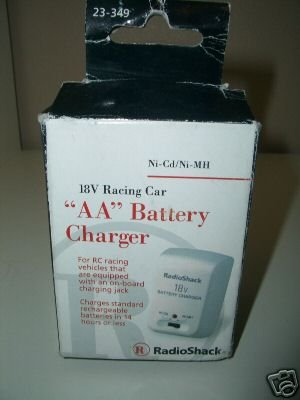
Figure 1: RadioShack 18V Racing Car AA Battery Charger unit. This image shows the compact design of the charger, suitable for AA Ni-Cd/Ni-MH batteries.
5. Operating Instructions
To charge your AA Ni-Cd or Ni-MH batteries:
- Insert Batteries: Carefully insert one or more AA Ni-Cd or Ni-MH batteries into the charging slots. Ensure the positive (+) and negative (-) terminals of the batteries align correctly with the markings on the charger. Incorrect insertion can damage the batteries and the charger.
- Charging Indicator: Once batteries are correctly inserted and the charger is plugged into a power outlet, an indicator light (if present) will illuminate to show that charging has begun. Refer to the charger's specific indicator behavior for details (e.g., solid light for charging, blinking for error, off for fully charged).
- Charging Time: Charging times vary depending on the battery capacity (mAh) and the battery's current charge level. Do not overcharge batteries.
- Remove Batteries: Once charging is complete (as indicated by the charger or after the estimated charging time), unplug the charger from the power outlet and carefully remove the batteries.
Estimated Charging Times (for reference):
These are approximate times and can vary. Always monitor the charging process.
- For 1000 mAh AA Ni-MH batteries: Approximately 5-7 hours.
- For 2000 mAh AA Ni-MH batteries: Approximately 10-14 hours.
- For 700 mAh AA Ni-Cd batteries: Approximately 3-5 hours.
6. Maintenance
- Cleaning: Disconnect the charger from the power outlet before cleaning. Use a soft, dry cloth to wipe the exterior of the charger. Do not use liquid cleaners or solvents.
- Storage: When not in use, store the charger in a cool, dry place, away from direct sunlight and extreme temperatures.
- Inspection: Periodically inspect the charger and its power cord for any signs of damage. If damage is found, discontinue use and contact support.
7. Troubleshooting
If you encounter issues with your charger, refer to the table below for common problems and solutions:
| Problem | Possible Cause | Solution |
|---|---|---|
| Charger indicator light does not turn on. | No power to the charger. | Check if the charger is properly plugged into a working electrical outlet. |
| Batteries are not charging. | Incorrect battery type or insertion. | Ensure only Ni-Cd/Ni-MH AA batteries are used and inserted with correct polarity (+/-). |
| Batteries get excessively hot during charging. | Damaged batteries or improper ventilation. | Remove batteries immediately. Do not charge damaged batteries. Ensure charger is in a well-ventilated area. |
| Charger appears damaged. | Physical damage. | Discontinue use immediately. Do not attempt to repair. Contact customer support. |
8. Specifications
- Model: RS-23-349
- Input Voltage: 240 Volts
- Output Voltage: 18 Volts (Charging)
- Compatible Battery Types: AA Ni-Cd, AA Ni-MH
- Item Weight: 8 ounces
- Package Dimensions: 4 x 2.2 x 2.1 inches
- Manufacturer: Radioshack
- UPC: 040293141066
9. Warranty and Support
RadioShack products are manufactured to high-quality standards. For information regarding warranty coverage, technical support, or service inquiries, please refer to the warranty card included with your purchase or visit the official RadioShack website. Keep your purchase receipt as proof of purchase.


