
1. Introduction
This manual provides instructions for the installation, operation, and maintenance of the Pentair Model 261055 Multiport Valve. This 2-inch side mount valve is designed for use with Pentair Triton and Quad D.E. pool filters, facilitating various pool system functions through its easy-to-use handle.
2. Setup and Installation
The Pentair 261055 Multiport Valve features 2-inch bulkhead union couplers for simplified installation. Proper plumbing and sealing are crucial for optimal performance and to prevent leaks.
2.1 Pre-Installation Checks
- Ensure all necessary plumbing components and tools are available.
- Verify the valve's inlet and outlet ports align with your existing or new plumbing configuration.
- Locate the small plug typically found at the bottom of the valve's packaging. This plug is essential for sealing a specific port on the valve body. Install it before operating the valve, but avoid overtightening to prevent damage.
2.2 Connecting the Valve
- Connect the valve to the filter and plumbing lines using the 2-inch bulkhead union couplers.
- Apply appropriate sealant (e.g., Teflon tape or pipe dope suitable for PVC) to threaded connections.
- Tighten fittings securely by hand, then use a wrench for an additional 1/4 to 1/2 turn. Do not overtighten, as this can crack the PVC housing and lead to leaks.
- Confirm the correct flow direction for your pool system.

Figure 1: Side view of the Pentair 261055 Multiport Valve, illustrating the plumbing connections and bulkhead union couplers. This image helps visualize how the valve integrates into the pool's filtration system.
3. Operation
The Pentair 261055 Multiport Valve features a one-piece handle for selecting various operational modes. Always turn off the pump before changing valve positions to prevent damage to the valve or system.
3.1 Valve Functions
- Filter: Normal filtering mode. Water flows through the filter media and returns to the pool.
- Backwash: Cleans the filter by reversing water flow, sending debris to waste.
- Rinse: Used after backwashing to flush out any remaining debris from the filter and plumbing before returning to filter mode.
- Recirculate: Bypasses the filter, circulating water directly back to the pool. Useful for chemical distribution without filtering.
- Waste: Drains water directly from the pool or spa to waste, bypassing the filter. Used for vacuuming heavy debris or lowering water level.
- Closed: Shuts off all flow through the valve. Use with caution and only when the pump is off.
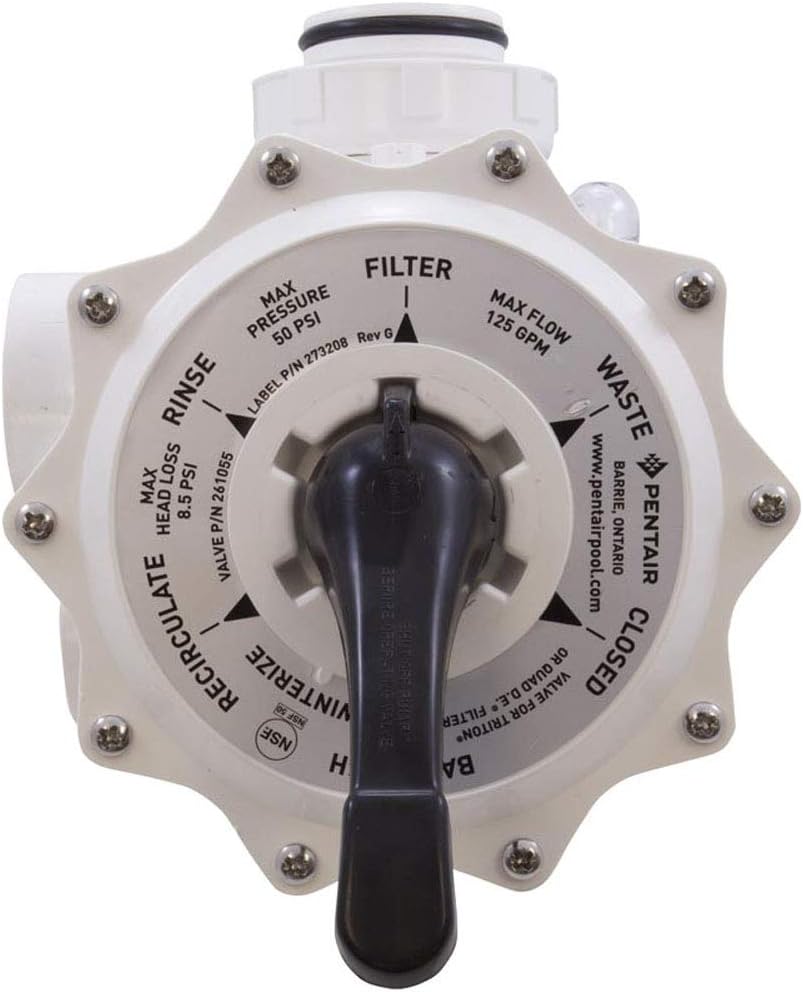
Figure 2: Top view of the Pentair 261055 Multiport Valve, showing the handle and the clearly labeled operational settings (Filter, Backwash, Rinse, Recirculate, Waste, Closed). This view assists users in selecting the correct function.
4. Maintenance
Regular maintenance ensures the longevity and efficient operation of your multiport valve. Inspect the valve periodically for signs of wear or damage.
- Gasket Inspection: Periodically check the internal gaskets and O-rings for cracks, tears, or signs of deterioration. Worn gaskets can lead to leaks or improper valve function.
- Handle Operation: Ensure the handle moves smoothly between positions. If it becomes stiff, consult a pool professional.
- Environmental Exposure: Prolonged exposure to direct sunlight and harsh chemicals can degrade PVC components over time. Consider protective measures if the valve is in an exposed location.
- Winterization: Follow standard pool winterization procedures, which typically involve draining water from the valve to prevent freezing damage.
5. Troubleshooting
This section addresses common issues that may arise with your multiport valve.
5.1 Leaks from the Valve Handle or Body
- Cause: Damaged internal gaskets or O-rings, improper assembly, or overtightened fittings.
- Solution:
- Turn off the pump and relieve system pressure.
- Inspect the handle assembly and valve body for visible cracks or loose screws.
- Disassemble the valve top (if applicable) and inspect the spider gasket and other O-rings for damage. Replace if necessary.
- Ensure all fittings are tightened correctly, but avoid overtightening.
5.2 Water Not Flowing Correctly Between Functions
- Cause: Internal blockage, damaged diverter, or handle not fully engaged in a position.
- Solution:
- Turn off the pump.
- Ensure the handle is firmly seated in the desired position.
- Check for any debris obstructing the valve's internal pathways.
- If the issue persists, professional inspection of the internal diverter may be required.
6. Specifications
| Feature | Detail |
|---|---|
| Model Number | 261055 |
| Brand | Pentair |
| Material | PVC |
| Item Dimensions (L x W x H) | 22 x 10.5 x 10.5 inches |
| Item Weight | 8.53 pounds |
| Outlet Connection Type | NPT |
| Number of Ports | 6 |
| Outlet Connection Size | 2 Inches |
| Included Components | Multiport Valve |
7. Warranty and Support
7.1 Warranty Information
This Pentair 261055 Multiport Valve comes with a 1-Year Limited Warranty from the date of purchase. This warranty covers defects in materials and workmanship under normal use. For specific terms and conditions, please refer to the official Pentair warranty documentation or contact customer support.
7.2 Customer Support
For technical assistance, replacement parts, or warranty claims, please contact Pentair customer support. You can find contact information and additional resources on the official Pentair website: