
SINGER 2932
SINGER 2932 Sewing Machine Instruction Manual
Model: 2932
Introduction
Welcome to your SINGER 2932 Sewing Machine. This manual provides essential information for the proper setup, operation, and maintenance of your machine. Please read these instructions carefully before using your sewing machine to ensure safe and efficient operation.
Product Overview
The SINGER 2932 is a mechanical sewing machine designed for a variety of sewing projects. It features 35 stitch patterns, including a fully automatic one-step buttonhole, adjustable stitch length and width, and an automatic needle threader.
Key Features:
- Thirty-five stitch patterns with a one-step buttonhole.
- Automatic needle threader for simplified threading.
- Adjustable stitch width and length for versatile sewing.
- Drop feed feature for free-motion sewing.
- Includes four presser feet: zigzag/all-purpose, button sewing, buttonhole, and zipper.
- Free-arm on-board storage compartment for accessories.
Video: An overview of the SINGER 2932 Sewing Machine, highlighting its key features, stitch patterns, and ease of use for various sewing projects.
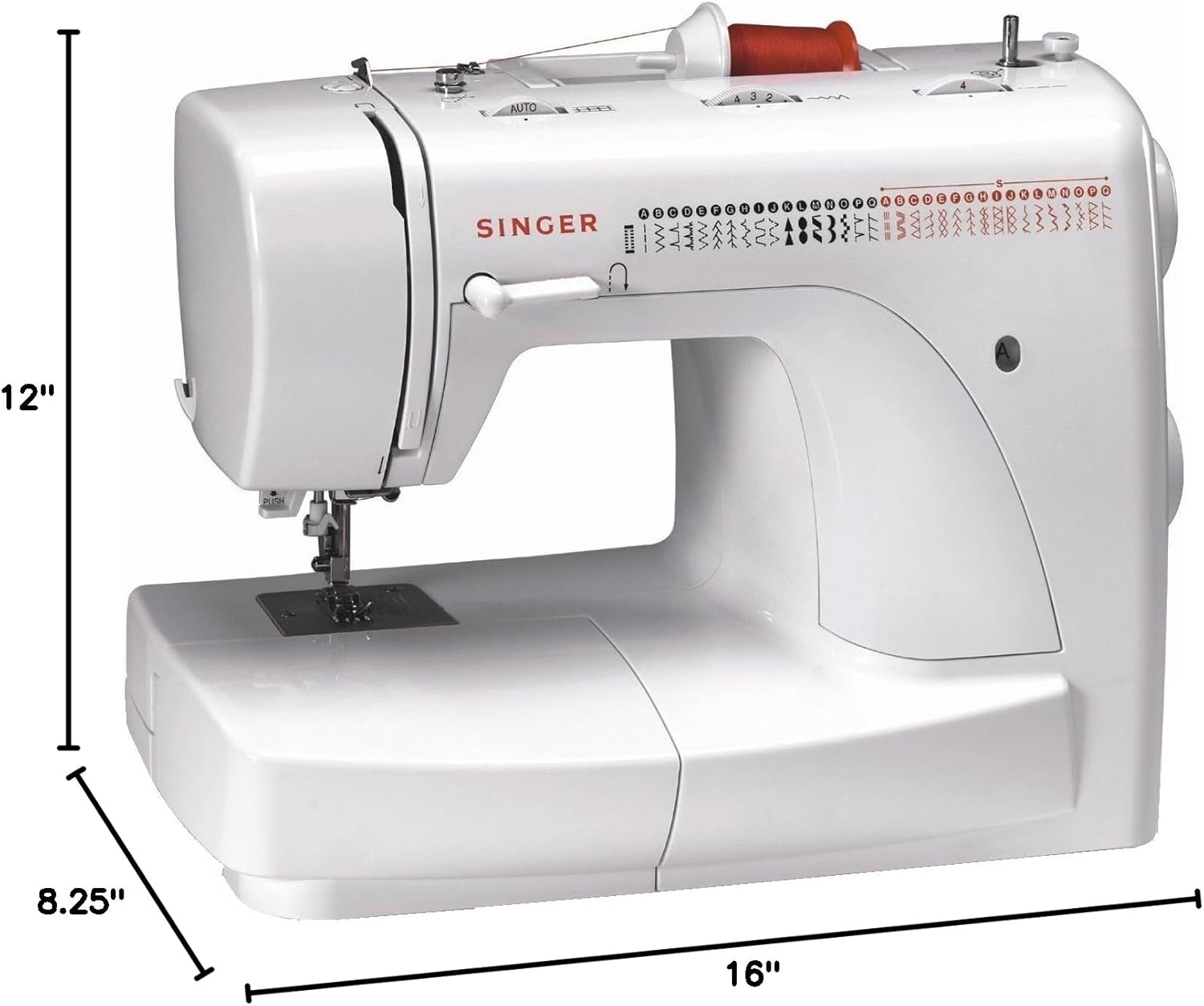
Image: The SINGER 2932 Sewing Machine, showing its dimensions: 16 inches wide, 8.25 inches deep, and 12 inches high. The machine is white with a SINGER logo.

Image: A stitch chart for the SINGER 2932, displaying various basic, stretch, and decorative stitch patterns, including a buttonhole stitch.
Setup
Unpacking and Placement
Remove the machine from its packaging. Place the machine on a stable, flat surface. Ensure the power cord (73 inches long) is easily accessible. This machine is designed for United States and Canadian use only, operating at 110 volts.
Bobbin Installation
Proper bobbin installation is crucial for smooth operation. Follow these steps to install or replace the bobbin:
- Ensure the needle is in its highest position by turning the hand wheel towards you.
- Remove the extension table from the machine to access the bobbin area.
- Open the hinged cover to reveal the bobbin case.
- Pull the bobbin case tab and remove the bobbin case. Remove the old bobbin if present.
- Insert a full SINGER Class 15 bobbin into the bobbin case, ensuring the thread moves in a clockwise direction.
- Pull the thread through the slit and under the finger on the bobbin case.
- Hold the bobbin case by its hinged latch and insert it into the shuttle. You should hear a click when it is correctly seated. Release the latch.
- To verify correct installation, slowly turn the hand wheel towards you. The needle should move up and down without hitting the bobbin case.
Video: This video demonstrates the correct procedure for inserting a front-loading bobbin into the SINGER 2932 sewing machine, including how to properly thread the bobbin case and install it into the shuttle.
Operating Instructions
Selecting a Stitch
The SINGER 2932 offers 35 stitch patterns. Use the pattern selector dial on the side of the machine to choose your desired stitch. This dial can be turned in either direction.
- Black Stitches: These include basic sewing stitches and various decorative patterns. To select, turn the pattern selector dial until the desired stitch letter appears in the window. Adjust the stitch length dial (at the top) and stitch width dial as needed.
- Red Stitches: These are stretch patterns suitable for stretch fabrics or for decorative embellishments. To select, turn the pattern selector dial until the desired stitch letter appears in the window. Set the stitch length dial to the 'S' setting and the stitch width dial to its widest setting.
Automatic Needle Threader
To use the automatic needle threader, ensure the needle is in its highest position. Follow the machine's markings to engage the threader and automatically thread the needle eye.
One-Step Buttonhole
The machine features a fully automatic one-step buttonhole. To create a buttonhole:
- Turn the pattern selector dial to the buttonhole icon.
- Set the stitch length dial to the buttonhole marking.
- Adjust the stitch width dial between 3 and 5, depending on the desired buttonhole appearance.
- Place your button into the buttonhole foot, then attach the foot to the machine.
- Position the fabric under the foot and lower the presser foot.
- Engage the buttonhole lever and begin sewing.
Free-Motion Sewing (Drop Feed)
For free-motion sewing, activate the drop feed feature. This allows you to move the fabric freely under the needle, ideal for quilting and embroidery.
Maintenance
Regular maintenance ensures the longevity and optimal performance of your sewing machine.
Cleaning
Periodically clean lint and dust from the bobbin area and feed dogs using a small brush. Ensure the machine is unplugged before cleaning.
Lubrication
Refer to the detailed machine diagram for specific lubrication points. Use only high-quality sewing machine oil.
Needle Replacement
Replace needles regularly, especially when starting a new project or if the needle shows signs of dullness or bending. Always use the correct needle type and size for your fabric.
Troubleshooting
This section addresses common issues you might encounter during the operation of your SINGER 2932 Sewing Machine.
Bobbin Tension Adjustment
Incorrect bobbin tension can lead to uneven stitches or thread breakage. To check and adjust:
- Remove the bobbin case and bobbin from the machine.
- Hold the bobbin case suspended by the thread tail.
- Gently bounce it once or twice.
- If the thread unwinds an inch or two, the tension is correctly set.
- If the thread does not unwind at all, the tension is too tight. Turn the small screw on the side of the bobbin case slightly to the left (counter-clockwise) to loosen the tension.
- If the bobbin case drops too much, the tension is too loose. Turn the screw slightly to the right (clockwise) to tighten the tension.
Needle Hitting Bobbin Case
If the needle hits the bobbin case during operation, or if the bobbin case falls out of the shuttle, it indicates improper installation. Remove the bobbin case completely and re-insert it carefully, ensuring it clicks securely into place.
Thread Jams
If the thread jams, especially at the start of sewing, ensure you are holding the starting threads firmly. Also, check that the bobbin is correctly installed and threaded, and that the upper thread is properly tensioned.
Specifications
| Feature | Detail |
|---|---|
| Model Number | 2932 |
| Brand | SINGER |
| Product Dimensions | 16"W x 8.25"D x 12"H (approx. 15 x 7.5 x 12 inches) |
| Item Weight | 14.6 pounds |
| Color | White |
| Material | Metal |
| Power Source | Corded Electric (110 volts, US and Canada only) |
| Stitch Patterns | 35 |
| Buttonhole Type | Fully Automatic One-Step |
| Automatic Needle Threader | Yes |
| Drop Feed | Yes |
| UPC | 037431881397 |
Warranty and Support
The SINGER 2932 Sewing Machine comes with a limited 25-year warranty. For detailed warranty information, service, or additional support, please visit the official SINGER website or refer to the warranty card included with your product.
You can also visit the SINGER Store on Amazon for more product information and resources.
Ask a question about this manual
Ask about setup, troubleshooting, compatibility, parts, safety, or missing instructions. Manuals+ will review the question and use this page’s manual context to help answer it.