1. Introduction
Thank you for choosing the Manfrotto 220B Still Life Table. This professional-grade table is designed for product photography, providing a seamless background and versatile lighting options. Its white, translucent Perspex cover allows for both front and back lighting, ensuring optimal results for various subjects.
Please read this manual carefully before assembly and operation to ensure safe and correct use of the product. Keep this manual for future reference.
2. Safety Information
Observe the following safety precautions to prevent damage to the product or injury to yourself:
- Weight Capacity: Do not exceed the maximum load capacity of 33.07 lbs (15 kg). Overloading can cause instability and damage.
- Stable Surface: Always place the table on a flat, stable, and level surface to prevent tipping.
- Assembly: Ensure all components are securely fastened before use. Refer to the setup instructions.
- Moving the Table: If equipped with wheels, ensure they are locked when the table is in use. Unlock them only when moving the table.
- Cleaning: Use only recommended cleaning agents for the Perspex surface to avoid damage.
- Children and Pets: Keep children and pets away from the table during assembly and operation to prevent accidents.
3. Package Contents
Verify that all components are present and undamaged upon unpacking:
- Manfrotto 220B Still Life Table Frame (Black)
- White Translucent Perspex Panel (200cm x 122cm)
- Assembly Hardware (knobs, clamps, etc.)
- Instruction Manual (this document)
If any parts are missing or damaged, please contact Manfrotto customer support.
4. Setup Instructions
Follow these steps to assemble your Manfrotto 220B Still Life Table:
- Unpack Components: Carefully remove all parts from the packaging and lay them out on a clean, flat surface.
- Assemble Frame: Connect the frame sections according to the diagram. Ensure all locking mechanisms and knobs are tightened securely. The frame provides the base structure for the table.
- Attach Perspex Panel: Gently place the white translucent Perspex panel onto the assembled frame. The panel should rest securely on the support bars.
- Secure Panel: Use the provided clamps or fasteners to secure the Perspex panel to the frame. Ensure the panel is taut and evenly supported.
- Adjust Back Section: The back section of the Perspex panel is designed to tilt. Adjust it to your desired angle for the shooting surface. Secure the tilt mechanism firmly once the desired position is achieved.
- Final Check: Before placing any items on the table, verify that all connections are tight and the table is stable.

Figure 4.1: Assembled Manfrotto 220B Still Life Table. Note the seamless curve of the Perspex panel.
5. Operating Instructions
The Manfrotto 220B Still Life Table is designed for versatile product photography. Here are guidelines for its use:
- Placement: Position the table in your studio or desired shooting location. Ensure adequate space around the table for lighting equipment and camera setup.
- Subject Placement: Carefully place your product on the flat surface of the Perspex panel. Distribute weight evenly and avoid placing heavy objects near the edges.
- Adjusting the Back: The back section of the Perspex panel can be adjusted to create a seamless background curve. Loosen the adjustment knobs, set the desired angle, and re-tighten the knobs firmly. The maximum height with the back in a vertical position is 193cm (75.98 inches).
- Lighting:
- Front Lighting: Position your light sources in front of the table, directing light onto the product and the Perspex panel.
- Back Lighting: Utilize the translucent nature of the Perspex panel by placing light sources behind or underneath the table, shining through the panel. This creates a bright, even background and can help eliminate shadows.
- Combined Lighting: Experiment with a combination of front and back lighting to achieve desired effects, such as high-key product shots.
- Cleaning During Use: If the Perspex surface gets smudged or dusty during a shoot, gently wipe it with a soft, lint-free cloth.
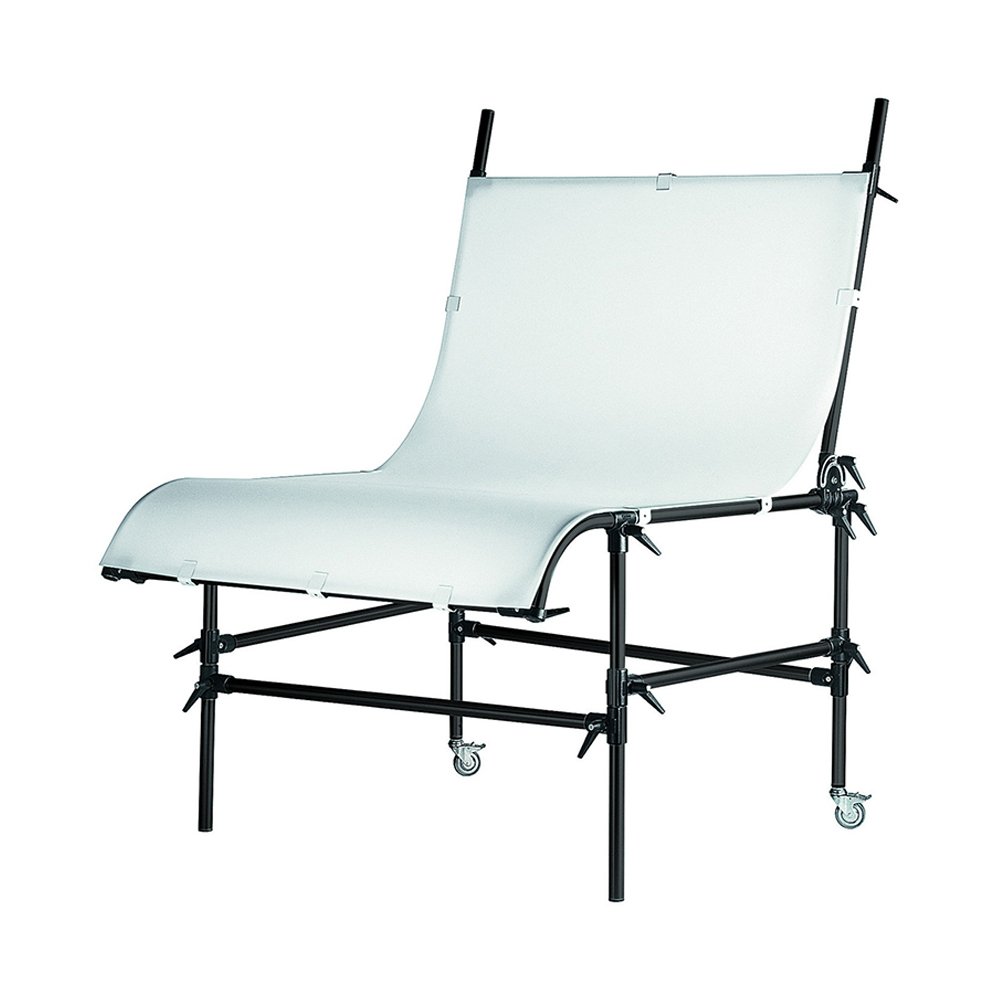
Figure 5.1: Manfrotto 220B Still Life Table in use, demonstrating the smooth transition from horizontal to vertical surface.
6. Maintenance
Proper maintenance will extend the life and performance of your still life table:
- Cleaning the Perspex Panel:
- For light dust, use a soft, dry, lint-free microfiber cloth.
- For smudges or fingerprints, dampen a soft cloth with water and a mild, non-abrasive soap solution. Wipe gently, then dry with a clean, dry cloth.
- Avoid: Harsh chemicals, ammonia-based cleaners (like window cleaner), abrasive pads, or solvents, as these can scratch or damage the Perspex.
- Cleaning the Frame: Wipe the metal frame with a damp cloth and mild detergent if necessary. Dry thoroughly to prevent rust.
- Inspecting Connections: Periodically check all screws, knobs, and clamps to ensure they are tight. Re-tighten as needed to maintain stability.
- Storage: When not in use, store the table in a clean, dry environment. If disassembling for storage, keep all components organized and protected from dust and damage.
7. Troubleshooting
If you encounter issues with your Manfrotto 220B Still Life Table, consider the following:
- Table Instability:
- Ensure all frame connections and panel clamps are securely tightened.
- Verify the table is placed on a completely flat and level surface.
- Check that the load on the table does not exceed the maximum capacity of 33.07 lbs (15 kg).
- Scratches on Perspex:
- Minor scratches can sometimes be buffed out with specialized acrylic polish, but prevention is key.
- Always use soft cloths for cleaning and avoid abrasive materials.
- Uneven Background:
- Ensure the Perspex panel is evenly secured and taut across the frame.
- Adjust the tilt of the back section to create a smooth, continuous curve.
- Check your lighting setup; uneven lighting can create the illusion of an uneven background.
8. Specifications
| Feature | Detail |
|---|---|
| Model Number | 220B |
| Brand | Manfrotto |
| Material | Aluminum Frame, Translucent White Perspex Panel |
| Panel Size | 200 cm x 122 cm (78.74 in x 48.03 in) |
| Distance from Floor to Flat Surface | 83 cm (32.68 in) |
| Height with Back in Vertical Position | 193 cm (75.98 in) |
| Load Capacity | 15 kg (33.07 lbs) |
| Item Weight | 37.19 kg (82 lbs) |
| Product Dimensions (packaged) | 78.8 x 49.25 x 9 inches |
| Manufacturer | Manfrotto |
| ASIN | B001D2GQAC |
9. Warranty and Support
Manfrotto products are manufactured to high quality standards and are warranted against defects in material and workmanship. Specific warranty terms may vary by region and product.
For detailed warranty information, product support, or to purchase replacement parts, please visit the official Manfrotto website or contact their customer service department:
- Manfrotto Official Website: www.manfrotto.com
- Customer Support: Refer to the "Support" or "Contact Us" section on the official website for regional contact information.
Please have your product model number (220B) and purchase date available when contacting support.


