
1. Introduction
This manual provides instructions for the setup, operation, and maintenance of your Howard Miller 625-290 Isabel Wall Clock. This traditional wall clock features a quartz, dual-chime movement, offering Westminster or Ave Maria chimes with adjustable volume and an automatic nighttime shut-off option. Its design includes carved shell overlays, a wood bezel with a convex glass crystal, an aged antique dial with black Roman numerals, classic spade hands, reeded columns with carved rosettes, and a distinctive tiered profile base.
Please read this manual thoroughly before installation and use to ensure proper function and longevity of your clock.
2. Safety Information
- Always handle the clock with care to prevent damage to its delicate components and finish.
- Ensure the clock is securely mounted to a wall stud or appropriate anchor to prevent falling.
- Keep batteries out of reach of children and pets. Dispose of used batteries responsibly according to local regulations.
- Do not expose the clock to extreme temperatures, direct sunlight, or high humidity, as this may affect its accuracy and material integrity.
- Avoid using harsh chemicals or abrasive cleaners on the clock's surfaces.
3. Package Contents
Verify that all items are present in the package:
- Howard Miller 625-290 Isabel Wall Clock
- Instruction Manual (this document)
- Mounting hardware (screws, wall anchors) - May vary by region or retailer.
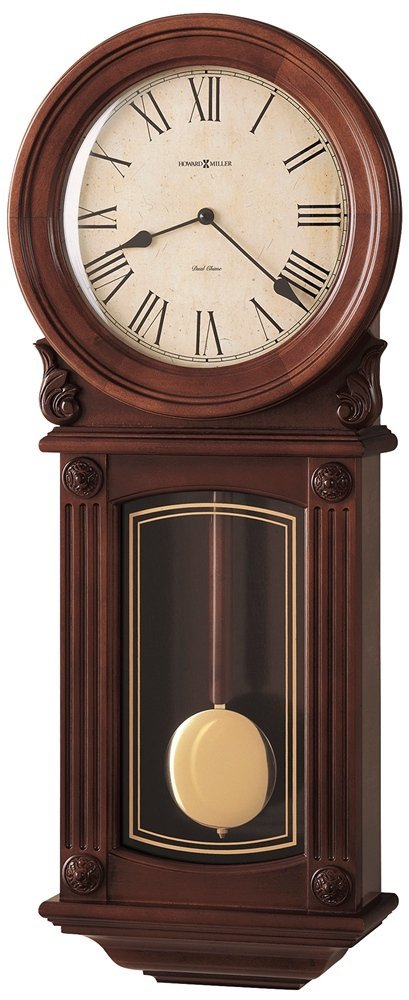
Image 1: Front view of the Howard Miller 625-290 Isabel Wall Clock, showcasing its traditional design, antique dial, and decorative columns.
4. Setup
4.1. Battery Installation
- Locate the battery compartment on the back of the clock.
- Insert the required batteries (typically C or D size, not included) according to the polarity indicators (+ and -).
- Close the battery compartment cover securely.
4.2. Mounting the Clock
The Isabel Wall Clock is designed for wall mounting.
- Choose a suitable location on a sturdy wall, away from direct heat sources or vents.
- Using a stud finder, locate a wall stud or use appropriate wall anchors for secure mounting.
- Mark the desired mounting point.
- Install a screw into the wall, leaving a small portion exposed for the clock's hanging mechanism.
- Carefully hang the clock, ensuring it is level and stable.
4.3. Setting the Time
- Locate the time-setting knob or wheel on the back of the clock movement.
- Gently turn the knob clockwise to advance the hands to the correct time.
- Allow the clock to chime at each hour during the setting process to synchronize the chimes with the time.
5. Operating Instructions
5.1. Chime Selection
Your clock features a dual-chime movement. Locate the chime selection switch on the back of the clock movement. This switch allows you to choose between:
- Westminster Chime: Plays a melodic tune every quarter hour and strikes the hour count on the hour.
- Ave Maria Chime: Plays a different melodic tune every quarter hour and strikes the hour count on the hour.
5.2. Volume Control
A volume control dial is located on the back of the clock movement. Turn the dial to adjust the loudness of the chimes to your preference.
5.3. Automatic Nighttime Chime Shut-Off
The clock is equipped with an automatic nighttime chime shut-off feature. This function silences the chimes typically between 10:00 PM and 7:00 AM to ensure quiet during sleeping hours. This feature is usually activated by a light sensor or a pre-programmed setting within the movement. Ensure the clock is in a location with adequate ambient light during the day for the sensor to function correctly, if applicable.
6. Maintenance
6.1. Cleaning
- Dust the clock regularly with a soft, dry cloth.
- For the glass crystal, use a soft cloth dampened with a mild glass cleaner, then wipe dry immediately. Avoid spraying cleaner directly onto the clock.
- Do not use abrasive cleaners, solvents, or polishes that may damage the wood finish or metal components.
6.2. Battery Replacement
Replace batteries annually or when the clock's accuracy diminishes, or chimes become weak. Always replace all batteries at the same time with new, high-quality batteries of the specified type.
7. Troubleshooting
| Problem | Possible Cause | Solution |
|---|---|---|
| Clock not running or keeping accurate time. | Dead or weak batteries. Incorrect battery installation. Damaged movement. | Replace batteries with new ones, ensuring correct polarity. Check if the hands are obstructed. If problem persists, contact customer support. |
| Chimes are weak or not sounding. | Low battery power. Volume control set too low. Chime shut-off activated. | Replace batteries. Adjust volume control. Check if the clock is in nighttime shut-off mode (e.g., dark room). |
| Chimes are out of sync with the time. | Time was set without allowing chimes to synchronize. | Advance the time clockwise until the chimes synchronize with the hour count. If necessary, remove batteries for a few minutes and re-install, then reset the time carefully. |
8. Specifications
- Model: Howard Miller 625-290 Isabel Wall Clock
- Brand: Howard Miller
- Display Type: Analog
- Style: Traditional
- Power Source: Battery Powered (Batteries not included)
- Movement: Quartz, Dual-Chime (Westminster or Ave Maria)
- Special Features: Adjustable Volume, Automatic Nighttime Chime Shut-Off
- Material: Wood (Primary material), Brass, Glass
- Color: Brown
- Mounting Type: Wall Mount
- Item Dimensions (LxWxH): 10.8 x 29.2 x 71.1 Centimeters (approximately 4.25 x 11.5 x 28 inches)
- Item Weight: 4 kg 760 g (approximately 10.5 lbs)
- GTIN/UPC: 020867252909
9. Warranty & Support
Howard Miller products are crafted with quality and precision. For specific warranty details, please refer to the warranty card included with your purchase or visit the official Howard Miller website. Keep your proof of purchase for warranty claims.
For technical assistance, replacement parts, or further inquiries, please contact Howard Miller customer support through their official channels.