Introduction
This manual provides essential information for the proper use, installation, and maintenance of your Cosco Replacement Ink Pad E2600. This ink pad is specifically designed for use with Cosco 2000 PLUS® Date & Phrase Stamps and Eight- & Ten-Band Numbering Stamps. Please read these instructions carefully before use to ensure optimal performance and longevity of your product.
Product Overview
The Cosco Replacement Ink Pad E2600 is a self-contained ink cartridge designed to provide consistent and clear impressions for compatible Cosco stamps. It features a durable casing and a pre-inked pad for easy replacement.
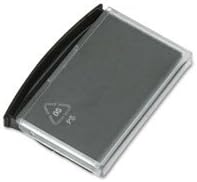
Image 1: The Cosco Replacement Ink Pad E2600. This image shows the compact, rectangular ink pad with a clear plastic cover and a black base, designed for easy insertion into compatible Cosco stamps. The ink pad itself is dark, indicating it is pre-inked.
Setup and Installation
Follow these steps to replace the ink pad in your compatible Cosco stamp:
- Prepare the Stamp: Ensure your Cosco Date/Phrase or Numbering Stamp is in a stable position. It is recommended to wear gloves to avoid ink stains.
- Remove Old Pad: Carefully locate the existing ink pad within your stamp. Most Cosco stamps have a small tab or release mechanism to eject the old pad. Gently slide or pull out the old ink pad. Dispose of the old pad responsibly.
- Unpack New Pad: Remove the new Cosco Replacement Ink Pad E2600 from its packaging. Avoid touching the inked surface directly.
- Insert New Pad: Align the new ink pad with the slot in your stamp. The pad is designed to fit in only one orientation. Gently push the new pad into the slot until it clicks into place or is fully seated. Do not force the pad.
- Test Impression: Make a few test impressions on a scrap piece of paper to ensure the ink pad is properly installed and providing clear, consistent marks.
Note: Refer to your specific Cosco stamp's manual for detailed instructions on ink pad replacement, as mechanisms may vary slightly between models.
Operating Instructions
Once the Cosco Replacement Ink Pad E2600 is installed, your stamp is ready for use. The ink pad automatically re-inks the stamp's rubber dies with each impression.
- Ensure the surface you are stamping on is flat and clean.
- Press the stamp firmly and evenly onto the desired surface to create a clear impression.
- Allow a moment for the ink to dry, especially on glossy surfaces.
Maintenance
Proper maintenance ensures the longevity and performance of your ink pad:
- Storage: When not in use, store the stamp with the ink pad installed in a cool, dry place away from direct sunlight and extreme temperatures. This helps prevent the ink from drying out prematurely.
- Cleaning: Do not attempt to clean the ink pad itself with water or solvents, as this can damage the pad and affect ink quality. If the stamp's rubber dies become dirty, clean them according to your stamp's specific cleaning instructions, ensuring no cleaning solution comes into contact with the ink pad.
- Replacement: Replace the ink pad when impressions become faint or inconsistent. The lifespan of the pad depends on usage frequency.
Troubleshooting
| Problem | Possible Cause | Solution |
|---|---|---|
| Faint or incomplete impressions | Ink pad is dry or low on ink. | Replace the ink pad with a new Cosco Replacement Ink Pad E2600. |
| Uneven impressions | Ink pad not seated correctly; stamp not pressed evenly. | Ensure the ink pad is fully and correctly inserted. Apply even pressure when stamping. |
| Ink smudges | Surface is too glossy; ink not dry. | Allow more drying time. Use on appropriate paper types. |
Specifications
- Model Number: E2600
- Compatibility: Cosco 2000 PLUS® Date & Phrase Stamps, Eight- & Ten-Band Numbering Stamps
- Ink Type: Self-contained, pre-inked
- Color: (Not specified in input, assume standard black or common color)
- First Available Date: February 23, 2010
Warranty and Support
Specific warranty information for the Cosco Replacement Ink Pad E2600 is not provided within this manual. For details regarding warranty coverage, product support, or to purchase additional replacement pads, please contact Cosco customer service directly or visit their official website. Keep your purchase receipt as proof of purchase.
For further assistance, please refer to the contact information provided with your original Cosco stamp or visit the manufacturer's website.


