1. Introduction
This manual provides comprehensive instructions for the safe and effective use of your Panasonic Lumix DMC-FZ28K digital camera. The DMC-FZ28K is a 10.1-megapixel camera featuring an 18x optical zoom Leica lens and advanced photographic technologies designed to capture high-quality images and HD video. Please read this manual thoroughly before using your camera and keep it for future reference.

Figure 1: Front view of the Panasonic Lumix DMC-FZ28K digital camera with the built-in flash in the raised position.
2. Setup
2.1. Battery Installation
The Panasonic Lumix DMC-FZ28K uses a rechargeable battery (not included). Ensure the battery is fully charged before first use. Open the battery compartment cover, insert the battery with the correct orientation as indicated inside the compartment, and close the cover securely.
2.2. Memory Card Insertion
This camera supports SD/SDHC memory cards (not included). To insert, open the memory card slot cover, gently push the card into the slot until it clicks into place, and close the cover. Ensure the card is inserted correctly to avoid damage.
2.3. Initial Settings
Upon first power-on or after a long period without battery, you may be prompted to set the date, time, and language. Follow the on-screen instructions using the camera's control buttons.
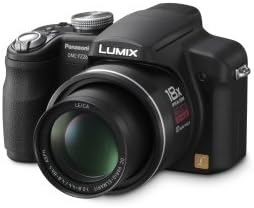
Figure 2: Front view of the Panasonic Lumix DMC-FZ28K digital camera with the built-in flash in the closed position.
3. Operating the Camera
3.1. Basic Photography (Intelligent Auto Mode)
The Intelligent Auto (iA) mode simplifies photography by automatically adjusting settings for optimal results.
- AF Tracking: Locks focus on a moving subject and tracks it automatically.
- Intelligent Exposure: Prevents under- or over-exposure by adjusting brightness in challenging lighting conditions.
- Digital Red-eye Correction: Automatically corrects red-eye in flash photos.
- MEGA O.I.S. (Optical Image Stabilizer): Compensates for hand-shake to reduce blur.
- Intelligent ISO: Adjusts ISO and shutter speed for blur-free photos of moving subjects.
- Intelligent Scene Selector: Automatically selects the appropriate scene mode (e.g., Scenery, Portrait, Macro).
- Face Detection: Detects up to 15 faces and optimizes focus and exposure.
- Quick AF: Minimizes autofocus time by initiating focus when the camera is pointed at a subject.
3.2. Advanced Shooting Modes
For more creative control, the DMC-FZ28K offers full SLR-like manual operations.
- Manual Modes: Adjust aperture, shutter speed, program, and full manual settings.
- Aperture Priority Mode: Set the aperture, and the camera automatically selects the shutter speed.
- Shutter Priority Mode: Set the shutter speed, and the camera automatically selects the aperture.
- Scene Modes: Choose from 37 scene modes including Pin Hole and Film Grain for unique effects. Preview effects on the LCD before shooting.
- Flash: Built-in flash with a range of 8.5 meters (wide) and 5.4 meters (telephoto) at ISO AUTO.
3.3. Video Recording
Record High Definition (HD) video at 1280 x 720p resolution at 30 frames per second (fps). Optical zoom is available during video recording.
3.4. Image Leveling
The Image Leveling function can correct images that appear tilted. It rotates the image to straighten it and crops the edges, all within the camera.
3.5. Software
The camera includes SILKYPIX Developer Studio 3.0 SE software for editing and developing RAW file format images on a computer.
4. Maintenance
4.1. Cleaning
Regularly clean the camera body with a soft, dry cloth. For the lens, use a specialized lens cleaning cloth and solution. Avoid touching the lens surface directly.
4.2. Storage
When not in use, store the camera in a cool, dry place away from direct sunlight and extreme temperatures. Remove the battery if storing for extended periods.
5. Troubleshooting
This section addresses common issues you might encounter with your DMC-FZ28K camera.
| Problem | Possible Cause / Solution |
|---|---|
| Blurry Images |
|
| Images too dark/bright |
|
| Red-eye in flash photos |
|
| Noise in low light images |
|
| Autofocus slow during video zoom |
|
6. Specifications
| Feature | Detail |
|---|---|
| Model Name | Panasonic Lumix FZ28K |
| Effective Still Resolution | 10.1 MP |
| Photo Sensor Technology | CCD |
| Optical Zoom | 18x |
| Image Stabilization | Optical (MEGA O.I.S.) |
| Lens Type | Wide Angle, Zoom (Leica DC Vario-Elmarit) |
| Minimum Focal Length | 27 Millimeters |
| Maximum Focal Length | 486 Millimeters |
| Display Type | LCD |
| Screen Size | 2.7 inches |
| Display Resolution | 230,000 dots |
| Viewfinder | LCD (Electronic Viewfinder equivalent to 201,600 pixels) |
| Supported File Format | JPEG, RAW |
| Video Resolution | HD 720p (1280 x 720 at 30fps) |
| Memory Card Type | SD/SDHC |
| Flash Memory Installed Size | 50 MB (internal) |
| ISO Sensitivity | 100 - 1600 (Expanded up to 6400 in High Sensitivity mode) |
| Minimum Shutter Speed | 60 seconds |
| Maximum Shutter Speed | 1/2000 Seconds |
| Connectivity Technology | USB |
| Item Weight | 0.92 Pounds |
| Color | Black |
7. Warranty and Support
This product comes with a 14-day no-hassle satisfaction guarantee and a 90-day parts and labor warranty. For support or warranty claims, please refer to the contact information provided with your purchase documentation.
The instruction manual is included in the box for detailed guidance.


