
Texas Instruments TI-30X IIS (30XIIS/TBL/1L1/BL)
Texas Instruments TI-30X IIS Scientific Calculator User Manual
Model: TI-30X IIS (30XIIS/TBL/1L1/BL)
Introduction
This manual provides detailed instructions for the effective use and maintenance of your Texas Instruments TI-30X IIS 2-Line Scientific Calculator. Designed for fundamental math, statistics, and science functionality, this calculator is a robust tool for high school and college-level studies.
The TI-30X IIS features a two-line display, allowing you to view both the entry and the calculated result simultaneously. It supports various calculations including trigonometry, logarithms, fractions, statistics, and more. Its dual power source (solar and battery) ensures reliable operation.
Product Overview

Figure 1: Front view of the Texas Instruments TI-30X IIS scientific calculator in pink. The two-line display shows an example calculation, and the solar panel is visible above the screen.

Figure 2: A direct frontal view of the TI-30X IIS calculator, highlighting the key layout and screen.
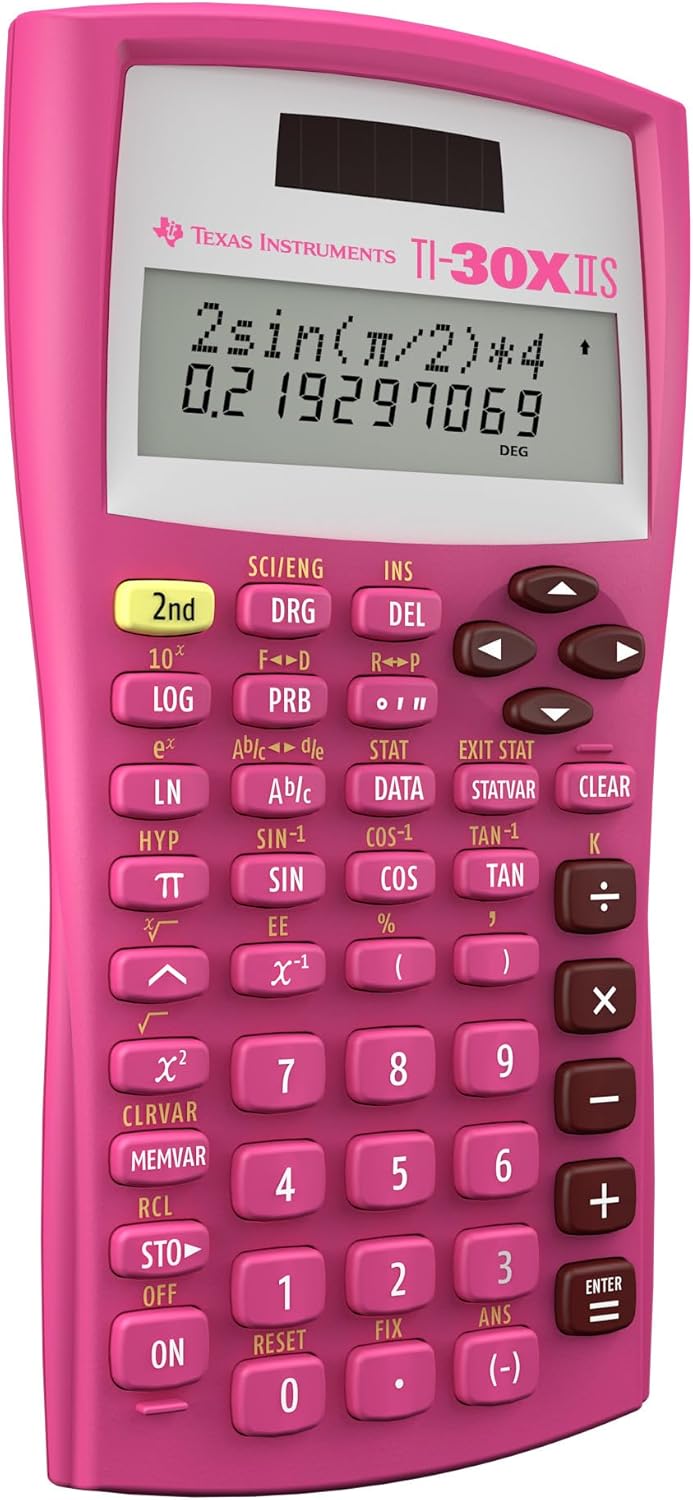
Figure 3: A side angle view of the calculator, showing its slim profile.

Figure 4: The back of the TI-30X IIS calculator, showing the battery compartment and product information.

Figure 5: Front view of the product packaging, highlighting key features like protective cover, dual power, and 2-line screen, along with exam permissions.

Figure 6: Back view of the product packaging, showing a comparison table of scientific calculator features and a QR code for more information.

Figure 7: Image illustrating the dimensions of the TI-30X IIS calculator: approximately 6.1 inches in length and 3.2 inches in width.
Setup
Powering On
The TI-30X IIS calculator is dual-powered, utilizing both solar energy and a lithium metal battery (included). To power on the calculator, press the ON button located at the bottom left of the keypad.
Initial Setup
Upon first use, or after a prolonged period of inactivity, the calculator should power on automatically when exposed to light or when the ON button is pressed. No specific initial setup is required beyond ensuring adequate light for solar power or sufficient battery charge.
Battery Installation/Replacement
The calculator uses 1 Lithium Metal battery. If the display becomes dim or unresponsive in adequate light, the battery may need replacement. Refer to the back of the calculator for the battery compartment. Ensure proper polarity when installing a new battery.
Operating Instructions
Basic Operations
Perform standard arithmetic operations using the number keys and operators (+, -, ×, ÷). Press ENTER to calculate the result.
Two-Line Display
The upper line of the display shows the entered expression, while the lower line shows the result. This allows for easy review and editing of calculations.
Scientific Functions
Access scientific functions such as logarithms (LOG, LN), trigonometric functions (SIN, COS, TAN), and their inverses using the corresponding keys. Many functions require pressing the 2nd key first to access the secondary function printed above the button.
Statistical Calculations
The calculator handles 1- and 2-variable statistical calculations. Use the DATA key to enter data points and the STATVAR key to access statistical variables.
Angle Modes
Switch between three angle modes: Degrees (DEG), Radians (RAD), and Grads (GRAD). The current mode is indicated on the display. Press the DRG key to cycle through the modes.
Fractions and Conversions
Enter and perform calculations with fractions using the n/d key. Convert between fractions and decimals, or mixed numbers and improper fractions, as needed.
Memory Functions
Store and recall values using the memory keys (STO, RCL). The calculator has multiple memory registers.
Error Messages
If an error occurs, an error message will appear on the display. Refer to the full user guide for a list of error codes and their meanings.
Maintenance
Cleaning
To clean the calculator, use a soft, dry cloth. Do not use abrasive cleaners or solvents, as these may damage the casing or screen.
Storage
When not in use, store the calculator in its protective slide case to prevent scratches and damage. Avoid exposing the calculator to extreme temperatures or humidity.
Battery Care
While the calculator is solar-powered, it also relies on a lithium metal battery. If storing the calculator for an extended period, ensure it is in a well-lit area to allow the solar panel to maintain the battery charge. If the battery is completely depleted, replace it as described in the Setup section.
Troubleshooting
- Calculator does not turn on:
- Ensure the calculator is exposed to sufficient light for solar power.
- Check the battery. If the battery is low or depleted, replace it.
- Press the ON button firmly.
- Display is dim or blank:
- Move the calculator to a brighter area.
- Replace the battery if the issue persists.
- Incorrect results:
- Verify the input values and the order of operations.
- Check the current angle mode (DEG, RAD, GRAD) if performing trigonometric calculations.
- Clear the calculator's memory by pressing 2nd then RESET.
- Buttons are unresponsive:
- Ensure the calculator is clean and free of debris around the buttons.
- If the calculator has been dropped or subjected to impact, internal damage may have occurred.
For further assistance, please refer to the official Texas Instruments support resources.
Specifications
| Feature | Detail |
|---|---|
| Model Number | 30XIIS/TBL/1L1/BL |
| Display Type | 2-Line Display |
| Power Source | Solar and Battery Powered (1 Lithium Metal battery included) |
| Dimensions | 6.12 x 3.23 x 0.1 inches |
| Item Weight | 5.6 ounces |
| Calculator Type | Scientific / Engineering |
| Permitted for Exams | SAT, ACT, AP (Advanced Placement) |
| Key Functions | Trigonometry, Logarithms, Statistics (1- & 2-variable), Fractions, Conversions, Scientific/Engineering Notation |
Warranty and Support
Warranty Information
The Texas Instruments TI-30X IIS calculator comes with a 1-year limited warranty. Please retain your proof of purchase for warranty claims.
Customer Support
For detailed user guides, FAQs, and technical support, please visit the official Texas Instruments education website:
Additional support documents, including a User Guide (PDF) and User Manual (PDF), are available online.
Related documentsTI-30X IIS (30XIIS/TBL/1L1/BL)


Ask a question about this manual
Ask about setup, troubleshooting, compatibility, parts, safety, or missing instructions. Manuals+ will review the question and use this page’s manual context to help answer it.