
1. Introduction
This manual provides instructions for the proper use, setup, maintenance, and troubleshooting of the Fowler 52-520-128-0 Dial Indicator. This precision instrument is designed for accurate dimensional measurement in various industrial and scientific applications.
Key features of this dial indicator include:
- 0-0.500" range with .0005" graduation.
- White dial face with clear markings.
- Solid brass housing for durability.
- Carbide contact point for wear resistance.
- Includes manufacturer's certificate of calibration.
2. Setup and Mounting
Before operation, ensure the dial indicator is securely mounted to a stable stand or fixture. Proper mounting is crucial for accurate and repeatable measurements.
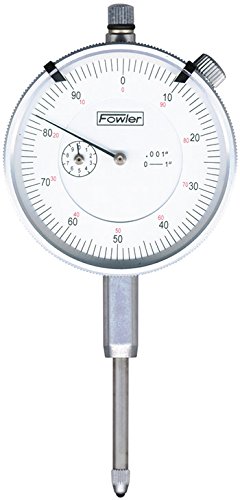
Figure 1: The Fowler 52-520-128-0 Dial Indicator. This image displays the front view of the dial indicator, showing the white dial face, the main needle, the revolution counter, and the carbide contact point at the bottom. The bezel and stem are also visible.
- Secure Mounting: Attach the dial indicator to a suitable stand or magnetic base using the stem clamp. Ensure the clamp is tightened sufficiently to prevent movement during measurement.
- Positioning: Position the indicator so that its contact point is perpendicular to the surface being measured. This minimizes cosine error and ensures accurate readings.
- Zeroing: Gently bring the contact point into contact with the reference surface. Rotate the outer bezel until the main needle aligns with the "0" mark on the dial.
3. Operating Instructions
The Fowler 52-520-128-0 Dial Indicator measures linear displacement. Follow these steps for accurate operation:
- Initial Contact: With the indicator mounted and zeroed on a reference surface, carefully move the workpiece or the indicator stand to bring the contact point into contact with the feature to be measured.
- Reading the Main Dial: The large needle on the main dial indicates measurements in increments of 0.0005 inches. Each numbered division (e.g., 10, 20, 30) represents 0.010 inches.
- Reading the Revolution Counter: The small dial (revolution counter) indicates the number of full revolutions the main needle has made. Each mark on the revolution counter typically represents 0.100 inches (100 divisions on the main dial). For a 0-0.500" range, the revolution counter will show up to 5 full revolutions.
- Total Measurement: Add the reading from the revolution counter to the reading from the main dial. For example, if the revolution counter shows 2 (meaning 0.200") and the main dial shows 35 (meaning 0.035"), the total measurement is 0.235".
- Tolerance Markers: Utilize the adjustable tolerance markers on the bezel to quickly identify if a measurement falls within acceptable limits.
Always ensure smooth and consistent contact pressure during measurement to avoid errors.
4. Maintenance and Care
Proper maintenance extends the life and accuracy of your dial indicator.
- Cleaning: After each use, wipe the indicator body and contact point with a clean, soft, lint-free cloth. If necessary, use a small amount of instrument cleaning fluid, applied to the cloth, not directly to the instrument.
- Lubrication: The internal mechanisms are factory-lubricated. Do not attempt to lubricate internal components unless performed by a qualified technician.
- Storage: Store the dial indicator in its protective case in a clean, dry environment, away from direct sunlight, extreme temperatures, and corrosive substances.
- Inspection: Periodically inspect the carbide contact point for wear or damage. A worn contact point can lead to inaccurate readings.
- Calibration: Regular calibration by a certified laboratory is recommended to ensure continued accuracy, especially in critical applications.
5. Troubleshooting
If you encounter issues with your dial indicator, consider the following common troubleshooting steps:
| Problem | Possible Cause | Solution |
|---|---|---|
| Inaccurate Readings | Improper mounting; dirty contact point; worn contact point; indicator not zeroed correctly; temperature fluctuations. | Ensure secure and perpendicular mounting. Clean or replace contact point. Re-zero the indicator. Allow indicator to acclimate to ambient temperature. |
| Sticking Movement | Dust or debris in the mechanism; lack of lubrication (rare for new units); bent stem. | Clean the stem and contact point area. If problem persists, contact Fowler support for service. Do not attempt to disassemble. |
| Bezel Difficult to Rotate | Dirt or debris under the bezel; overtightened bezel clamp (if applicable). | Clean around the bezel. Ensure no foreign objects are obstructing rotation. |
If troubleshooting steps do not resolve the issue, contact Fowler customer support for further assistance.
6. Specifications
The following are the technical specifications for the Fowler 52-520-128-0 Dial Indicator:
| Feature | Detail |
|---|---|
| Model Number | 52-520-128-0 |
| Range | 0-0.500 inches |
| Graduation | 0.0005 inches |
| Dial Face Color | White |
| Housing Material | Solid Brass |
| Contact Point Material | Carbide |
| Product Dimensions | 5 x 3 x 2 inches |
| Item Weight | 1.09 Pounds |
| Manufacturer | Fred V. Fowler Company, Inc. |
7. Warranty and Support
The Fowler 52-520-128-0 Dial Indicator comes with a full one-year warranty on material and workmanship from the date of purchase.
For warranty claims, technical support, or service inquiries, please contact Fred V. Fowler Company, Inc. directly. Ensure you have your product model number and purchase details available when contacting support.
For more information, visit the official Fowler High Precision Store.

