
Introduction
The Kodak EasyShare M1093 IS digital camera is designed for ease of use, offering advanced features in a compact form factor. This camera is equipped with a 10-megapixel sensor for high-quality images and 3x optical zoom. Key features include Smart Capture for automatic setting adjustments, image stabilization to reduce blur, and the ability to capture both HD stills and video.

Figure 1: Front view of the Kodak EasyShare M1093 IS Digital Camera.
Setup
1. Inserting the Battery and Memory Card
Locate the battery and memory card compartment on the bottom of the camera. Slide the latch to open the cover. Insert the Li-Ion rechargeable battery as indicated by the diagram inside the compartment. Insert a compatible SD/SDHC memory card into its slot until it clicks into place. Close the compartment cover securely.

Figure 2: Battery and memory card compartment.
2. Powering On and Initial Setup
To power on the camera, press and hold the PWR button located on the top of the camera. The lens will extend, and the 3.0-inch wide-angle LCD will activate. Upon first use or after a battery drain, you may be prompted to set the date and time. Follow the on-screen instructions to configure these settings or bypass them if desired.
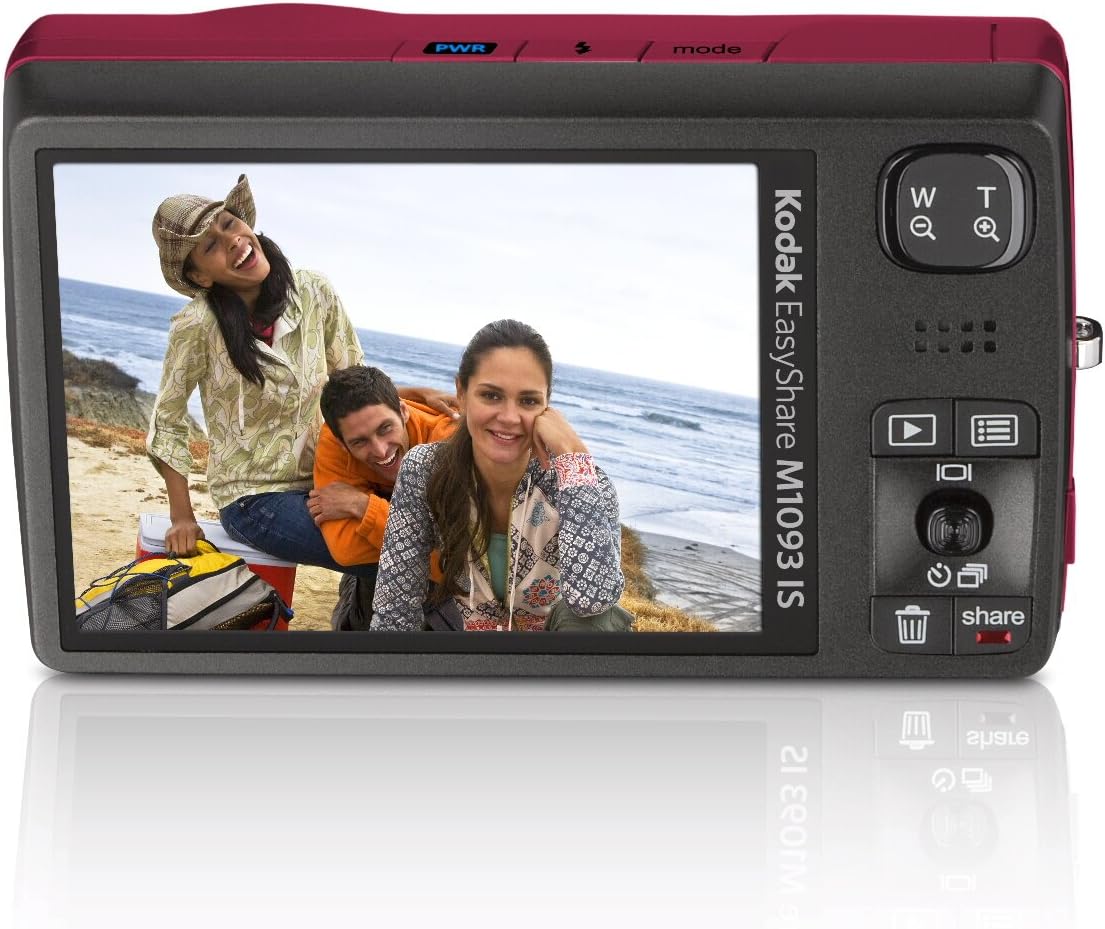
Figure 3: Rear view with LCD screen and controls.
Operating the Camera
Taking Photos
The Kodak EasyShare M1093 IS features a 10-megapixel resolution for detailed prints up to 30 x 40 inches. The 3x optical zoom (35 mm equivalent: 32-105 mm) allows you to get closer to your subject without compromising image quality. The Kodak Retinar all-glass aspheric lens ensures crisp details.
- Smart Capture: This innovative feature automatically adjusts camera settings, including exposure, focus, and ISO, for optimal pictures in various environments, even low-light conditions. It intelligently detects and analyzes scene conditions.
- Image Stabilization: Built-in image stabilization and blur reduction technology minimize blur caused by camera shake, subject movement, or fast action, resulting in sharper pictures.
- Face Detection: For portraits and group shots, face detection technology automatically locates faces and adjusts camera settings to ensure they are in focus and well-exposed.
- High ISO: Capture details in low-light situations and fast-action scenarios with high ISO sensitivity (up to 3200).
- Scene Modes: Select from multiple scene and color modes such as portrait, children, snow, beach, and backlight to optimize settings for specific shooting conditions.
- On-Camera Editing: Easily crop images or combine up to three shots into one large picture using the on-camera panorama stitch mode. Auto picture rotation is also available.
Recording Videos
Capture HD quality video (1280 x 720 pixels) at 30 frames per second (fps) or VGA video (640 x 480 pixels) at 30 fps with sound. The camera utilizes MPEG-4 compression to allow for more video recording while using less memory. You can also print multiple frames on a 4 x 6-inch print or save single frames for sharing.
- Video Bookmarking: Mark special spots in your video for easy navigation.
Viewing and Sharing
Review your photos and videos on the large 3.0-inch wide-angle viewing color LCD. The auto picture rotation feature ensures images are viewed correctly regardless of how they were shot.
- Text and Sound Tagging: Add text or sound tags to your pictures to easily find and organize them later.
- Multimedia Slideshow: Create multimedia slideshows directly from your camera with pre-loaded sound themes and creative transitions.
- On-Camera Share Button: The exclusive Share button on the camera allows you to tag pictures for easy printing or emailing later when connected to a computer.
- Kodak Perfect Touch Technology: Enhance your pictures to be more vivid and brighter, clearing up dark shadows for richer detail.
Maintenance
Battery Care
The camera uses a Li-Ion rechargeable battery. Ensure the battery is fully charged before use. The camera supports in-camera charging. For optimal battery life, avoid extreme temperatures and store the battery in a cool, dry place when not in use.
Cleaning the Camera
Use a soft, lint-free cloth to clean the camera body and LCD screen. For the lens, use a specialized lens cleaning cloth and solution. Avoid using abrasive materials or harsh chemicals.
Troubleshooting
- Camera not turning on: Ensure the battery is properly inserted and fully charged.
- Lens not retracting: If the battery dies while the lens is extended, it may get stuck. Try waiting a minute for the battery to regain a little charge, then quickly turn the camera on and off to retract the lens.
- Date and Time Reset: If the date and time settings reset frequently, the internal backup battery may be low or depleted. Recharge the main battery fully and leave it in the camera for several hours to allow the internal battery to charge.
- Grainy pictures/video: This can occur in low light conditions. Ensure adequate lighting or use the flash. High ISO settings can also introduce noise.
- Video blurry during zoom: The autofocus may kick in after zooming. Allow a moment for the camera to re-focus after adjusting the zoom during video recording.
- Error messages / Corrupt files: If you encounter error messages or issues transferring files via USB, try transferring files directly from the SD card using a card reader. If issues persist, try reformatting the SD card (this will erase all data).
- Slow operation (startup, shutdown, mode switching): This is a characteristic of the camera. Ensure sufficient memory card speed for optimal performance.
Specifications
| Feature | Detail |
|---|---|
| Model Name | Easyshare M1093 IS |
| Brand | Kodak |
| Product Dimensions | 3.78 x 0.87 x 2.32 inches |
| Item Weight | 6.6 ounces |
| Optical Zoom | 3x |
| Digital Zoom | 5x |
| Photo Sensor Technology | CCD |
| Image Stabilization | Sensor-shift |
| Supported File Format | MPEG-4 (Video) |
| Maximum Focal Length | 105 Millimeters |
| Expanded ISO Minimum | 50 |
| Metering Description | Multi, Center-weighted, Spot |
What's in the Box
The Kodak EasyShare M1093 IS Digital Camera package typically includes:
- Kodak EasyShare M1093 IS Digital Camera
- Li-Ion Rechargeable Battery
- USB Cable (for charging and data transfer)
- Wrist Strap
- Quick Start Guide (not included in this manual)
Warranty and Support
For warranty information and technical support, please refer to the documentation provided with your camera or visit the official Kodak support website. Keep your proof of purchase for warranty claims.


