
Introduction
This manual provides comprehensive instructions for the NIXON Time Teller A045 watch. Designed for durability and style, this timepiece features a Miyota Japanese quartz 3-hand movement and a 100m water resistance rating. Please read this manual carefully to ensure proper use and maintenance of your watch.

Figure 1: Front view of the NIXON Time Teller A045 watch, showcasing its silver stainless steel construction and black dial.
Setup
Setting the Time
- Locate the Crown: The crown is the small knob on the right side of the watch case.
- Pull Out the Crown: Gently pull the crown outwards to the time-setting position. You may feel a slight click.
- Adjust the Time: Rotate the crown clockwise or counter-clockwise to set the hour and minute hands to the correct time.
- Push In the Crown: Once the time is set, push the crown back into its original position. This will start the watch movement.

Figure 2: Side view of the NIXON Time Teller A045, highlighting the crown used for time adjustment.
Adjusting the Watch Band
The NIXON Time Teller A045 features an adjustable clasp that allows for easy resizing without the need to remove links.
- Open the Clasp: Locate the small lever or tab on the clasp mechanism. Lift it to open the clasp.
- Unlock the Adjustment Bar: On the inside of the clasp, there is a bar that locks into grooves on the band. Use a small, flat tool (like a precision screwdriver or a sturdy paperclip) to gently lift the locking mechanism on this bar.
- Slide to Adjust: Once unlocked, slide the clasp along the band to achieve the desired fit. Ensure the clasp is aligned with the grooves for proper locking.
- Lock the Adjustment Bar: Press the locking mechanism back down firmly until it clicks into place, securing the clasp at the new position.
- Close the Clasp: Close the main clasp securely.
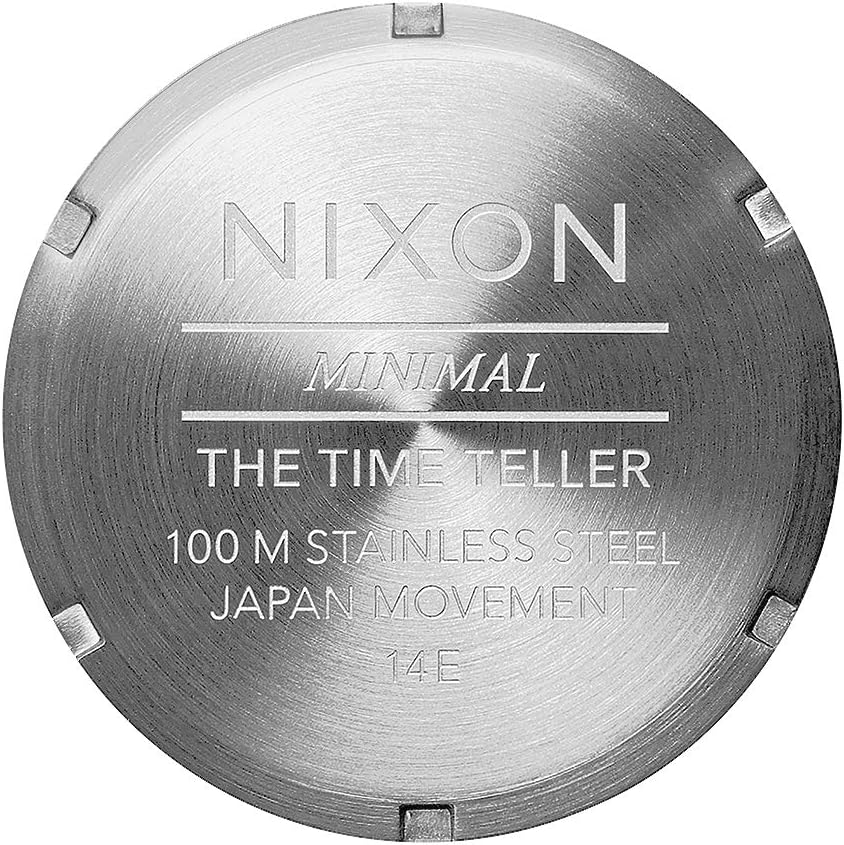
Figure 3: Rear view of the NIXON Time Teller A045, illustrating the adjustable clasp and band.
Battery Information
The NIXON Time Teller A045 watch is powered by one LR44 battery, which is included with the watch. Battery replacement should ideally be performed by a qualified watch technician to ensure the water resistance seal is maintained.
Operating Your Watch
Basic Timekeeping
Your NIXON Time Teller A045 is an analog watch that displays time using three hands: hour, minute, and second. Once the time is set as described in the "Setup" section, the watch will continuously keep time.
Water Resistance
This watch has a water resistance rating of 100 meters (10 ATM). This means it is suitable for showering, swimming, and snorkeling. It is not suitable for high-impact water sports, diving, or prolonged submersion at depths beyond its rating.
- Important: Do not operate the crown or pushers (if any) while the watch is wet or submerged, as this can compromise the water resistance.
- Always ensure the crown is fully pushed in before exposing the watch to water.

Figure 4: The NIXON Time Teller A045 is designed for water activities up to 100 meters, making it suitable for swimming and snorkeling.
Maintenance
Cleaning Your Watch
To maintain the appearance of your NIXON Time Teller A045, regularly clean it with a soft, damp cloth. For the stainless steel band and case, a mild soap solution can be used, followed by thorough rinsing with clean water and drying with a soft, lint-free cloth. Avoid using harsh chemicals or abrasive materials, as these can damage the finish.
Water Resistance Care
The gaskets that provide water resistance can degrade over time. It is recommended to have your watch's water resistance checked by a professional watchmaker every 2-3 years, especially if it is frequently exposed to water. After exposure to saltwater, rinse the watch with fresh water and dry it thoroughly.
Storage
When not in use, store your watch in a cool, dry place away from direct sunlight and extreme temperatures. Keeping it in its original box or a watch case can help protect it from dust and scratches.
Troubleshooting
| Problem | Possible Cause | Solution |
|---|---|---|
| Watch is not running. | Battery depleted or crown not fully pushed in. | Ensure crown is fully pushed in. If still not running, the battery may need replacement. Consult a professional watch technician. |
| Time is inaccurate. | Time was not set correctly or watch was exposed to strong magnetic fields. | Re-set the time as per the "Setting the Time" instructions. Keep the watch away from strong magnets. |
| Condensation inside the crystal. | Compromised water resistance seal due to impact, age, or improper crown operation. | Immediately take the watch to a professional watch technician for inspection and repair to prevent internal damage. |
Specifications
| Feature | Detail |
|---|---|
| Model Number | A045000 |
| Movement | Miyota Japanese Quartz 3-Hand |
| Water Resistance | 100m / 10 ATM |
| Case Material | Stainless Steel |
| Band Material | Stainless Steel |
| Case Diameter | 37mm |
| Band Width | 19.5mm-18mm (tapered) |
| Product Dimensions | 1 x 1 x 1 inches |
| Item Weight | 3.2 ounces |
| Battery Type | 1 LR44 (included) |
| First Available Date | October 1, 2001 |

Figure 5: Engraved details on the watch case back, confirming specifications like water resistance and movement type.
Warranty and Support
For detailed warranty information, product registration, and customer support, please visit the official NIXON website.
Official NIXON Website: www.nixon.com
You can also find additional product information and support on the Amazon product page.
Important Notes
- Avoid exposing the watch to extreme temperatures (hot or cold) or sudden temperature changes.
- Keep the watch away from strong magnetic fields, as they can affect the accuracy of the movement.
- Do not attempt to open the watch case yourself, as this will void the warranty and may damage the watch.
Additional Resources
Explore more from NIXON:
Product Videos
No official product videos from the seller were found for this specific model. For general brand information, please refer to the NIXON official website or their Amazon store page.