Introduction
This manual provides detailed instructions for the setup, operation, and maintenance of your Allen & Heath ZED-420 Live Audio Mixer. The ZED-420 is designed for professional live sound applications, offering a comprehensive feature set for bands, houses of worship, theaters, and AV installations.
Key features include 16 mic/line inputs, 4 stereo inputs, 4-band MusiQ EQ, 4 subgroups, 6 auxiliary sends, a 7x2 matrix, and USB audio connectivity.
Setup
Unpacking and Inspection
Carefully unpack the mixer and inspect it for any signs of damage. Retain all packaging materials for future transport or service.
Power Connection
Connect the supplied power cable to the mixer's IEC inlet on the rear panel and then to a suitable AC power outlet. Ensure the power switch is in the OFF position before connecting. The ZED-420 uses a standard corded electric power source.
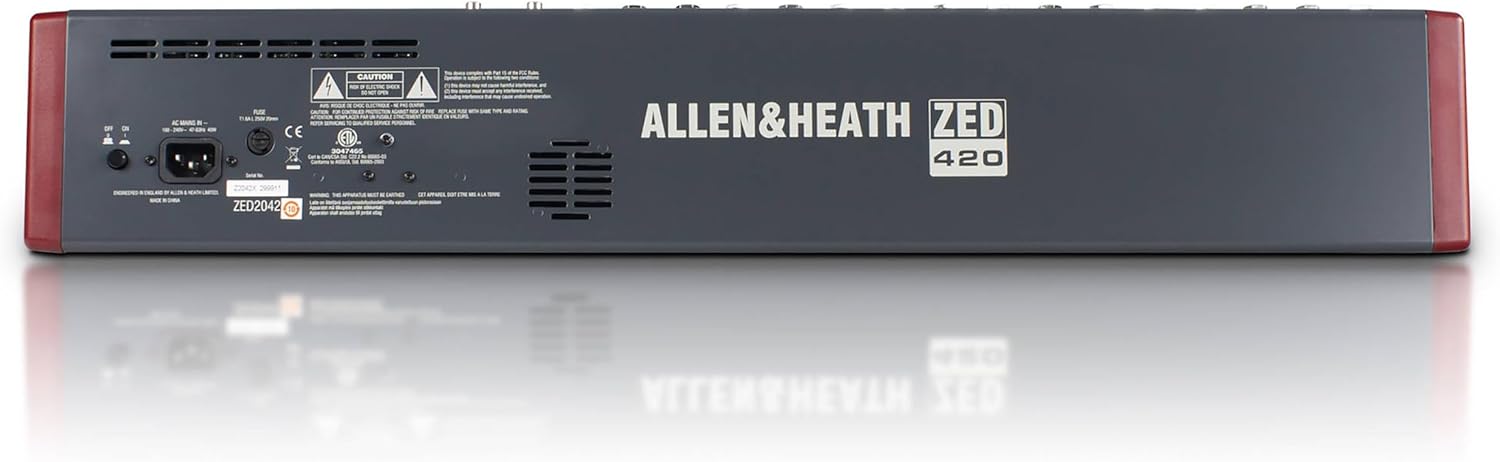
Image: Rear panel of the ZED-420 mixer, highlighting the power input and other rear connections.
Initial Connections
Before powering on, connect all necessary audio inputs and outputs. The mixer features XLR microphone inputs, 1/4-inch line/instrument inputs, and various output options.
For USB audio, connect a standard USB cable from the mixer's USB port to your computer or compatible mobile device. The ZED-420 is class-compliant and does not require specific drivers for most operating systems.
Operating Instructions
Input Channels (Mono)
Each of the 16 mono channels features a DuoPre XLR microphone preamp with 48V Phantom power and up to 69dB of gain. These preamps utilize two gain stages for accurate sound across the gain range.

Image: Overhead view of the ZED-420 mixer, displaying the layout of all input channels, faders, and controls.
High Pass Filter (HPF): A 100Hz HPF is available on every mono input to remove unwanted low frequencies.
MusiQ EQ: Each mono channel includes a 3-band MusiQ EQ with a swept mid-frequency, allowing for musical tone shaping. Adjust high and low frequencies with shelving EQ and precisely control the mid-range.

Image: Detailed view of the ZED-420's channel strip, focusing on the MusiQ EQ section and other channel controls.
Insert Sockets: Mono channels, groups, and the main mix feature insert sockets for connecting external processors like compressors or graphic equalizers.
Auxiliary Sends
The ZED-420 provides six auxiliary sends:
- Two Pre-Fade Auxiliaries: Ideal for monitor mixes, independent of the main mix fader.
- Two Post-Fade Auxiliaries: Suitable for external effects units, subwoofers, or streaming/recording feeds, where the send level follows the main mix fader.
- Two Switchable Auxiliaries: Can be set to either pre-fade or post-fade operation on a per-channel basis.

Image: Close-up of the ZED-420's master section, showing auxiliary send controls, matrix, and USB I/O section.
USB Audio Interface
The integrated stereo-in stereo-out USB connection allows for easy recording of the main mix or selected channels. It also enables a stereo return from a connected device back into the mixer. This feature is class-compliant, supporting Mac, Windows, and many mobile devices without requiring drivers.
Groups and Matrix
The mixer includes 4 assignable output buses (subgroups) for routing channels to multitrack recorders or monitors. A 7x2 matrix provides additional routing flexibility.
Maintenance
To ensure the longevity and optimal performance of your ZED-420 mixer, follow these general maintenance guidelines:
- Cleaning: Regularly clean the mixer's surface with a soft, dry cloth. Avoid abrasive cleaners or solvents. For stubborn dirt, a slightly damp cloth can be used, ensuring no liquid enters the controls or openings.
- Dust Protection: Keep the mixer covered when not in use to prevent dust accumulation, which can affect faders and potentiometers.
- Environmental Conditions: Operate the mixer in a clean, dry environment, away from extreme temperatures, humidity, and direct sunlight.
- Cable Management: Ensure all cables are properly routed and secured to prevent strain on connectors and accidental disconnections.
Troubleshooting
This section addresses common issues you might encounter with your ZED-420 mixer. For more complex problems, consult the full user manual or contact Allen & Heath support.
- No Power: Ensure the power cable is securely connected to both the mixer and a working power outlet. Check the power switch position.
- No Sound Output: Verify that all faders (channel, group, main mix) are raised appropriately. Check mute buttons on channels and groups. Ensure output cables are correctly connected to amplifiers or speakers.
- No Input Signal: Confirm that input sources are active and connected correctly. Check gain settings on individual channels. For microphones, ensure 48V phantom power is engaged if required.
- Hum or Noise: Check for ground loops by ensuring all equipment is properly grounded. Use balanced cables where possible. Disconnect inputs one by one to identify the source of the noise.
- USB Audio Issues: Ensure the USB cable is connected securely. Verify that the ZED-420 is selected as the audio input/output device in your computer's sound settings or DAW.
Specifications
| Feature | Detail |
|---|---|
| Item Weight | 31 pounds (14.06 kg) |
| Product Dimensions | 22.1 x 5.1 x 28.2 inches (56.1 x 13.0 x 71.6 cm) |
| Model Number | AH-ZED420 |
| Brand | Allen & Heath |
| Number of Channels | 22 (16 Mic/Line, 4 Stereo) |
| Hardware Interface | USB |
| Power Source | Corded Electric |
| Connectivity Technology | USB |
| Color | Gray and Red |
| First Available | April 13, 2004 |
Warranty and Support
Allen & Heath products are designed for reliability and performance. For specific warranty information, please refer to the documentation included with your product or visit the official Allen & Heath website. Keep your proof of purchase for warranty claims.
For technical support, service, or further inquiries, please contact Allen & Heath customer service or your authorized dealer. You can find contact information on the official Allen & Heath website: www.allen-heath.com