
1. Important Safety Instructions
Please read these instructions carefully before operating the unit. Keep this manual for future reference.
- Power Source: Connect the unit only to an AC power outlet of the specified voltage.
- Ventilation: Ensure adequate ventilation. Do not block ventilation openings.
- Water and Moisture: Do not expose the unit to rain, moisture, or dripping water. Do not place objects filled with liquids on the unit.
- Heat: Keep the unit away from heat sources such as radiators, heat registers, stoves, or other heat-producing appliances.
- Cleaning: Unplug the unit from the wall outlet before cleaning. Use a soft, dry cloth.
- Servicing: Do not attempt to service this unit yourself. Refer all servicing to qualified service personnel.
2. Product Overview
The Karcher KA 5300 is a compact audio system designed for versatile media playback. It integrates a 3-way CD changer, a double cassette deck, a turntable, and an FM tuner. The system delivers audio through two external speakers.

Figure 2.1: Front view of the Karcher KA 5300 Compact System with integrated speakers.

Figure 2.2: Front view of the Karcher KA 5300 showing the CD changer tray in the open position.
3. Setup
3.1 Unpacking
Carefully remove all components from the packaging. Ensure the following items are present:
- Karcher KA 5300 Compact System Unit
- Remote Control
- Instruction Manual
- Two External Speakers
3.2 Placement
Place the main unit and speakers on a stable, flat surface. Allow sufficient space around the unit for proper ventilation. Avoid placing the unit near strong magnetic fields or direct sunlight.
3.3 Connecting Speakers
Connect the two external speakers to the main unit using the provided speaker wires. Observe the polarity: connect the red wire to the red (+) terminal and the black wire to the black (-) terminal on both the main unit and the speakers.

Figure 3.1: Rear view of the Karcher KA 5300 main unit, illustrating the speaker connection terminals.
3.4 Power Connection
Plug the power cable into the AC inlet on the rear of the unit, then plug the other end into a standard wall outlet.
4. Operating Instructions
4.1 Control Panel Overview
The main controls are located on the front panel of the unit. Familiarize yourself with the buttons and dials for power, volume, source selection, and media playback.
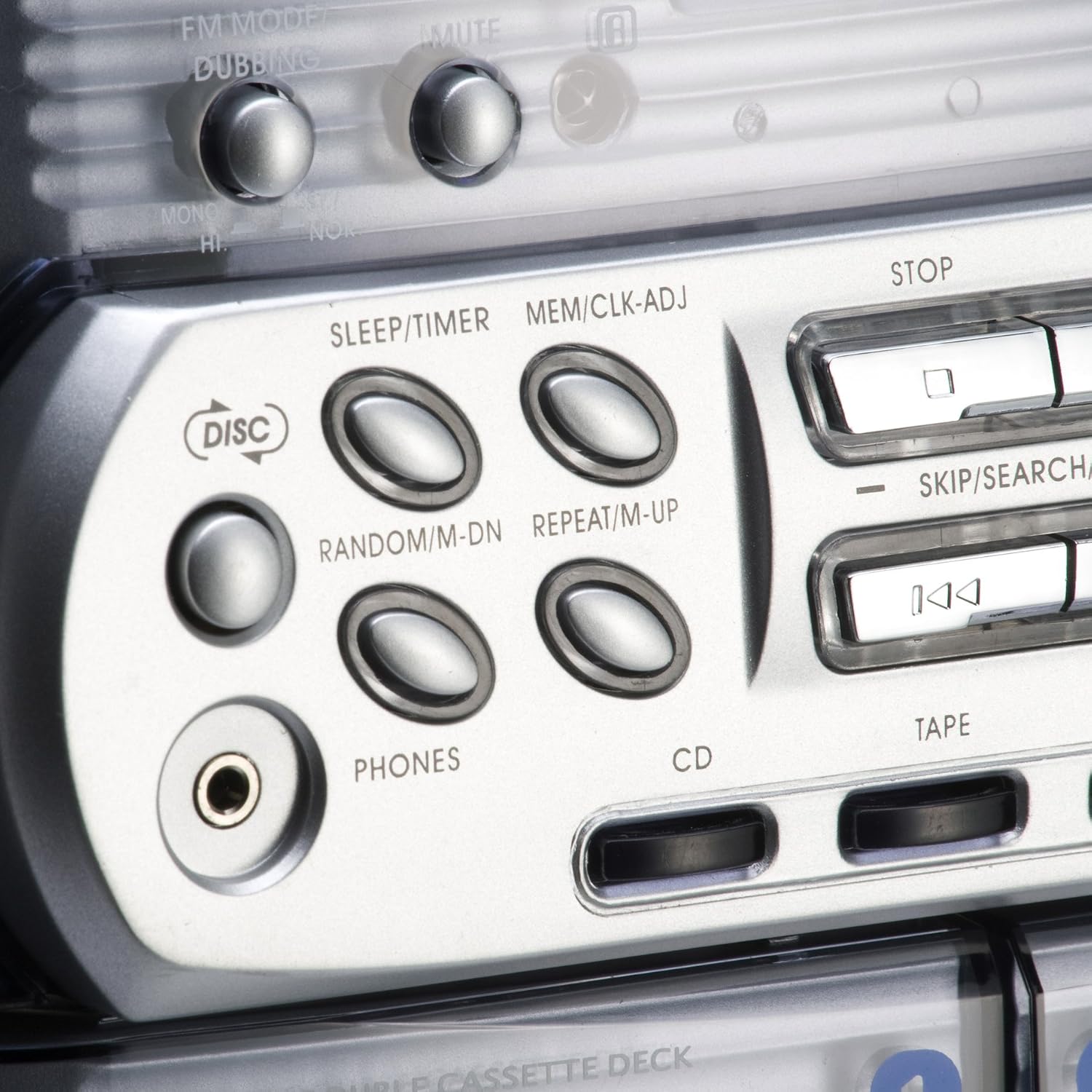
Figure 4.1: Close-up view of the control buttons for CD, Tape, and Phono functions.
4.2 CD Player Operation
- Press the CD button to select the CD source.
- Press the OPEN/CLOSE button to open the 3-way CD changer tray.
- Place up to three CDs (CD, CD-R, CD-RW) onto the respective trays.
- Press OPEN/CLOSE again to close the tray.
- Press PLAY/PAUSE to start playback.
- Use SKIP/SEARCH buttons to navigate tracks.
- The system supports programming up to 60 tracks. Refer to the detailed manual for programming instructions.
4.3 Cassette Player Operation
- Press the TAPE button to select the cassette source.
- Open the cassette deck door by pressing the EJECT button.
- Insert a cassette tape with the open edge facing upwards.
- Close the cassette deck door.
- Press PLAY to begin playback.
- Use FAST FORWARD and REWIND for navigation.
- Press STOP to end playback.
- The unit features a double cassette deck for playback and dubbing.
4.4 Turntable Operation
- Press the PHONO button to select the turntable source.
- Carefully place a vinyl record on the turntable platter.
- Release the tone arm from its rest and position the stylus over the desired track on the record.
- Gently lower the tone arm onto the record. Playback will begin automatically.
- To stop playback, lift the tone arm and return it to its rest.
4.5 Radio Operation
- Press the TUNER or FM button to select the radio source.
- Use the tuning dial or buttons to search for desired FM stations.
- Refer to the detailed manual for instructions on saving radio presets.
4.6 Remote Control
The included remote control provides convenient access to most functions, including power, volume, source selection, and media playback controls. Ensure batteries are correctly inserted.
5. Maintenance and Care
Regular maintenance helps ensure the longevity and optimal performance of your Karcher KA 5300 system.
- Cleaning the Unit: Wipe the exterior surfaces with a soft, dry cloth. Do not use abrasive cleaners or solvents.
- CD Lens Care: Use a specialized CD lens cleaner disc periodically to maintain optimal CD playback.
- Cassette Head Cleaning: Clean the cassette heads, pinch rollers, and capstans with a cotton swab lightly dampened with isopropyl alcohol after every 10-20 hours of use.
- Turntable Stylus Care: Gently clean the stylus with a soft brush designed for stylus cleaning. Replace the stylus when wear is noticeable to prevent damage to records.
- General Handling: Avoid dropping or subjecting the unit to strong impacts.
6. Troubleshooting
If you encounter issues with your Karcher KA 5300, refer to the following common problems and solutions:
| Problem | Possible Cause | Solution |
|---|---|---|
| No power | Power cable not connected; Wall outlet not active | Ensure power cable is securely connected; Test wall outlet with another device. |
| No sound from speakers | Volume too low; Incorrect source selected; Speakers not connected correctly | Increase volume; Select correct source (CD, Tape, Phono, Tuner); Check speaker wire connections and polarity. |
| CD Player displays "Door Error" or does not play | CD tray not fully closed; Disc inserted incorrectly; Dirty CD lens | Ensure CD tray is fully closed; Reinsert disc correctly; Clean CD lens with a cleaner disc. |
| Cassette playback issues (e.g., muffled sound, tape jamming) | Dirty cassette heads; Worn tape | Clean cassette heads; Try a different tape. |
| Turntable skipping or poor sound | Dirty or damaged record; Worn or dirty stylus; Unit not level | Clean record; Clean or replace stylus; Ensure unit is on a level surface. |
| Poor radio reception | Antenna not extended or positioned correctly; Interference | Extend and adjust the FM antenna; Relocate the unit away from other electronic devices. |
7. Specifications
Technical specifications for the Karcher KA 5300 Compact System:
| Feature | Detail |
|---|---|
| Brand | Karcher |
| Model Number | Karcher KA 5300 |
| Connectivity Technology | FM Tuner |
| Color | Silver |
| Speaker Type | Stereo |
| Item Dimensions (L x W x H) | 70.5 x 41 x 38.8 centimeters |
| Power Source | Electric Cable |
| Compatible Devices | CD, Cassette, Vinyl |
| Item Weight | 10.9 Kilograms |
| Wattage | 10 Watts (2 x 5W RMS) |
| Supported Audio Formats | Vinyl Record, CD, Cassette |
| Number of Speakers | 2 |
| Audio Output Mode | Stereo |
| Number of Audio Channels | 2.0 |
| Bluetooth Compatible? | No |
| Country of Origin | Germany |
8. Warranty and Support
For warranty information, technical support, or service inquiries, please contact Karcher customer service or your local dealer. The included manual may be available in multiple languages, including German and English.


