1. Introduction
This manual provides essential information for the installation, operation, and maintenance of your TRIPP LITE SU1000RTXL2UA 1000VA On-Line Double-Conversion UPS System. This UPS is designed to protect critical server, network, and telecommunications equipment from power outages, voltage fluctuations, and transient surges by providing a continuous, regulated, and filtered AC output.
The SU1000RTXL2UA features true on-line operation with pure sine wave output and zero transfer time to battery, ensuring the highest level of power protection. It is a 2U rackmount form factor with an installed depth of only 13.5 inches.
2. Setup
2.1 What's in the Box
Verify that all components are present:
- SU1000RTXL2Ua Online Double-Conversion UPS System
- USB Cable (1 x 6-ft.)
- DB9 Cable (1 x 6-ft.)
- Mounting hardware for 4-post rack enclosures
- Instruction manual (this document)
- PowerAlert Software CD
2.2 Installation Options
The SU1000RTXL2UA offers versatile installation options:
- 4-Post Rackmount: Requires 2U of rack space. Mounting accessories are included.
- 2-Post Rackmount: Can be installed using the optional 2POSTRMKITWM accessory (sold separately).
- Tower Configuration: Can be installed in an upright tower configuration with the optional 2-9USTAND accessory (sold separately).
2.3 Connecting the UPS
Follow these steps to connect your UPS:
- Input Power: Connect the UPS to a standard NEMA 5-15R wall outlet using the integrated NEMA 5-15P input plug.
- Output Devices: Connect your critical equipment to the NEMA 5-15R output receptacles on the rear panel of the UPS. The UPS features six outlets, including two that are individually controllable.
- Communication Ports:
- USB Port: Connect the included USB cable from the UPS to your computer for power management and auto-shutdown features.
- DB9 Serial Port: Connect the included DB9 cable for serial communication and monitoring.
- SNMPWEBCARD Slot: For advanced network management, an optional SNMPWEBCARD accessory can be installed (sold separately).
- Tel/Ethernet Surge Suppression: Connect a phone or network line to the RJ45 jacks for surge protection (cable not included).
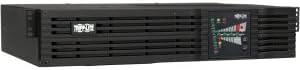
Image: Rear panel of the SU1000RTXL2UA UPS. This view displays the NEMA 5-15P input plug, six NEMA 5-15R output receptacles, a cooling fan, USB and DB9 serial communication ports, an SNMPWEBCARD slot, and RJ45 jacks for Tel/Ethernet surge suppression.
3. Operating Instructions
3.1 True On-Line Double-Conversion Operation
The SU1000RTXL2UA operates in a true on-line double-conversion mode. This means that incoming AC power is continuously converted to DC, and then re-converted back to a regulated, filtered AC output with a pure sine wave. This process completely isolates connected equipment from all power problems, including blackouts, brownouts, overvoltages, surges, and line noise, providing the highest level of power protection.
3.2 Battery Backup and Runtime
During a power failure, the internal batteries provide backup power to connected equipment. The SU1000RTXL2UA's internal battery set provides approximately 4.5 minutes of battery support for a full load (800 watts) and 14 minutes for a half-load (400 watts). For extended runtime, optional external battery packs (BP24V28-2U and BP24V70-3U) can be connected (sold separately).
3.3 LED Status Display and Audible Alarms
The front panel features a 14-LED display that provides real-time status information. This display can be rotated for viewing in horizontal rack or vertical tower installations.
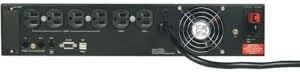
Image: Front panel of the SU1000RTXL2UA UPS. This view highlights the 14-LED status display, which indicates various operational parameters such as line power, on-line mode, bypass mode, on-battery status, overload, battery low, replace battery, and fault conditions.
The LEDs indicate:
- Line power status
- On-line mode
- Bypass mode
- On-battery status
- Overload condition
- Battery low warning
- Replace battery indicator
- Fault status information
An audible alarm will sound to signal UPS startup, power failure, low battery, overload, UPS fault, and remote shutdown conditions.
3.4 Individually Controllable Outlets
The UPS includes two AC outlets that can be individually controlled via software. This feature allows for:
- Remote Reboot: Rebooting locked-up equipment without manual intervention.
- Load Shedding: Shedding nonessential loads during a power outage to maximize battery backup time for mission-critical equipment.
3.5 PowerAlert Software
The included PowerAlert software, used with the USB or DB9 communication ports, provides comprehensive network power monitoring and control. Capabilities include:
- UPS and line power status messaging (on battery, low-battery, power restored, AC line voltage, DC battery voltage, remaining battery capacity).
- Timed inverter shutoff after unattended shutdown.
- UPS output power control for delayed or immediate reboot of connected devices.
3.6 Economy Mode
The SU1000RTXL2UA features an optional, highly efficient economy mode setting. When enabled, this mode can significantly reduce energy costs by operating with 94% efficiency, minimizing heat output, reducing cooling requirements, and consuming less electricity.
4. Maintenance
4.1 Battery Replacement
The internal batteries of the SU1000RTXL2UA are field replaceable and hot-swappable, allowing for battery replacement without interrupting power to connected equipment. Refer to the "Replace Battery" indicator on the LED display for guidance on when to replace batteries. Always use genuine TRIPP LITE replacement batteries to ensure optimal performance and safety.
5. Troubleshooting
This section provides guidance for common issues you might encounter with your UPS system.
5.1 UPS Not Providing Power
- Check Input Power: Ensure the UPS is securely plugged into a functioning wall outlet. Verify the wall outlet has power.
- Check UPS On/Off Switch: Confirm the UPS is turned on.
- Check Circuit Breaker: The UPS has an input circuit breaker. If tripped, reset it.
- Battery Charge: If the UPS is on battery mode and the battery low alarm sounds, the battery may be depleted. Allow the UPS to recharge.
5.2 Audible Alarm Sounds Continuously or Periodically
- Power Failure: A continuous alarm indicates the UPS is operating on battery power. Save your work and shut down equipment if the outage is prolonged.
- Low Battery: A periodic alarm (e.g., every few seconds) often indicates a low battery condition.
- Overload: A continuous alarm with an overload LED illuminated indicates too much equipment is connected. Disconnect non-essential loads.
- UPS Fault: A specific alarm pattern or fault LED may indicate an internal UPS fault. Contact TRIPP LITE support.
5.3 Connected Equipment Not Receiving Surge Protection
- Verify Connections: Ensure phone or network lines are correctly connected to the RJ45 jacks on the rear panel.
- Check Surge Suppression Rating: The UPS provides 480-joule surge suppression. Extreme surges might exceed this, but the UPS should still protect connected equipment.
For more detailed troubleshooting or issues not covered here, refer to the PowerAlert software documentation or contact TRIPP LITE technical support.
6. Specifications
| Feature | Description |
|---|---|
| Model Number | SU1000RTXL2UA |
| Product Type | On-Line Double-Conversion UPS System |
| Output Volt Amp Capacity (VA) | 1000 VA |
| Output Watt Capacity (Watts) | 800 Watts |
| Output Nominal Voltage | 120V AC (100/110/120V selectable) |
| Input Plug | NEMA 5-15P |
| Output Receptacles | NEMA 5-15R (6 outlets) |
| Connectivity | SNMP slot, USB, Serial (DB9) |
| Form Factor | 2U Rackmount |
| Product Dimensions (L x W x H) | 23.03 x 20 x 9 inches |
| Item Weight | 40 pounds |
| Color | Black |
| Surge Suppression Rating | 480 Joules |
| First Available Date | December 13, 2004 |
7. Warranty and Support
The TRIPP LITE SU1000RTXL2UA UPS System comes with a 2-year warranty. Additionally, it includes $250,000 Ultimate Lifetime Insurance coverage for connected equipment, providing peace of mind against damage due to power events.
For technical support, warranty claims, or further assistance, please contact TRIPP LITE customer service or visit their official website.


