New Bright Radio Control Mighty Buggy XTRM Orange 9.6v User Manual
Introduction
This manual provides comprehensive instructions for the New Bright Radio Control Mighty Buggy XTRM Orange 9.6v. This 1:8 scale XTRM Buggy features full function radio control, allowing for left/right and forward/reverse steering. It is equipped with off-road tires on custom chrome rims, a lightweight Lexan bodyshell with a custom finish, and independent suspension with front and rear guards. The package includes a 9.6v rechargeable battery, charger, and 2 x AA batteries for the controller.
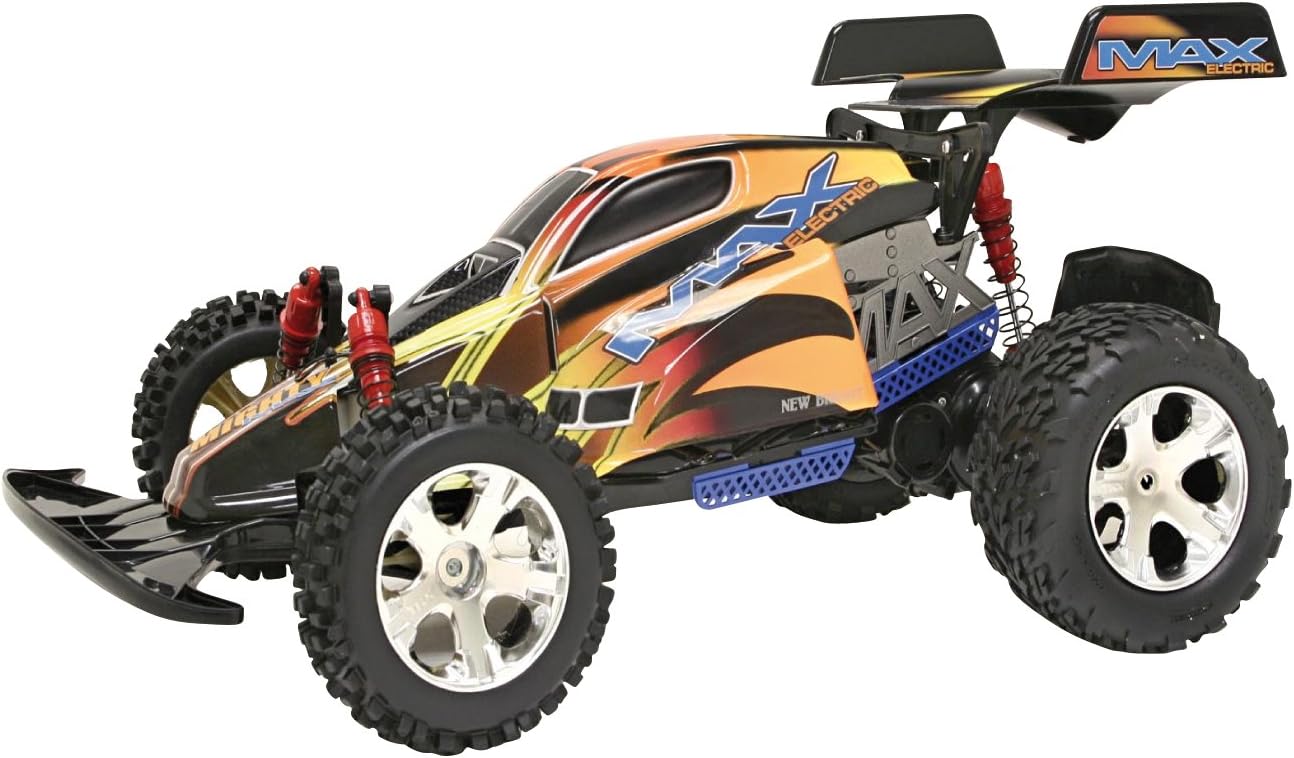
Image: The New Bright Radio Control Mighty Buggy XTRM in orange, showcasing its robust design, off-road tires, and distinctive Lexan bodyshell.
Setup
Battery Charging (Vehicle)
- Connect the 9.6v rechargeable battery to the included charger.
- Plug the charger into a standard wall outlet.
- Allow the battery to charge for the recommended time as indicated on the charger or packaging. Do not overcharge.
- Once charged, disconnect the battery from the charger.
Battery Installation (Vehicle)
- Locate the battery compartment on the underside of the Mighty Buggy XTRM.
- Open the battery compartment cover.
- Insert the charged 9.6v battery, ensuring correct polarity.
- Securely close the battery compartment cover.
Battery Installation (Controller)
- Locate the battery compartment on the back of the radio control transmitter.
- Open the battery compartment cover.
- Insert 2 x AA batteries, ensuring correct polarity (+/-).
- Securely close the battery compartment cover.
Operating Instructions
Power On
- Turn on the power switch on the Mighty Buggy XTRM.
- Turn on the power switch on the radio control transmitter.
- The vehicle and controller should automatically link. If not, turn both off and on again.
Controls
- Forward/Reverse: Use the trigger or joystick on the controller to move the vehicle forward or backward.
- Left/Right Steering: Use the steering wheel or directional pad on the controller to turn the vehicle left or right.
Wheel Alignment
If the vehicle does not drive straight, use the wheel alignment trim dial or lever on the underside of the vehicle or on the controller to adjust the steering until it tracks straight.
4 Band Transmitter
The 4 band transmitter allows for multiple vehicles to be operated in the same area without interference. Ensure your vehicle and controller are set to the same band if issues arise with other RC vehicles nearby.
Maintenance
Cleaning
- After use, especially in dusty or dirty conditions, gently wipe down the vehicle with a soft, dry cloth.
- Remove any debris from the wheels, axles, and suspension components.
- Do not immerse the vehicle or controller in water.
Storage
- Always remove batteries from both the vehicle and the controller when not in use for extended periods.
- Store the Mighty Buggy XTRM and its accessories in a cool, dry place, away from direct sunlight and extreme temperatures.
Troubleshooting
| Problem | Possible Cause | Solution |
|---|---|---|
| Vehicle does not respond or has limited range. | Low batteries in vehicle or controller. Interference. | Ensure vehicle battery is fully charged. Replace controller batteries. Move to an area with less electronic interference. |
| Vehicle pulls to one side. | Wheel alignment is off. | Adjust the wheel alignment trim dial/lever on the vehicle or controller. |
| Vehicle moves slowly or inconsistently. | Low battery charge. Obstruction in wheels/axles. | Recharge vehicle battery. Check for and remove any debris from moving parts. |
Specifications
| Feature | Detail |
|---|---|
| Model Number | 80850 |
| Scale | 1:8 Scale |
| Colour | Orange |
| Vehicle Battery | 9.6v Rechargeable (Included) |
| Controller Batteries | 2 x AA (Included) |
| Functions | Full function: Forwards/Backwards/Left/Right |
| Transmitter | 4 Band Transmitter |
| Dimensions (L x W x H) | 50.8 x 33.02 x 22.86 cm |
| Weight | 3.06 kg |
Warranty Information
For specific warranty details, please refer to the warranty card included with your product packaging or visit the official New Bright website. Keep your proof of purchase for any warranty claims.
Customer Support
If you encounter any issues not covered in this manual or require further assistance, please contact New Bright customer support. Contact information can typically be found on the product packaging or the official New Bright website.