
Introduction
This manual provides detailed instructions for the safe and efficient operation of your Coby DP559 Digital Photo Frame with MP3 Player. Please read this manual thoroughly before using the device and retain it for future reference.
The Coby DP559 is a versatile digital photo frame featuring a 5.6-inch TFT LCD color display. It supports JPEG image files, plays MP3 and WMA audio files, and can play AVI, MPG, and XviD video files. It includes multiple card slots (SD, MMC, MS, xD, CF) and a full-size USB port for flash memory drives. Integrated stereo speakers and an AV output allow for use with home theater systems. The design is wall-mountable and includes a detachable stand.
Important Safety Information
- Power Source: Use only the specified power adapter. Ensure the voltage matches the device requirements.
- Placement: Place the device on a stable, flat surface. Avoid direct sunlight, heat sources, and areas with high humidity or dust.
- Ventilation: Do not block ventilation openings. Ensure adequate airflow around the device.
- Cleaning: Disconnect from power before cleaning. Use a soft, dry cloth. Do not use liquid cleaners or aerosols.
- Water and Moisture: Do not expose the device to water or moisture. Do not operate with wet hands.
- Servicing: Do not attempt to service the device yourself. Refer all servicing to qualified personnel.
- Children: Keep out of reach of small children.
Package Contents
Verify that all items are present in the package:
- Coby DP559 Digital Photo Frame
- Power Adapter
- Detachable Stand
- User Manual (this document)
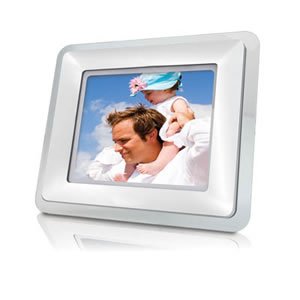
Image: The Coby DP559 Digital Photo Frame, showing its 5.6-inch screen, control buttons, and the included detachable stand. The power adapter is also visible.
Setup Guide
- Attach the Stand: Locate the detachable stand and securely attach it to the back of the photo frame. Ensure it clicks into place for stability.
- Connect Power: Plug the power adapter into the DC IN port on the back of the frame. Then, plug the other end of the adapter into a standard electrical outlet.
- Insert Storage Media: Insert your SD, MMC, MS, xD, or CF memory card into the appropriate slot, or connect a USB flash drive to the full-size USB port. Ensure the media is inserted correctly.
- Power On: Press the Power button, usually located on the back or side of the frame, to turn on the device.
Operating Instructions
Basic Navigation
Use the control buttons on the back or side of the frame to navigate menus. Typically, these include directional buttons (Up, Down, Left, Right), an Enter/OK button, and a Menu/Exit button.
Viewing Photos
- From the main menu, select "Photo" or "Pictures."
- Navigate to your desired memory card or USB drive.
- Select a folder or individual photo to begin a slideshow.
- Use the directional buttons to manually advance or go back through photos.
Playing Music (MP3/WMA)
- From the main menu, select "Music" or "Audio."
- Navigate to your desired memory card or USB drive.
- Select an audio file or folder to begin playback.
- Use the control buttons to play, pause, skip tracks, or adjust volume.
Playing Videos (AVI/MPG/XviD)
- From the main menu, select "Video."
- Navigate to your desired memory card or USB drive.
- Select a video file to begin playback.
- Use the control buttons to play, pause, fast forward, or rewind.
Connecting to a Home Theater System
The DP559 features an AV output. Connect an appropriate AV cable (not included) from the frame's AV OUT port to the AV IN ports on your television or home theater receiver. Select the correct input source on your TV/receiver to view the frame's output.
Care and Maintenance
- Cleaning the Screen: Gently wipe the screen with a soft, lint-free cloth. For stubborn marks, slightly dampen the cloth with water or a screen cleaner designed for electronics. Do not spray liquids directly onto the screen.
- Cleaning the Casing: Use a soft, dry cloth to wipe the exterior casing. Avoid abrasive cleaners or solvents.
- Storage: If storing the device for an extended period, disconnect it from power and store it in a cool, dry place away from direct sunlight.
- Media Handling: Always handle memory cards and USB drives carefully. Insert and remove them gently to prevent damage to the device's ports.
Troubleshooting Guide
| Problem | Possible Cause | Solution |
|---|---|---|
| Frame does not power on. | No power, faulty adapter, or loose connection. | Ensure the power adapter is securely connected to both the frame and the electrical outlet. Test the outlet with another device. |
| No images displayed. | No memory card/USB drive, unsupported file format, or corrupted files. | Insert a memory card or USB drive with JPEG images. Ensure images are in JPEG format. Try different media or files. |
| No sound from speakers. | Volume too low, muted, or audio file issue. | Increase the volume using the control buttons. Check if the device is muted. Ensure audio files are MP3 or WMA format. |
| Video files do not play. | Unsupported video format or corrupted file. | Ensure video files are in AVI, MPG, or XviD format. Try different video files. |
Product Specifications
- Model: DP559
- Display: 5.6" TFT LCD Color Display
- Supported Image Formats: JPEG
- Supported Audio Formats: MP3, WMA
- Supported Video Formats: AVI, MPG, XviD
- Card Slots: SD, MMC, MS, xD, CF
- USB Port: Full-Size USB (for flash memory drives)
- Audio Output: Integrated Stereo Speakers, AV Output
- Mounting: Wall Mountable Design with Detachable Stand
- Unit Dimensions (WHD): 8" x 7" x 2.24"
- Item Weight: 1.35 pounds
- Power Source: Corded Electric
- Connectivity Technology: USB
Warranty and Customer Support
For warranty information or technical assistance, please refer to the warranty card included with your product or visit the official Coby website. Keep your purchase receipt as proof of purchase for warranty claims.
Manufacturer: Coby
ASIN: B0017LZIRQ
For further support, you may visit the Coby Store on Amazon.