1. Introduction
This manual provides essential information for the proper setup, operation, and maintenance of your Telex Airman 750 Aviation Headset. Designed for fixed-wing General Aviation (GA) aircraft, this headset offers clear communication and comfort for pilots. Please read this manual thoroughly before using the headset to ensure optimal performance and safety.
2. Product Overview
The Telex Airman 750 is a lightweight aviation headset featuring a noise-cancelling electret microphone and passive noise reduction. It is approved for aircraft use under FAA TSO C57a and C58a.
Key Features:
- Miniature, amplified, noise-cancelling electret microphone with superior 400Hz hum rejection.
- Lightweight design for extended comfort.
- Passive noise reduction for effective ambient noise attenuation.
- FAA TSO C57a and C58a approved.
- Flexible microphone boom for precise positioning.
- Comfortable ear seals and padded headband.
What's in the Box:
- Telex Airman 750 Headset
- Ear Cushions
- Earphone Housings
- Flexible Boom
- Removable Microphone Boom

Image 2.1: The Telex Airman 750 Aviation Headset, showcasing its lightweight design and microphone boom.
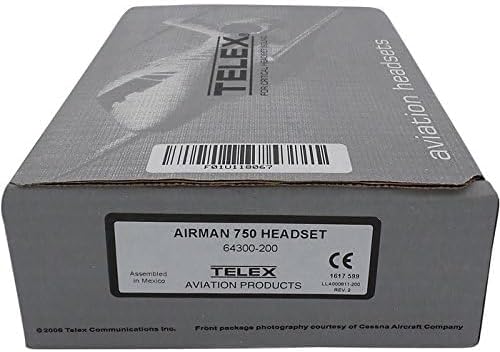
Image 2.2: Packaging for the Telex Airman 750 Headset, displaying the model number 64300-200.
3. Setup
The Telex Airman 750 is designed for fixed-wing General Aviation (GA) aircraft and utilizes a dual plug connector type (PJ-068 & PJ-055 equivalent). This headset is not intended for Airbus aircraft, which typically require an XLR-5-12C connector.
Connecting the Headset:
- Locate the dual plugs on the headset cable. These consist of a larger plug (PJ-068 equivalent) for the headphone audio and a smaller plug (PJ-055 equivalent) for the microphone.
- Identify the corresponding jacks in your aircraft's cockpit. The larger jack is for audio, and the smaller jack is for the microphone.
- Carefully insert the larger plug into the audio jack until it is fully seated.
- Carefully insert the smaller plug into the microphone jack until it is fully seated.
- Ensure both plugs are securely connected to prevent intermittent communication.

Image 3.1: The Telex Airman 750 Headset showing the dual GA plugs (PJ-068 and PJ-055 equivalents) for standard fixed-wing aircraft connections.

Image 3.2: A close-up view of the dual plugs on the Telex Airman 750 headset, ready for connection to an aircraft's intercom system.
4. Operating Instructions
Wearing the Headset:
- Adjust the headband to fit comfortably over your head. The padded headband should rest gently on your crown.
- Position the earcups so they fully enclose your ears, ensuring a good seal for optimal passive noise reduction.
Microphone Adjustment:
- The flexible boom microphone can be adjusted to your preferred position.
- Position the microphone approximately 1/4 to 1/2 inch (0.6 to 1.3 cm) from your lips, slightly to the side, to minimize breath noise while ensuring clear voice pickup.
Volume Control:
- The headset features a single volume control. Adjust this dial to achieve a comfortable listening level for incoming audio.
5. Maintenance
Proper care and maintenance will extend the life of your Telex Airman 750 headset.
Cleaning:
- Wipe the headset's exterior surfaces with a soft, damp cloth. Avoid using harsh chemicals or abrasive cleaners.
- Periodically inspect and clean the ear cushions. Replace them if they show signs of wear or damage to maintain comfort and noise reduction effectiveness.
- Ensure no moisture enters the microphone or speaker components.
Storage:
- Store the headset in a clean, dry place, away from direct sunlight and extreme temperatures.
- Avoid coiling the cables tightly to prevent damage.
6. Troubleshooting
If you encounter issues with your Telex Airman 750 headset, refer to the following common troubleshooting steps:
No Audio / Intermittent Audio:
- Check Connections: Ensure both dual plugs are fully and securely inserted into the aircraft's jacks.
- Adjust Volume: Verify the headset's volume control is not set to minimum.
- Aircraft Intercom: Confirm the aircraft's intercom system is powered on and functioning correctly. Test with another known-good headset if available.
No Microphone Transmission:
- Check Microphone Position: Ensure the microphone is correctly positioned near your mouth.
- Microphone Plug: Verify the microphone plug (smaller of the dual plugs) is securely connected.
- Aircraft Intercom: Check the aircraft's intercom settings for microphone activation (e.g., Push-To-Talk button functionality).
Poor Audio Quality / Excessive Noise:
- Earcup Seal: Ensure the earcups form a tight seal around your ears. Adjust the headband if necessary.
- Microphone Hum: The noise-cancelling microphone is designed to reduce hum. If excessive hum persists, check for proper microphone positioning and connections.
- Aircraft Electrical System: Noise can sometimes originate from the aircraft's electrical system. Consult with aircraft maintenance personnel if suspected.
7. Specifications
| Feature | Specification |
|---|---|
| Product Name | Telex Airman 750 |
| Model | Airman 750 (64300-200) |
| Manufacturer | Telex |
| Impedance | 150-600 ohms (+/-20%) |
| Speaker Sensitivity | 90 dB SPL/mW @ 1 kHz |
| Speaker Frequency Response | 100 Hz - 3 kHz |
| Microphone Sensitivity | -51 dB re: 1 V/µbar @ 1 kHz, 12 VDC |
| Cord Length | Approximately 5.5-8 feet (1.7-2.4 meters) |
| Noise Reduction | Passive |
| Power Requirements | Via boom microphone |
| FAA TSO Approvals | C57a and C58a |
| Weight | Approximately 2.3-3.2 ounces (65-91 grams) |
| Connector Type | PJ-068 & PJ-055 equivalent |
| Color | Black |
| Material | Stainless Steel |
| Product Dimensions | 9 x 4 x 6 inches |
8. Warranty and Support
This product is provided "AS IS" without warranty of any kind from Telex or seller, either expressed or implied. For any questions or support, please refer to the seller or manufacturer's official channels.


