1. Introduction and Overview
This manual provides essential information for the setup, operation, maintenance, and troubleshooting of your LG 42LG50 42-Inch 1080p LCD HDTV. Please read this manual thoroughly before using your television to ensure proper functionality and to maximize your viewing experience.
The LG 42LG50 is a 42-inch LCD HDTV featuring 1080p Full HD resolution (1920 x 1080), a 15,000:1 contrast ratio, and a wide 178-degree viewing angle. It includes an ATSC/NTSC/Clear QAM tuner, XD Engine for enhanced picture quality, and SRS TruSurroundXT for immersive audio. The television is designed with a slim profile, contoured edges, and a silver chrome accent, complete with a swivel stand.
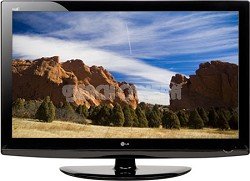
Image: Front view of the LG 42LG50 42-Inch 1080p LCD HDTV, showcasing its sleek design and display.
2. Setup
2.1 What's in the Box
- TV Unit
- Table Stand
2.2 Placement and Mounting
Your LG 42LG50 HDTV comes with a table stand for convenient placement on a flat surface. Ensure the surface is stable and can support the weight of the television (approximately 49.6 pounds).
For wall mounting, ensure you use a compatible VESA-compliant wall mount (sold separately) and follow the instructions provided with the wall mount. Professional installation is recommended for wall mounting to ensure safety and proper setup.
2.3 Initial Connection
Connect the power cord to the TV and then to a wall outlet. Connect your antenna, cable box, or other video sources to the appropriate input ports (HDMI, Component, etc.) on the back of the TV.
3. Operating Instructions
3.1 Power On/Off
Press the power button on the TV or the remote control to turn the TV on or off.
3.2 Input Selection
Use the 'Input' button on your remote control to cycle through available input sources (HDMI 1, HDMI 2, HDMI 3, Component, PC, etc.) to select your desired device.
3.3 AV Mode
The AV Mode feature allows for quick and easy optimization of audio and video settings based on your content. Select from three simple presets: Cinema, Sports, and Game mode.
- Cinema Mode: Ideal for movies in a dim environment, providing a theater-like experience.
- Game Mode: Enhances vivid colors and sharp graphics for HD video gaming.
- Sports Mode: Provides the brightest, most colorful setting for optimal sports viewing in social settings.
Video: This video demonstrates the LG HDTVs AV Mode, explaining how it optimizes audio and video settings for different content types like movies, sports, and games.
3.4 Intelligent Sensor
Intelligent Sensor technology automatically adjusts picture settings by detecting ambient light conditions and color in your room. This ensures optimal picture quality day or night and can reduce power consumption.
Video: This video explains the LG HDTVs Intelligent Sensor feature, detailing how it adjusts picture settings based on ambient room light for optimal viewing and energy efficiency.
3.5 ISFccc Calibration
Your LG HDTV is ISFccc capable, meaning it can be professionally calibrated by an ISF-certified technician. This calibration customizes the TV's picture settings to your specific room environment, ensuring a true film-like picture and peak performance. Calibrated settings can be locked to prevent accidental changes and are stored in the TV's memory.
Video: This video describes the benefits of ISFccc calibration for LG HDTVs, highlighting how professional calibration optimizes picture quality for specific viewing environments.
3.6 1080p Full HD Resolution
The LG 42LG50 features 1080p Full HD resolution, meaning the display has 1920 vertical columns and 1080 horizontal rows of pixels. This progressive scan technology ensures you see the entire frame and every pixel at once, delivering superior clarity and detail. This high resolution also allows for a closer viewing distance without pixelation, enhancing the immersive experience.
Video: This video explains 1080p Full HD resolution, detailing its technical aspects and benefits for high-definition viewing.
3.7 Invisible Speaker System
The LG 42LG50 incorporates an Invisible Speaker system, designed by audio expert Mr. Mark Levinson. This innovative technology uses tiny magnets to send subtle vibrations through microscopic channels within the TV's cabinet, effectively transforming the entire television into a speaker. This design eliminates the need for visible speaker grilles, contributing to the TV's sleek aesthetic without compromising sound performance, and offers a larger audio sweet spot.
Video: This video introduces the LG Invisible Speaker system, explaining its unique technology and how it delivers audio without visible speakers.
4. Connectivity
Your LG 42LG50 HDTV offers a variety of connectivity options for your entertainment devices:
- HDMI Inputs: 3x HDMI v 1.3 digital inputs for high-definition audio and video.
- USB 2.0: For connecting compatible USB devices.
- PC Input: Connect your computer for use as a monitor.
- Audio Input: HDMI, USB.
5. Specifications
| Feature | Specification |
|---|---|
| Screen Size | 42 Inches |
| Brand | LG |
| Display Technology | LCD |
| Resolution | 1080p |
| Special Feature | Flat |
| Included Components | Stand, TV |
| Connectivity Technology | HDMI |
| Supported Internet Services | Browser, Netflix |
| Color | Gloss Black |
| Mounting Type | Table Mount |
| Contrast Ratio | 15,000:1 |
| Screen Finish | flat |
| Item Weight | 49.6 Pounds |
| Internet Applications | Browser, Netflix |
| Audio Input | HDMI, USB |
| Total Number of HDMI Ports | 3 |
| Hardware Interface | HDMI, USB |
| Control Method | Remote |
| Controller Type | Remote Control |
| Built-In Media | Stand, TV |
| Model Year | 2018 |
| Model Number | 42LG50 |
| Manufacturer | LG Electronics |
| UPC | 719192173019 |
| Mfr Part Number | 42LG50 |
| ASIN | B0016PCPNS |
| Additional Features | Flat |
| Tuner Type | ATSC, QAM |
| GTIN | 719192173019 |
6. Maintenance
6.1 Cleaning the Screen
Gently wipe the screen with a soft, dry, lint-free cloth. For stubborn marks, lightly dampen the cloth with water or a specialized screen cleaner and wipe carefully. Avoid using harsh chemicals or abrasive materials.
6.2 Cleaning the Cabinet
Wipe the TV cabinet with a soft, dry cloth. Do not use any liquid cleaners directly on the cabinet.
6.3 Ventilation
Ensure adequate ventilation around the TV to prevent overheating. Do not block any ventilation openings.
7. Troubleshooting
7.1 No Power
- Check if the power cord is securely plugged into both the TV and the wall outlet.
- Verify that the wall outlet is functioning by plugging in another device.
7.2 No Picture or Poor Picture Quality
- Ensure the correct input source is selected.
- Check all cable connections between the TV and external devices.
- Adjust picture settings (brightness, contrast, sharpness) via the TV menu.
- If using an antenna, check its connection and position.
7.3 No Sound or Poor Sound Quality
- Check the volume level and ensure the TV is not muted.
- Verify audio cable connections for external devices.
- If using external speakers, ensure they are properly connected and powered on.
8. Warranty and Support
8.1 Warranty Information
The LG 42LG50 42-Inch 1080p LCD HDTV comes with a 1-year parts & labor warranty from the date of purchase. Please retain your proof of purchase for warranty claims.
8.2 Customer Support
For technical assistance, troubleshooting beyond this manual, or warranty service, please contact LG Customer Support. Refer to the contact information provided in your product packaging or visit the official LG website for the most up-to-date support details.