
GE Security RCRPET
Interlogix PrecisionLine PIR/RCR Motion Detector User Manual
Model: RCRPET | Brand: GE Security
Introduction
This manual provides comprehensive instructions for the installation, operation, and maintenance of the Interlogix PrecisionLine PIR/RCR Motion Detector, Model RCRPET. This device is a sophisticated motion sensor featuring both Passive Infrared (PIR) and Range-Controlled Radar (RCR) technologies, designed with pet immunity to minimize false alarms.
Product Overview
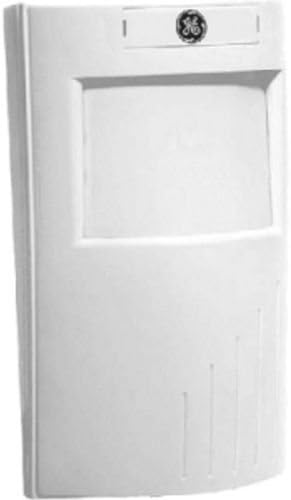
Figure 1: Front view of the Interlogix PrecisionLine PIR/RCR Motion Detector. This image shows the compact, white rectangular casing with the GE logo at the top and the main sensor lens area below it.
The Interlogix PrecisionLine PIR/RCR Motion Detector (RCRPET) is engineered for reliable security detection. It combines two detection methods: Passive Infrared (PIR) for detecting body heat and Range-Controlled Radar (RCR) for precise motion sensing. This dual-technology approach enhances detection accuracy while reducing susceptibility to false alarms. The unit is specifically designed with pet immunity, allowing pets up to a certain weight (typically 80 lbs, though this can vary based on thermal signature) to move freely within the protected area without triggering an alarm. The device features an LED indicator that can display which sensor (PIR or RCR) has tripped, and its range and LED behavior can be adjusted via internal jumpers.
Specifications
| Feature | Detail |
|---|---|
| Brand | GE Security |
| Model Number | RCRPET |
| Power Source | Corded Electric |
| Maximum Range | 35 Feet |
| Mounting Type | Tabletop (Note: Can also be wall-mounted with appropriate hardware, not included) |
| Item Weight | 1.6 ounces |
| Package Dimensions | 5.3 x 3.1 x 2.6 inches |
| ASIN | B0016LJWTC |
| UPC | 046188080526 |
Setup and Installation
Proper installation is crucial for optimal performance and to prevent false alarms. It is recommended to have this device installed by a qualified security professional.
- Choose Location: Select a location that provides the best coverage of the area to be protected. Avoid placing the detector directly facing windows, heat sources (e.g., vents, radiators), or areas with significant air drafts. Consider mounting height for optimal pet immunity.
- Mounting: Securely mount the detector to a wall or stable surface using appropriate screws. Ensure the mounting surface is flat and stable to prevent vibrations.
- Wiring: Connect the detector to your alarm control panel according to the wiring diagram provided with your alarm system. Ensure all connections are secure and insulated. This device requires a corded electric power source.
- Jumper Settings: Adjust internal jumpers for sensitivity, LED indicator behavior, and pet immunity levels. Refer to the detailed wiring and jumper configuration guide (typically included in the product packaging) for specific settings. For example, the LED can be disabled to prevent visual indication of detection.
- Walk Test: After installation, perform a walk test to verify coverage and detection. Walk through the protected area to ensure the detector triggers as expected. Adjust the angle or sensitivity if necessary.
Operating Instructions
The RCRPET motion detector operates automatically once powered and configured. It is designed to detect movement within its specified range (up to 35 feet).
- Detection Principle: The detector uses a combination of Passive Infrared (PIR) and Range-Controlled Radar (RCR). An alarm is typically triggered only when both sensors detect an event, enhancing reliability and reducing false alarms.
- LED Indicator: If enabled via jumpers, the LED will illuminate to indicate detection. The color of the LED may signify which sensor (PIR or RCR) has tripped. Consult your specific model's documentation for LED color codes.
- Pet Immunity: The pet immunity feature allows pets up to approximately 80 lbs to move within the detection zone without triggering an alarm. However, large pets or pets with significant thermal signatures (e.g., close proximity to the sensor) may still occasionally trigger the alarm. Adjusting the mounting angle can help optimize pet immunity.
- Arming/Disarming: The motion detector is part of a larger security system. Its operational status (active/inactive) is controlled by the arming and disarming of your main alarm control panel.
Maintenance
The Interlogix RCRPET motion detector requires minimal maintenance to ensure continued reliable operation.
- Cleaning: Periodically wipe the exterior of the detector with a soft, dry cloth to remove dust and debris. Do not use abrasive cleaners or solvents, as these can damage the casing or sensor lens.
- Lens Inspection: Ensure the sensor lens is clear and unobstructed. Dust, cobwebs, or foreign objects on the lens can impair detection performance.
- Functionality Test: It is recommended to test the detector's functionality periodically (e.g., monthly) by performing a walk test while the system is armed.
- Power Supply: Ensure the detector receives continuous power as it is a corded electric device. Any power interruptions could affect its operation.
Troubleshooting
If you experience issues with your Interlogix RCRPET motion detector, consider the following common troubleshooting steps:
- False Alarms:
- Environmental Factors: Check for heat sources (e.g., direct sunlight, heating vents, appliances) or significant air drafts (e.g., open windows, fans) within the detection zone.
- Pet Immunity: While designed for pet immunity, very active or large pets, or pets positioned very close to the sensor, might still trigger an alarm. Try adjusting the mounting angle or sensitivity settings if possible.
- Vibrations: Ensure the detector is securely mounted and not subject to vibrations from nearby machinery or structural movement.
- Obstructions: Verify that there are no objects (e.g., curtains, plants) that could move within the detection zone and trigger the sensor.
- No Detection:
- Power: Confirm the detector is receiving power. Check wiring connections.
- Obstructions: Ensure the sensor lens is clean and unobstructed.
- Range/Sensitivity: Verify that the detection range and sensitivity settings are appropriate for the area. Adjust jumpers if necessary.
- Wiring: Check all wiring connections to the alarm panel for looseness or damage.
- LED Behavior: If the LED is not behaving as expected, check the jumper settings for the LED indicator. It might be intentionally disabled.
If issues persist after attempting these steps, contact a qualified security technician or GE Security customer support for further assistance.
Warranty and Support
For information regarding product warranty, technical support, or service, please refer to the documentation provided with your purchase or visit the official GE Security (now UTC) website. Keep your purchase receipt and product serial number handy when contacting support.
Online Resources: For additional support and resources, you may visit the product page on Amazon or search for "GE Security RCRPET manual" online.
Related documentsRCRPET

Ask a question about this manual
Ask about setup, troubleshooting, compatibility, parts, safety, or missing instructions. Manuals+ will review the question and use this page’s manual context to help answer it.