Introduction
Thank you for choosing the Sunny Health & Fitness Mini Stepper. This manual provides important information for the safe and effective use of your new fitness equipment. Please read it thoroughly before assembly and operation. Keep this manual for future reference.
The Sunny Health & Fitness Mini Stepper (Model NO. 012-S) is designed to provide a low-impact, full-body workout in the comfort of your home. Its compact design and integrated resistance bands make it a versatile tool for cardio and muscle strengthening.
Important Safety Information
Before starting any exercise program, consult with your physician. This is especially important for individuals over the age of 35 or those with pre-existing health conditions.
- Always place the stepper on a flat, stable surface.
- Ensure all parts are securely fastened before each use.
- Do not exceed the maximum user weight capacity of 300 lbs (136 kg).
- Keep children and pets away from the equipment during operation.
- Wear appropriate athletic footwear and clothing.
- Stop exercising immediately if you feel faint, dizzy, or experience pain.
- The stepper is for indoor use only.
Product Components
The Sunny Health & Fitness Mini Stepper comes pre-assembled. The package includes the Mini Stepper unit and a user manual.

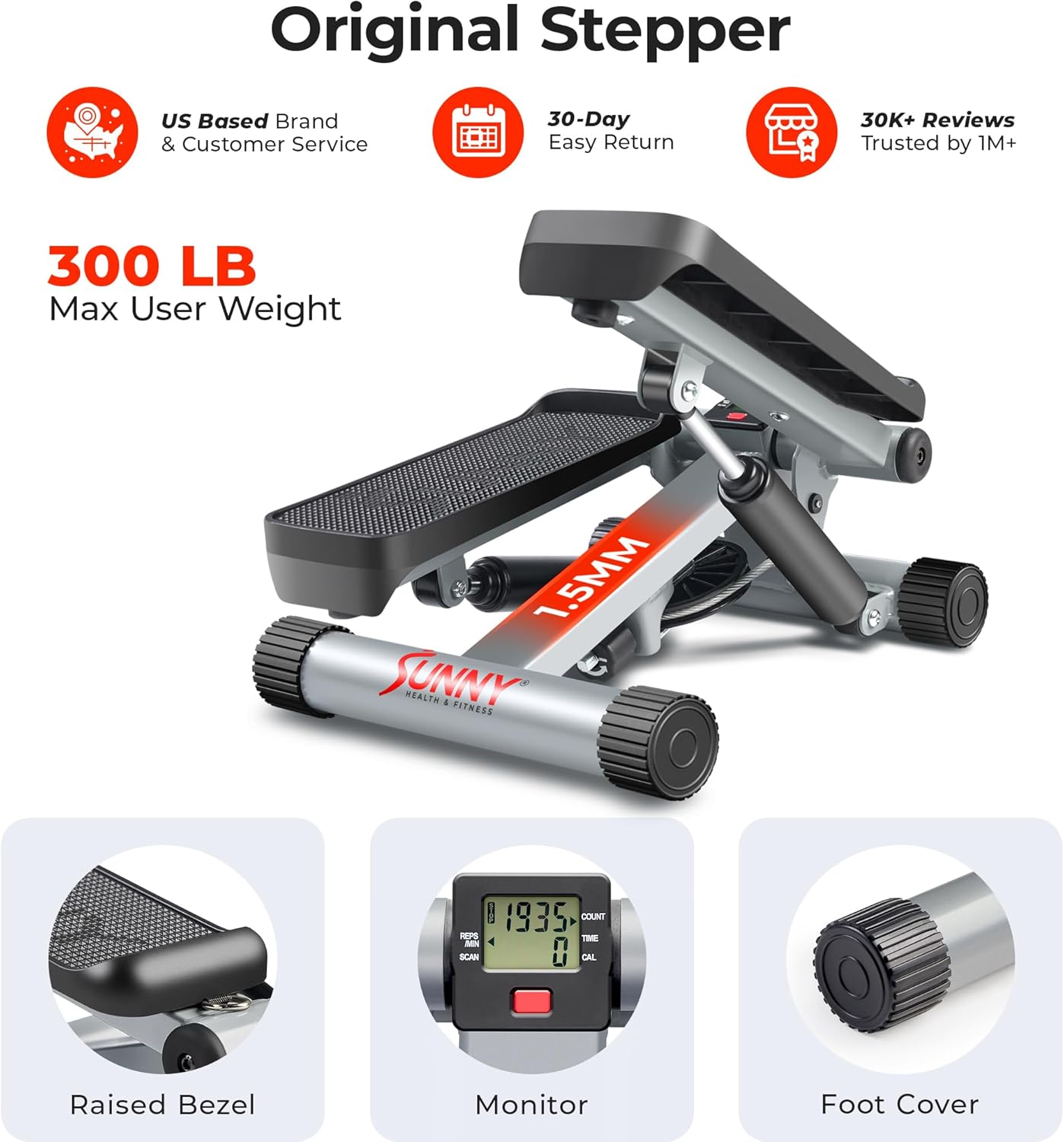
The stepper features a durable alloy steel frame, dual hydraulic cylinders for smooth operation, and an LCD monitor to track your workout progress.
Setup
The Sunny Health & Fitness Mini Stepper is designed for immediate use and requires no assembly. Simply remove it from its packaging and place it on a stable, level surface.
- Unpacking: Carefully remove the stepper from its box.
- Placement: Position the stepper on a flat, non-slip surface. Ensure there is enough clear space around the unit for safe operation.
- Resistance Bands (Optional): If using the included resistance bands, attach them to the designated points on the stepper.

Operating Instructions
Getting Started
- Step onto the pedals one foot at a time, ensuring your feet are centered and stable.
- Maintain balance by holding onto a stable object or using the resistance bands for support if needed.
Adjusting Intensity
The stepper's intensity can be adjusted by turning the knob located at the front of the unit. Turning the knob clockwise increases resistance and shortens the stride, while turning it counter-clockwise decreases resistance and allows for a longer stride.

Using the LCD Monitor
The integrated LCD monitor tracks your workout data. It typically displays:
- TIME: Duration of your workout.
- COUNT: Total number of steps taken.
- CALORIES: Estimated calories burned.
- SCAN: Automatically cycles through all display functions.
To reset the monitor, press and hold the red button for a few seconds.
Workout Techniques
The stepper provides a low-impact, twisting motion that engages various muscle groups.
- Lower Body: Focus on pushing down through your heels to engage glutes and hamstrings.
- Core Engagement: Maintain an upright posture and engage your abdominal muscles throughout the exercise.
- Upper Body (with Resistance Bands): Use the resistance bands for exercises targeting your chest, back, and shoulders while stepping.

The dual hydraulic system ensures a smooth and quiet operation, allowing for discreet workouts at any time.

Maintenance
Regular maintenance will ensure the longevity and optimal performance of your Mini Stepper.
- Cleaning: Wipe down the stepper with a damp cloth after each use to remove sweat and dust. Do not use abrasive cleaners.
- Inspection: Periodically check all bolts and nuts to ensure they are tightened. Inspect the hydraulic cylinders and resistance bands for any signs of wear or damage.
- Storage: Store the stepper in a cool, dry place away from direct sunlight and extreme temperatures. Its compact size allows for easy storage in small spaces.
Troubleshooting
| Problem | Possible Cause | Solution |
|---|---|---|
| LCD Monitor not displaying | Battery drained or incorrectly installed. | Replace the LR44 battery. Ensure it is installed with correct polarity. |
| Squeaking noise during operation | Loose parts or lack of lubrication. | Check and tighten all bolts and nuts. Apply a small amount of silicone-based lubricant to moving joints if necessary. |
| Uneven stepping motion | Uneven surface or hydraulic cylinder issue. | Ensure the stepper is on a flat, level surface. If the issue persists, contact customer support. |
Product Specifications
- Model: NO. 012-S
- Brand: Sunny Health & Fitness
- Material: Alloy Steel
- Color: Gray
- Dimensions (L x W x H): 40.64 cm x 31.75 cm x 34.29 cm (16 in x 12.5 in x 13.5 in)
- Product Weight: 5.84 kg (12.87 lbs)
- Maximum User Weight: 136 kg (300 lbs)
- Display Type: LCD (Time, Count, Calories)
- Battery: 1 x LR44 (included)
- Special Features: Adjustable Resistance, Dual Hydraulic System, Resistance Bands (optional)
Warranty and Support
Sunny Health & Fitness stands behind the quality of its products. For warranty information, replacement parts, or technical support, please visit the official Sunny Health & Fitness website or contact their customer service department.
Customer Service: Refer to the contact information provided on the Sunny Health & Fitness official website or the product packaging.
Online Resources: www.sunnyhealthfitness.com