
JBL JBLONSTM2P
JBL On Stage Micro Portable Speaker Dock for iPod Instruction Manual
Model: JBL On Stage Micro
1. Introduction
The JBL On Stage Micro is a portable docking sound system designed for iPods and other audio devices. It provides clear, powerful sound and offers convenient features for music playback and device charging.
1.1. Key Features
- iPod Compatibility: Supports all docking versions of the iPod, including iPod mini 1G; iPod nano 1G, 2G, 3G; iPod 3G, 4G, 5G, 5.5G, 6G; and iPod touch.
- Auxiliary Input: A 3.5mm stereo mini jack allows connection of other audio devices such as MP3 players, CD players, desktop computers, satellite radios, and laptops.
- OnePoint iPod Dock Connection: Facilitates synchronization with iTunes and charging.
- Evercharge Topology: Charges your iPod even when the unit is switched off or not connected to a computer.
- IR Remote Control: Provides full iPod navigation and volume control.
- Portable Design: Can be powered by AC adapter or AAA batteries for on-the-go use.
2. Setup
2.1. Unpacking
Carefully remove all components from the packaging. Ensure you have the JBL On Stage Micro unit, remote control, and auxiliary audio input cable.
2.2. Power Connection
The JBL On Stage Micro can be powered in two ways:
- AC Power: Connect the provided AC adapter to the power input on the rear of the unit and then to a wall outlet.
- Battery Power: For portable use, insert four AAA batteries into the battery compartment located on the underside of the unit. Ensure correct polarity.
2.3. Docking an iPod
Gently place your compatible iPod into the dock connector located at the center of the JBL On Stage Micro. Ensure it is seated firmly for proper connection and charging.
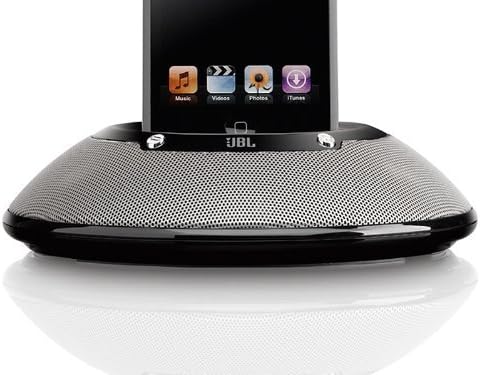
Image 1: The JBL On Stage Micro portable speaker dock in black. An iPod is securely docked in the center, showcasing its screen with music, video, photos, and iTunes icons. The speaker features a sleek, circular design with a perforated metallic grille covering the speakers, and the JBL logo is visible below the dock connector. The device is designed for portability and integrates seamlessly with iPods.
2.4. Connecting Auxiliary Devices
To connect an external audio source (e.g., MP3 player, CD player), use the provided 3.5mm auxiliary audio input cable. Connect one end to the auxiliary input jack on the JBL On Stage Micro and the other end to the headphone or line-out jack of your audio device.
2.5. USB Connection for Computer
To synchronize your iPod with iTunes or connect to a computer, use a USB cable (not included). Connect the USB cable to the rear of the JBL On Stage Micro and to an available USB port on your computer. When your iPod is docked, it will establish a connection for synchronization and charging.
3. Operation
3.1. Power On/Off
Press the power button on the unit or the remote control to turn the JBL On Stage Micro on or off.
3.2. Volume Control
Adjust the volume using the dedicated volume buttons on the unit or the IR remote control. The left button decreases volume, and the right button increases it.
3.3. Remote Control Functions
The IR remote control offers comprehensive control over your docked iPod:
- Music Mode: Control volume, change tracks, fast forward, and fast reverse.
- iPod Navigation Mode: Navigate iPod menus, browse songs, photos, and playlists, and adjust settings as if directly interacting with the iPod.
3.4. Charging Your iPod
When your iPod is docked and the JBL On Stage Micro is connected to AC power, the iPod will charge automatically, even if the speaker system is turned off, thanks to the Evercharge topology.
4. Advanced Technologies and Features
The JBL On Stage Micro incorporates several proprietary technologies to deliver high-quality audio performance:
- Odyssey Transducers: These drivers provide accurate high frequencies and extended low-frequency response, offering a full and rich sound from low bass to high treble.
- Slipstream Port Design: Minimizes boundary layer separation, resulting in high-output bass with reduced distortion.
- COE (Computer-Optimized Equalization): The system's equalization is optimized by computer to create a rich, complete soundstage across various listening positions.
- OCT (Optimized Compression Topology): A proprietary compression technology ensures clean and accurate sound reproduction even at high output levels.
- AEMS (Advanced Energy Management System): Features an automatic battery-saving shutoff. The system enters sleep mode when no audio input is detected and awakens with a touch, resuming at the previous volume level.
5. Maintenance
5.1. Cleaning
Wipe the unit with a soft, dry cloth. Do not use liquid cleaners or aerosols, as they may damage the finish or internal components.
5.2. Battery Care
If using batteries, replace them when the amber LED flashes, indicating low battery power. JBL encourages the use of rechargeable batteries to minimize waste.
6. Troubleshooting
- No Power: Ensure the AC adapter is securely connected to both the unit and a working power outlet. If using batteries, check if they are inserted correctly and are not depleted.
- No Sound: Verify that the iPod or auxiliary device is playing and its volume is turned up. Check the volume level on the JBL On Stage Micro. Ensure the iPod is properly docked or the auxiliary cable is fully inserted.
- Remote Control Not Working: Check the battery in the remote control. Ensure there are no obstructions between the remote and the unit's IR receiver.
- iPod Not Charging: Confirm the JBL On Stage Micro is connected to AC power. Ensure the iPod is correctly docked.
- Distorted Sound: Reduce the volume on both the JBL On Stage Micro and the connected audio source. Ensure the audio source is not outputting a distorted signal.
7. Specifications
| Feature | Specification |
|---|---|
| Product Dimensions | 3.9 x 8.2 x 8.8 inches |
| Item Weight | 1 pound (16 ounces) |
| Manufacturer | Harman Kardon |
| Model Number | JBLONSTMBLK2P |
| Hardware Interface | USB |
| Compatible Devices | iPod Nano, iPod Touch (and other docking iPod models) |
| Number of Ports | 1 (USB) |
| UPC | 050036916882 |
8. Official Product Videos
8.1. Paul McCartney for JBL
Video 1: This video showcases Paul McCartney in various settings, including a recording studio, a street, and a bedroom, highlighting the presence and quality of JBL audio equipment in everyday life and professional environments. The video emphasizes the clarity and truthfulness of sound reproduction by JBL products.
9. Warranty Information
The JBL On Stage Micro Portable Speaker Dock is covered by a manufacturer's limited warranty. Please refer to the warranty card included with your product for specific terms, conditions, and duration. Retain your proof of purchase for warranty claims.
10. Customer Support
For technical assistance, troubleshooting, or service inquiries, please visit the official JBL support website or contact their customer service department. Contact information can typically be found on the manufacturer's website or in the product packaging.
Related documentsJBLONSTM2P


Ask a question about this manual
Ask about setup, troubleshooting, compatibility, parts, safety, or missing instructions. Manuals+ will review the question and use this page’s manual context to help answer it.