Product Overview
This manual provides instructions for the safe and efficient use of your Bosch TDA2630 Sensixx B1 Secure steam iron. Please read all instructions carefully before first use and retain for future reference.
Key Features
- Power: 2100 Watt for quick heating.
- Palladium-glissée Soleplate: Ensures excellent glide and even heat distribution.
- Drip Stop Function: Prevents water drips at low temperatures.
- 3AntiCalc System: Integrated self-clean, calc'n clean, and anti-calc functions for extended product life.
- Spray Function: For moistening stubborn creases.
- Vertical Steam: Allows for steaming hanging garments.
- Automatic Shut-off: Enhances safety by turning off the iron when left unattended.
Setup
Before using the iron for the first time, remove any protective film or stickers from the soleplate. It is recommended to iron an old piece of fabric first to ensure no residue is transferred to your garments.
Filling the Water Tank
- Ensure the iron is unplugged from the power outlet.
- Set the steam selector to the 'dry ironing' position (no steam).
- Open the water filler cap.
- Fill the water tank with tap water up to the 'MAX' mark. Do not overfill. For areas with very hard water, use a mixture of 50% tap water and 50% distilled water. Do not use perfumed water, water from tumble dryers, or other additives.
- Close the water filler cap securely.

Image: The Bosch TDA2630 steam iron positioned on a pink shirt, illustrating typical use.
Operating Instructions
Temperature Setting
- Plug the iron into a suitable power outlet.
- Turn the temperature dial to the desired setting according to the fabric type. Refer to the garment's care label.
- The indicator light will illuminate while the iron is heating and turn off when the set temperature is reached.
Steam Ironing
- Ensure the water tank is filled.
- Set the temperature dial to the steam zone (usually between two and three dots). Steam is only produced at higher temperatures.
- Adjust the steam selector to the desired steam output.
- For an extra burst of steam, press the steam shot button. This is useful for stubborn creases.
- For vertical steaming of hanging garments or curtains, hold the iron vertically and press the steam shot button repeatedly.

Image: Diagram illustrating the steam output from the iron's soleplate, indicating continuous steam and steam shot functions.
Drip Stop Function
The integrated drip stop function automatically prevents water from dripping from the soleplate when the iron's temperature is too low for steam production. This helps protect your garments from water stains.
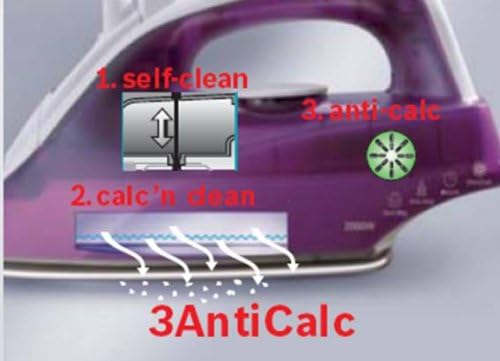
Image: Diagram indicating the 'drip stop' feature, showing a crossed-out water drop symbol over the iron's soleplate.
Automatic Shut-off (Secure Function)
For your safety, the iron is equipped with an automatic shut-off feature. If the iron is left stationary in a horizontal position for approximately 30 seconds, or in a vertical position for approximately 8 minutes, it will automatically switch off. The indicator light will flash to signal this. To reactivate, simply move the iron.

Image: Diagram illustrating the automatic shut-off feature, showing the iron turning off after 30 seconds horizontally and 8 minutes vertically.
Maintenance
Regular maintenance ensures optimal performance and extends the lifespan of your iron.
3AntiCalc System
The 3AntiCalc system combines three functions to prevent limescale buildup:
- Self-clean: Use this function regularly to flush out loose scale particles from the steam chambers.
- Calc'n Clean: A dedicated function to remove stubborn scale deposits. Follow the instructions in the full manual for detailed steps.
- Anti-calc cartridge: An integrated system that reduces limescale formation in the water tank.

Image: Diagram detailing the 3AntiCalc system, showing 'self-clean', 'calc'n clean', and 'anti-calc' components within the iron.
Cleaning the Soleplate
- Allow the iron to cool completely before cleaning.
- Wipe the soleplate with a damp cloth and a non-abrasive liquid cleaner if necessary.
- Do not use abrasive scouring pads or chemical cleaners as these can damage the Palladium-glissée coating.
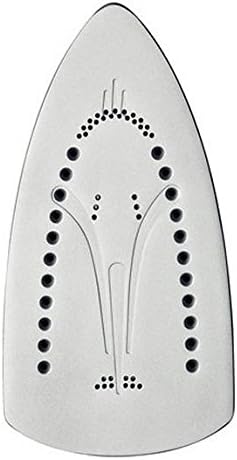
Image: Close-up view of the Palladium-glissée soleplate, highlighting its steam vents and smooth surface.
Troubleshooting
| Problem | Possible Cause | Solution |
|---|---|---|
| Iron does not heat up. | Not plugged in, power outlet faulty, automatic shut-off activated. | Check power connection, try another outlet, move the iron to reactivate. |
| No steam or insufficient steam. | Water tank empty, temperature too low, steam vents blocked. | Fill water tank, set higher temperature, perform Calc'n Clean. |
| Water drips from soleplate. | Temperature too low for steam, water tank overfilled. | Increase temperature, ensure water level is below MAX mark. |
| White flakes or brown stains on garments. | Limescale buildup, impurities in water. | Perform Calc'n Clean, use appropriate water mixture (tap/distilled). |
Specifications
| Feature | Detail |
|---|---|
| Brand | Bosch |
| Model Number | TDA2630 |
| Power | 2100 Watt |
| Voltage | 230 Volt |
| Soleplate Material | Palladium-glissée |
| Continuous Steam Output | 25 g/min |
| Steam Shot | 80 g/min |
| Product Dimensions (L x W x H) | 28 x 11.5 x 14 cm |
| Weight | 930 g |
| Special Features | Corded, Drip Stop, 3AntiCalc, Vertical Steam, Automatic Shut-off |


