
Eton NGSAT750B
Eton Grundig Satellit 750 Ultimate AM/FM Radio User Manual
Model: NGSAT750B
Introduction
This manual provides comprehensive instructions for the operation and maintenance of your Eton Grundig Satellit 750 Ultimate AM/FM Radio. The Satellit 750 features auto/manual/direct frequency key-in and station memory tuning, offering a versatile listening experience across multiple bands.
Safety Information
- Do not expose the unit to rain or moisture to prevent fire or electric shock.
- Do not open the casing. Refer all servicing to qualified personnel.
- Use only the specified power adapter or batteries.
- Avoid extreme temperatures, direct sunlight, and high humidity.
- Keep away from strong magnetic fields.
Package Contents
Verify that all items are present in the package:
- Eton Grundig Satellit 750 Radio
- USB Cable
- Headphone
- AC Power Adapter
Product Overview
The Eton Grundig Satellit 750 is a versatile radio designed for comprehensive reception and user-friendly operation. Key features include:
- Multi-Band Reception: Broadcasts on AM, FM, LW, SW, SSB, and VHF aircraft band frequencies.
- Enhanced Sensitivity: DSP Technology improves tuning sensitivity and reduces interference.
- Extensive Memory: Store up to 1000 channels, with 100 for each band and 55 customizable channels.
- Audio Connectivity: Line input for external audio devices and line output for broadcasting to other devices.
- Dual Alarm Clock: Features a dual alarm clock for multiple wake-up times.
- 360° Rotating AM Antenna: Designed to capture even weak AM signals.
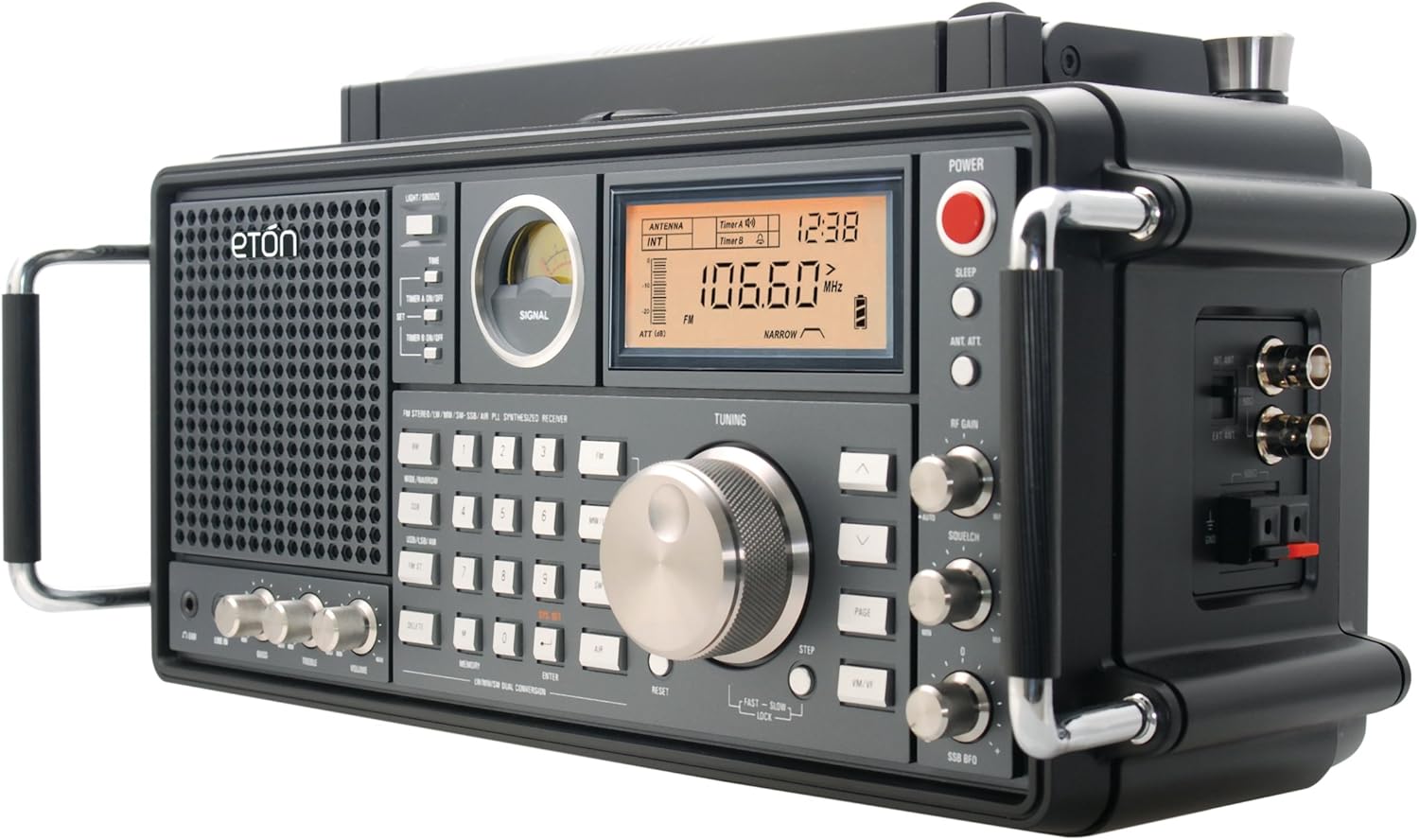
Figure 1: Angled view of the Eton Grundig Satellit 750, highlighting the main display, tuning knob, and side handles.

Figure 2: Front view of the radio, showcasing the speaker grille, control buttons, display, and tuning dials.

Figure 3: Top view of the radio, featuring the rotatable MW/LW antenna for optimal signal reception.
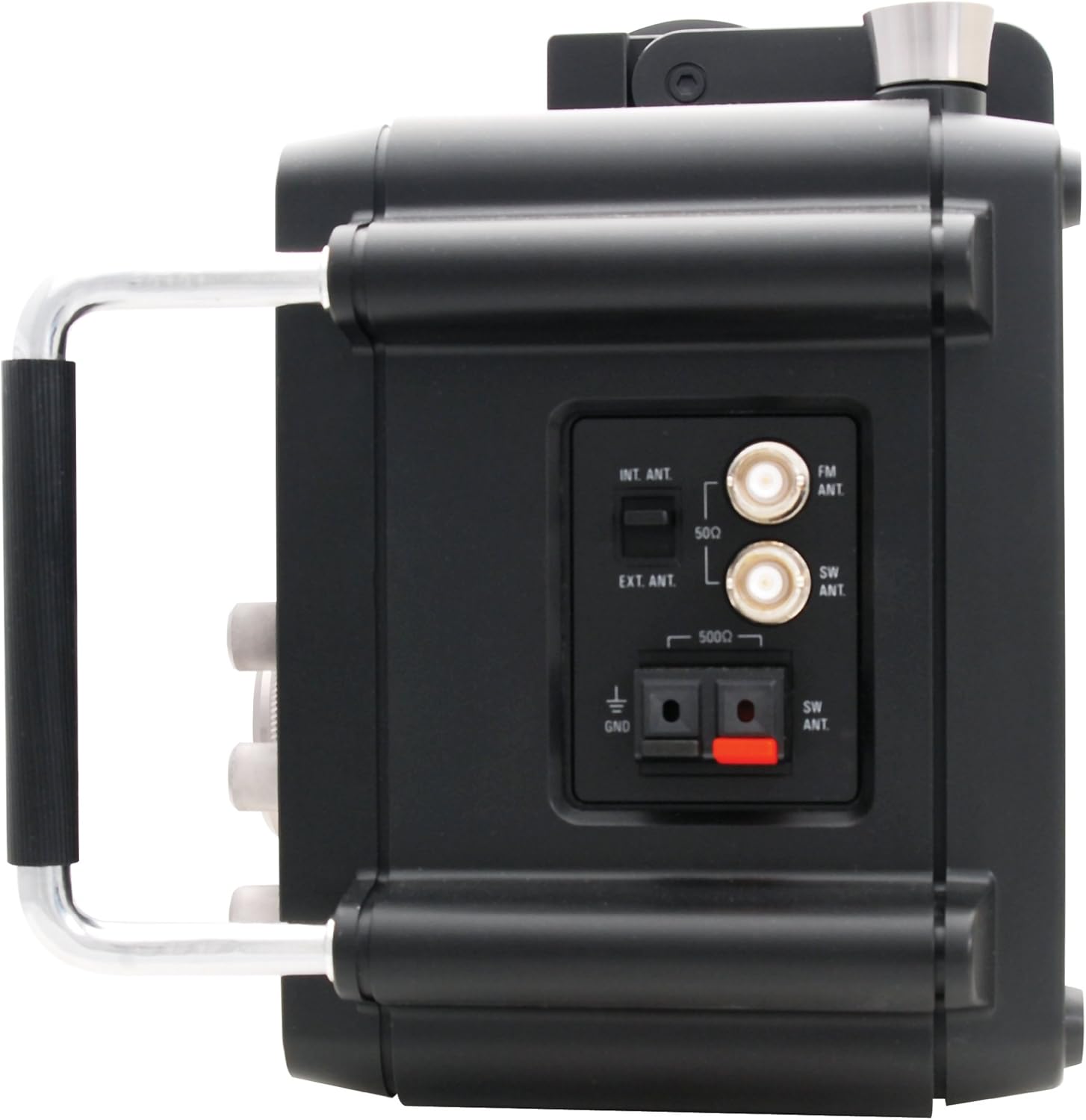
Figure 4: Side view of the radio, displaying the external antenna input ports for FM, SW, and ground connections.
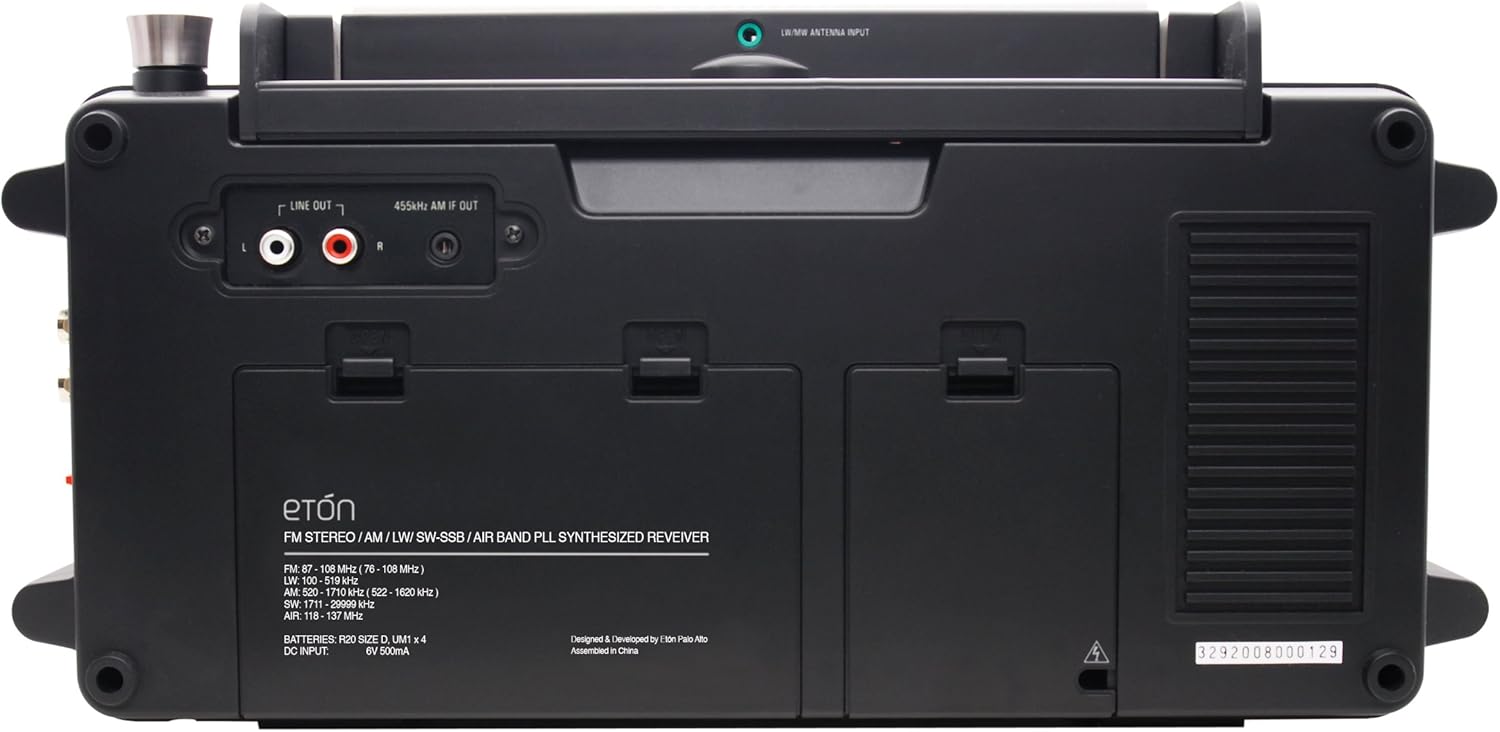
Figure 5: Rear view of the radio, showing the battery compartments and line output jacks for connecting to external audio systems.
Setup
1. Powering the Unit
The Satellit 750 can be powered by the included AC adapter or by 4 D-cell batteries (not included). Ensure the correct polarity when inserting batteries.
- AC Power: Connect the DC power adapter to the DC IN jack on the back of the radio and plug it into a standard wall outlet.
- Battery Power: Open the battery compartment on the back of the unit and insert 4 D-cell batteries, observing the polarity markings.
2. Antenna Setup
- Telescopic Antenna: For FM, SW, and Airband reception, extend the telescopic antenna fully.
- Rotatable AM Antenna: For AM (MW/LW) reception, rotate the built-in ferrite rod antenna on top of the unit for optimal signal strength.
- External Antennas: For improved reception, connect external FM or SW antennas to the dedicated jacks on the side of the unit. Ensure the internal/external antenna switch is set correctly.
3. Initial Power On
Press the POWER button located on the top right of the front panel to turn on the radio. The LCD display will illuminate.
Operating Instructions
1. Band Selection
Use the dedicated band selection buttons (FM, AM, LW, SW, AIR) on the front panel to switch between frequency bands.
2. Tuning Methods
- Manual Tuning: Rotate the large TUNING knob to manually scan frequencies. Use the STEP button to adjust tuning increments.
- Direct Frequency Entry: Use the numeric keypad to enter a desired frequency directly, then press ENTER.
- Auto Tuning Storage (ATS): Press the ATS button to automatically scan and store strong stations into memory.
- Memory Recall: Use the MEMORY button and numeric keypad or PAGE buttons to recall stored stations.
3. Single Sideband (SSB) Operation
For SSB reception (e.g., amateur radio, utility stations), select the SW band, then press the SSB button. Use the SSB BFO (Beat Frequency Oscillator) knob to fine-tune the audio for clear voice reception.
4. Audio Controls
- Volume: Adjust the VOLUME knob to control the output level.
- Bass/Treble: Use the BASS and TREBLE knobs to adjust the audio tone.
- RF Gain: The RF GAIN knob adjusts the radio frequency amplification, useful for strong signals or reducing noise.
- Squelch: The SQUELCH knob (primarily for Airband) mutes static noise when no signal is present.
- Wide/Narrow Bandwidth: Use the WIDE/NARROW button to select the appropriate filter for better signal clarity or to reduce adjacent channel interference.
5. Alarm Clock Function
The radio features a dual alarm clock. Refer to the detailed instructions in the full user manual (PDF) for setting and managing alarms.
6. External Audio Connections
- Line In: Connect external audio sources (e.g., MP3 player) to the LINE IN jack to play audio through the radio's speaker.
- Line Out: Connect the LINE OUT jacks to an external amplifier or recording device to output the radio's audio.
- Earphone Jack: Plug headphones into the EAR jack for private listening.
Maintenance
- Cleaning: Wipe the unit with a soft, dry cloth. Do not use abrasive cleaners or solvents.
- Battery Care: Remove batteries if the unit will not be used for an extended period to prevent leakage.
- Antenna Care: Handle the telescopic antenna carefully to avoid bending or breaking.
Troubleshooting
- No Power: Check AC adapter connection or ensure batteries are correctly inserted and charged.
- Poor Reception: Extend antennas fully, rotate the AM antenna, try an external antenna, or adjust RF Gain/Squelch. Ensure you are in an area with good signal.
- No Sound: Check volume level, ensure headphones are not plugged in if using the speaker, or check line out connections.
- Display Issues: If the display is dim or erratic, check power source or batteries.
For more detailed troubleshooting, please refer to the official user manual PDF available for download from the product's support page.
Specifications
| Brand | Eton |
| Model Number | NGSAT750B |
| Product Dimensions | 14.65"L x 5.75"W x 7.24"H (5.75 x 14.65 x 7.24 inches) |
| Item Weight | 0.114 ounces (approx. 3.22 Grams) |
| Manufacturer | Grundig |
| Radio Bands Supported | AM, FM, LW, SW, SSB, VHF Aircraft Band |
| Tuner Technology | DSP, PLL Synthesized |
| Power Source | DC (AC Adapter), 4 x D-cell Batteries |
| Connectivity Technology | Auxiliary (Line In/Out), USB (for charging, not data) |
Warranty and Support
For warranty information and technical support, please contact Eton customer service. Details can typically be found on the official Eton website or within the product packaging.
Manufacturer: Grundig
Brand: Eton
For the most up-to-date support resources, including the full user manual PDF, please visit the Eton support page or refer to the documentation included with your purchase.
Related documentsNGSAT750B


Ask a question about this manual
Ask about setup, troubleshooting, compatibility, parts, safety, or missing instructions. Manuals+ will review the question and use this page’s manual context to help answer it.