
Introduction
This manual provides essential information for the safe and efficient operation of your Samsung HL61A750 61-Inch 1080p LED Powered DLP HDTV. Please read these instructions thoroughly before using your television and retain them for future reference. This television features a 61-inch screen, 1080p resolution, and an LED light source, eliminating the need for lamp replacement.
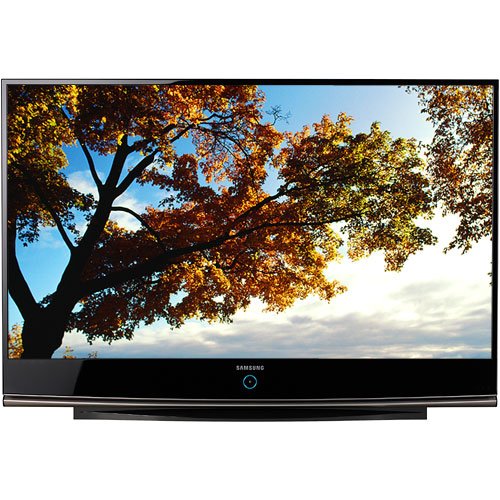
This image shows the front view of the Samsung HL61A750 61-inch LED Powered DLP HDTV, highlighting its large screen and sleek design.
Setup
1. Unpacking
- Carefully remove the television from its packaging.
- Ensure all included components are present: Remote Control, Stand, and TV.
- Place the television on a stable, level surface or mount it securely according to mounting instructions (mounting hardware not included).
2. Connecting Power
- Connect the power cord to the TV's power input.
- Plug the other end of the power cord into a standard 110 VAC, 60 Hz electrical outlet.
3. Connecting External Devices
Your Samsung HL61A750 HDTV offers multiple connectivity options for various devices.
- HDMI Connections: Use one of the 3 HDMI inputs for high-definition devices such as Blu-ray players, game consoles, or cable/satellite boxes. HDMI-CEC is supported.
- Component Video Connections: Use the 3 component inputs for devices that support component video output.
- Composite Video Connections: For older devices, use the composite video input.
- Antenna/Cable Connection: Connect your antenna or cable directly to the TV's RF input for over-the-air or basic cable channels.
4. Initial Setup Wizard
Upon first power-on, the TV will guide you through an initial setup wizard. Follow the on-screen prompts to:
- Select your preferred language.
- Scan for available channels.
- Set up network connectivity (if applicable for smart features).
Operating Instructions
1. Remote Control Functions
The included remote control allows you to access all TV functions. Ensure batteries are correctly inserted. The remote requires 1 battery.
- Power Button: Turns the TV on or off.
- Volume Up/Down: Adjusts the sound level.
- Channel Up/Down: Changes the TV channel.
- Input/Source Button: Cycles through available input sources (HDMI1, HDMI2, Component, etc.).
- Menu Button: Accesses the main menu for settings adjustments.
- Navigation Buttons (Up/Down/Left/Right) and Enter: Used to navigate menus and confirm selections.
2. Basic TV Functions
- Power On/Off: Press the Power button on the remote or the TV.
- Adjusting Volume: Use the Volume Up/Down buttons.
- Changing Channels: Use the Channel Up/Down buttons or enter the channel number directly.
3. Input Selection
To view content from an external device, press the Input or Source button on your remote control. A list of available inputs will appear on screen. Use the navigation buttons to select the desired input (e.g., HDMI 1 for a Blu-ray player) and press Enter.
4. Picture Settings
Access the Picture menu to adjust settings such as Brightness, Contrast, Sharpness, Color, and Tint. You can also select preset picture modes like Standard, Movie, or Dynamic.
5. Sound Settings
The Sound menu allows you to adjust settings like Bass, Treble, and Balance. You can also choose sound modes (e.g., Standard, Music, Clear Voice) or configure audio output options for external sound systems.
6. Smart Features
This TV supports internet applications such as a web browser and YouTube. Connect your TV to the internet to access these features. Navigate to the Smart Hub or Applications menu to launch them.
Maintenance
1. Cleaning the Screen
- Turn off the TV and unplug it from the power outlet.
- Gently wipe the screen with a soft, dry microfiber cloth.
- For stubborn marks, lightly dampen the cloth with water or a specialized screen cleaner (do not spray directly onto the screen).
- Avoid using harsh chemicals, abrasive cloths, or paper towels, as these can damage the screen surface.
2. General Care
- Keep the TV in a well-ventilated area to prevent overheating.
- Avoid exposing the TV to direct sunlight, extreme temperatures, or high humidity.
- Do not block the ventilation openings on the TV.
3. Firmware Updates
Periodically check the Samsung support website for available firmware updates. Updates can improve performance and add new features. Follow the instructions provided with the update carefully.
Troubleshooting
If you encounter issues with your TV, refer to the following common solutions before contacting service.
No Picture or Sound
- Ensure the power cord is securely plugged into both the TV and the wall outlet.
- Verify that the correct input source is selected (e.g., HDMI 1).
- Check all cable connections between the TV and external devices.
- Confirm that the external device is powered on and functioning correctly.
Remote Control Not Working
- Check and replace the batteries in the remote control.
- Ensure there are no obstructions between the remote and the TV's remote sensor.
- Point the remote directly at the TV.
"Check Fan No. 3" Message
If you see a "Check Fan No. 3" message, turn the TV off and then back on. If the message persists, ensure the TV's ventilation areas are clear and not obstructed. If the issue continues, contact Samsung customer support.
Picture Ghosting or Misalignment (Convergence)
For issues with picture ghosting or color misalignment, especially with analog sources, ensure your input source is high-quality. While this model does not feature a user-accessible convergence adjustment in the menu, using high-definition digital inputs (like HDMI) will provide the best picture quality. If issues persist with HD sources, professional calibration or service may be required.
Specifications
| Feature | Specification |
|---|---|
| Model Name | HL61A750 |
| Model Number | HL-61A750 |
| Screen Size | 61 Inches |
| Display Technology | LED Powered DLP |
| Resolution | 1080p |
| Refresh Rate | 120 Hz |
| Aspect Ratio | 16:9 |
| Contrast Ratio | High (e.g. 5000:1 or greater) |
| Viewing Angle | 170 Degrees |
| Total HDMI Ports | 3 |
| Component Inputs | 3 |
| Connectivity Technology | Composite Video, HDMI |
| Supported Internet Services | Browser, YouTube |
| Item Weight | 70.1 Pounds |
| Power Consumption | 100 Watts |
| Line Voltage | 110 VAC 60 Hz |
| Included Components | Remote Control, Stand, TV |
| Tuner Type | ATSC, QAM |
| Color | Black |
Warranty Information
Your Samsung HL61A750 HDTV comes with a limited warranty. The warranty covers 1 Year for parts and 1 Year for labor from the original date of purchase. Please retain your proof of purchase for warranty claims. For full terms and conditions, refer to the warranty card included with your product or visit the official Samsung website.
Customer Support
For further assistance, technical support, or service inquiries, please contact Samsung customer support. You can find contact information, FAQs, and additional resources on the official Samsung website:
Samsung Official Support Website
When contacting support, please have your TV's model number (HL61A750) and serial number ready.