
Introduction
This manual provides essential information for the safe and effective use of your Weller WPS18MP High-Performance Soldering Iron. Please read all instructions carefully before operation and retain this manual for future reference. The Weller WPS18MP is designed for various electronics soldering tasks, offering rapid heat-up and efficient performance.

Figure 1: Weller WPS18MP High-Performance Soldering Iron
Important Safety Information
WARNING: Soldering processes produce fumes and lead dust. Always work in a well-ventilated area and use appropriate personal protective equipment, including eye protection. Avoid inhaling fumes. Wash hands thoroughly after handling soldering materials.
- Hot Surfaces: The soldering iron tip and barrel become extremely hot during operation. Avoid contact with skin or flammable materials.
- Fire Hazard: Do not leave the soldering iron unattended when powered on. Ensure the iron is placed on a heat-resistant surface or in a suitable stand when not in use.
- Electrical Safety: Do not use the iron with a damaged cord or plug. Do not expose the iron to water or operate in damp conditions.
- California Proposition 65 Warning: This product contains chemicals known to the State of California to cause cancer and birth defects or other reproductive harm.
- Children and Pets: Keep the soldering iron out of reach of children and pets.
Product Features
The Weller WPS18MP soldering iron incorporates several features designed for user convenience and performance:
- Rapid Heat-Up: Achieves working temperature in approximately 35 seconds.
- Efficient Performance: Patented design provides performance equivalent to a 60-watt iron.
- LED Indicators: A red power-on LED changes to green when the iron reaches its optimal working temperature.
- Integrated Work Light: A bright white LED illuminates the working surface for improved visibility.
- Ergonomic Design: Features a molded grip for comfortable handling during extended use.
- Stable Placement: The tip is elevated when the tool is placed flat on a work surface, eliminating the need for a separate stand.
- Modular Tip System: Utilizes a modular plug design for easy and quick tip exchange.
- Versatile Application: Ideal for various electronics hobbies, including PC modding, PCB work, audio/visual projects, and RC kits.
- High Temperature Capability: Capable of reaching temperatures up to 900°F (482°C).

Figure 2: Key features of the Weller WPS18MP
Package Contents
Verify that all items are present in the package:
- Weller WPS18MP High-Performance Soldering Iron
- Power Adapter
- Standard Soldering Tip (pre-installed)
Setup
- Unpack: Carefully remove the soldering iron and all accessories from the packaging.
- Inspect: Check the soldering iron and power cord for any signs of damage. Do not use if damaged.
- Work Area Preparation: Set up your work area in a well-ventilated space. Ensure the surface is clean, stable, and heat-resistant. Have appropriate soldering materials (solder, flux, desoldering braid, cleaning sponge) readily available.
- Connect Power: Plug the power adapter into a standard AC outlet. Then, connect the power adapter's cord to the soldering iron's power input.

Figure 3: Connecting the power adapter
Operating Instructions
- Power On: Press the power button on the soldering iron. The power-on LED will illuminate red, indicating the iron is heating up.
- Wait for Ready Indicator: The iron will reach working temperature in approximately 35 seconds. The power-on LED will change from red to green, indicating it is ready for use.
- Tin the Tip: Before first use and periodically during operation, apply a small amount of solder to the hot tip. This process, called 'tinning', helps protect the tip and improves heat transfer.
- Soldering: Bring the hot, tinned tip into contact with both the component lead and the PCB pad simultaneously. Apply solder to the junction of the tip and the parts. Allow the solder to flow and form a shiny, smooth joint. Remove the solder, then remove the iron.
- Utilize Work Light: The integrated white LED work light will illuminate your soldering area, enhancing precision.

Figure 4: Proper soldering technique

Figure 5: Red LED indicates heating, green LED indicates ready
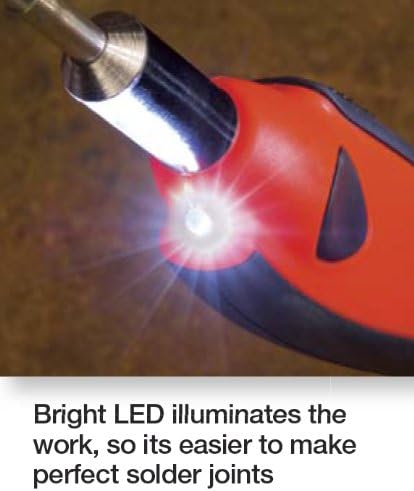
Figure 6: Bright LED illuminates the work area
Tip Care and Replacement
Proper tip care extends the life of your soldering tip and ensures optimal performance.
- Cleaning: Wipe the tip frequently on a damp sponge or brass wool during use to remove excess solder and oxidation.
- Re-tinning: Always re-tin the tip with a fresh coat of solder after cleaning and before storing the iron.
- Tip Replacement: To replace a tip, ensure the iron is unplugged and completely cool. Grasp the rubberized sleeve of the tip and pull it straight out. Insert the new tip by pushing it firmly into the receptacle until it clicks into place.

Figure 7: Easy and quick tip change-out
Maintenance
- Cleaning the Handle: Wipe the handle with a clean, damp cloth. Do not use abrasive cleaners or solvents.
- Storage: Store the soldering iron in a dry, safe place when not in use. Ensure the tip is tinned before storage.
- Cord Inspection: Periodically inspect the power cord for cuts, fraying, or other damage. Replace if damaged.
Troubleshooting
| Problem | Possible Cause | Solution |
|---|---|---|
| Iron does not heat up. | Not plugged in; power outlet fault; damaged cord/iron. | Check power connections; test outlet; inspect cord/iron for damage. If damaged, do not use. |
| Solder does not melt or flow well. | Tip is not hot enough; tip is oxidized/dirty; incorrect solder type. | Ensure green LED is on; clean and re-tin tip; use appropriate solder for electronics. |
| LED work light not functioning. | Internal fault. | Contact customer support if other functions are working. |
| Tip is loose. | Tip not fully inserted. | Ensure iron is cool and unplugged. Re-insert tip firmly until it clicks into place. |
Specifications
| Attribute | Specification |
|---|---|
| Model Number | WPS18MP |
| Brand | Weller |
| Power Source | AC |
| Wattage | 18 watts (equivalent to 60 watts performance) |
| Heating Element | Ceramic |
| Head Style | Pencil |
| Item Weight | 9.6 ounces |
| Maximum Temperature | 900°F (482°C) |
Warranty Information
The Weller WPS18MP High-Performance Soldering Iron comes with a 7-year manufacturer's warranty. This warranty covers defects in materials and workmanship under normal use. Please retain your proof of purchase for warranty claims. For specific terms and conditions, refer to the warranty documentation included with your product or visit the official Weller website.
Customer Support
For technical assistance, replacement parts, or warranty service, please contact Weller customer support. Refer to the contact information provided on the product packaging or the official Weller website for the most up-to-date support details.