1. Introduction
The Gefen GTV-DIGAUD-2-AAUD is a compact device designed to convert digital audio signals (Coaxial or Optical S/PDIF/TOSLink) into standard analog left/right (L/R) audio. This allows modern digital audio sources to connect with older analog audio systems, such as amplifiers or recording decks that utilize RCA-style inputs.
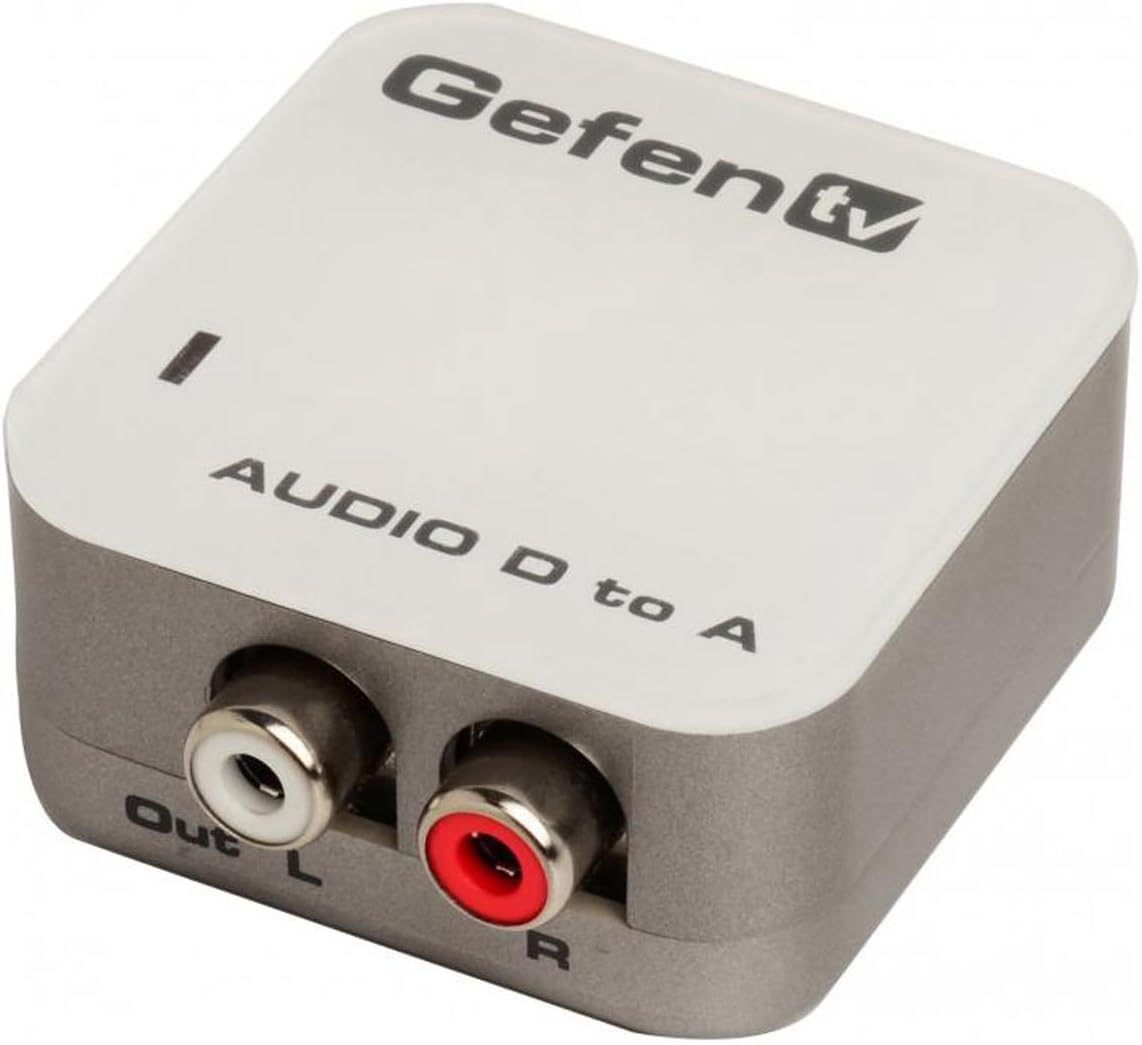
Image 1.1: Front view of the Gefen Digital Audio to Analog Audio Converter. The device is white and gray with 'GefenTV' branding and 'AUDIO D to A' text. It features two RCA output jacks labeled 'Out L' (white) and 'R' (red) on the front panel.
2. Product Overview and Features
This converter facilitates the connection between digital audio sources and analog audio receivers. It is particularly useful for integrating devices like DVD players, CD players, or streaming devices that only offer digital audio outputs with legacy audio equipment.
Key Features:
- Converts Coaxial/Optical (S/PDIF or TOSLink) digital audio to standard analog Left/Right audio.
- Enables connection to external analog devices such as amplifiers or recording decks via RCA jacks.
- Supports uncompressed digital audio input with sample rates of 32, 44.1, 48, and 96 KHz.
- Processes 2-channel LPCM (Linear Pulse Code Modulation) and 24-bit S/PDIF incoming bitstream.
- Compact design for easy integration into any audio setup.
3. Package Contents
Verify that all items are present in the package:
- Gefen Digital Audio To Analog Audio Converter (GTV-DIGAUD-2-AAUD)
- Power Supply
- User's Manual (this document)

Image 3.1: The Gefen Digital Audio to Analog Audio Converter shown in its retail packaging, held by hands for scale. The packaging displays 'GefenTV Digital to Analog Audio Converter'.
4. Setup Instructions
Follow these steps to connect and set up your Gefen Digital Audio to Analog Audio Converter:
- Connect Digital Audio Source: Run a digital audio cable (either Coaxial or Optical TOSLink, depending on your source device) from the digital audio output jack of your source device (e.g., DVD player, TV, game console) to the corresponding digital input on the Gefen Converter.
- Select Input Type: Use the selector switch on the converter to choose between Coaxial or Optical input, matching the type of digital cable you connected.
- Connect Analog Audio Receiver: Connect standard RCA-style Left (white) and Right (red) audio cables from the converter's analog RCA output jacks to the corresponding analog input jacks on your amplifier, receiver, or recording deck.
- Connect Power: Plug the included power supply into the 5V DC input on the converter, then connect it to a power outlet.
- Power On: Power on all connected equipment, including your digital audio source, the Gefen converter, and your analog audio receiver.

Image 4.1: Close-up view of the input side of the converter, showing the 'In Coax' (3.5mm jack) and 'Optical' (TOSLink) ports.

Image 4.2: Side view of the converter, illustrating the 5V DC power input and the slide switch for selecting 'Optical' or 'Coax' input.

Image 4.3: Close-up view of the output side of the converter, showing the 'Out L' (white) and 'R' (red) RCA jacks.
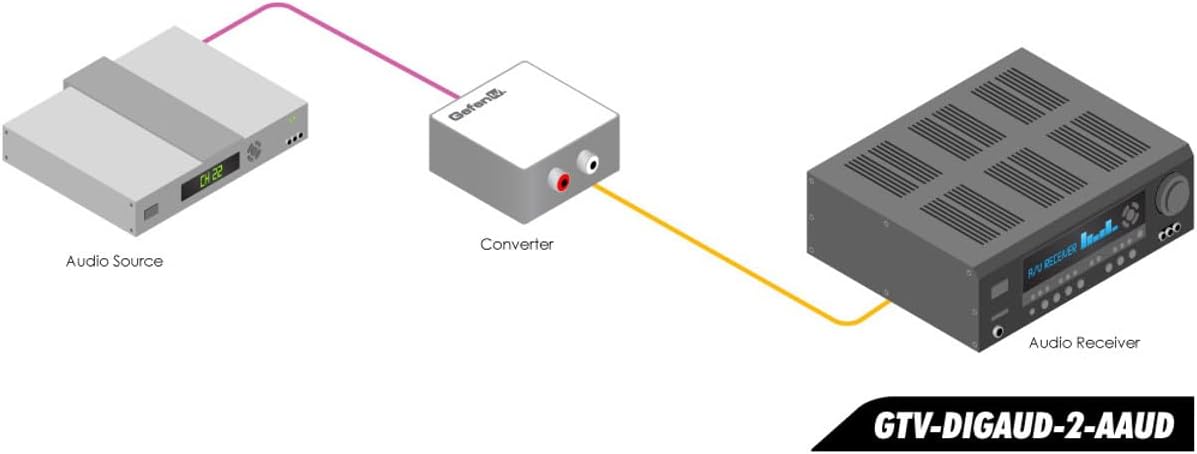
Image 4.4: A diagram illustrating the typical connection setup. An 'Audio Source' device connects via a digital cable to the 'Converter', which then connects via RCA cables to an 'Audio Receiver'.
5. Operating Instructions
Once properly set up, the Gefen Digital Audio to Analog Audio Converter operates automatically. Ensure the input selector switch is set to match your digital audio source (Coaxial or Optical). The converter will then process the digital signal and output it as analog audio through the RCA jacks.
No further user interaction is typically required for its basic function. Adjust volume and other audio settings on your connected analog audio receiver.
6. Troubleshooting
- No Audio Output:
- Ensure all cables (digital input, analog output, and power) are securely connected.
- Verify the input selector switch on the converter is set correctly (Coax or Optical) to match your digital audio source.
- Check that your digital audio source is outputting audio and that your analog receiver is set to the correct input.
- Important: This product does not support encoded Dolby Digital audio. If you are experiencing no sound, ensure that Dolby Digital output is disabled on your source device. Refer to your source device's manual for instructions on how to disable Dolby Digital and output PCM (Pulse Code Modulation) audio.
- Confirm that the optical cable has its protective caps removed from both ends before insertion.
- Static or Distorted Audio:
- Check all cable connections for looseness or damage. Reseat cables if necessary.
- Ensure the converter is not placed in an area with excessive electromagnetic interference from other electronic devices. Try relocating the converter if static persists.
- Verify that the power supply is functioning correctly and providing stable power to the unit.
- While the converter maintains sound quality, significant volume increases on the analog receiver might reveal minor distortion. This is generally expected with analog amplification of a converted signal.
- Unit is Hot:
- Ensure the converter has adequate ventilation and is not covered or enclosed in a tight space. Overheating can affect performance.
7. Specifications
| Model Number | GTV-DIGAUD-2-AAUD |
| Brand | Gefen |
| Input Audio | Coaxial S/PDIF, Optical TOSLink |
| Output Audio | Analog L/R RCA |
| Supported Sample Rates | 32, 44.1, 48, 96 KHz |
| Supported Audio Formats | 2-channel LPCM, 24-bit S/PDIF bitstream |
| Dimensions (L x W x H) | 1.8 x 1.9 x 0.09 inches (approximately 4.57 x 4.83 x 0.23 cm) |
| Item Weight | 1 pound (approximately 0.45 kg) |
| Power Supply | 5V DC (included) |
| Operating Temperature | Up to 70°C (158°F) |
| UPC | 845344080567, 803982766526, 898029718064 |
8. Safety Information
- Do not expose the device to water or excessive moisture.
- Avoid placing the device near heat sources or in direct sunlight.
- Use only the provided power adapter. Using unauthorized power adapters may damage the device and void the warranty.
- Do not attempt to open or repair the device yourself. Refer all servicing to qualified personnel.
- Keep the device away from children.
9. Warranty and Support
For warranty information and technical support, please refer to the official Gefen website or contact Gefen customer service directly. Keep your purchase receipt as proof of purchase for warranty claims.
For further assistance, visit the Gefen Store on Amazon.


