
DSC BV300DP
DSC BV-300DP Digital Bravo 300 PIR Motion Detector User Manual
Model: BV-300DP
1. Introduction
This manual provides comprehensive instructions for the installation, operation, and maintenance of the DSC BV-300DP Digital Bravo 300 PIR Motion Detector. This device is designed to detect human infrared energy, offering reliable motion detection for security systems.

Image 1: DSC BV-300DP Digital Bravo 300 PIR Motion Detector. This image shows the compact, white casing of the motion detector, designed for discreet wall mounting.
2. Safety Information
- Read all instructions carefully before installation and operation.
- Installation should be performed by qualified personnel in accordance with local electrical codes.
- Disconnect power before servicing the device.
- Do not expose the device to extreme temperatures, humidity, or direct sunlight.
- This device is intended for indoor use only.
3. Package Contents
Verify that all components are present before beginning installation:
- DSC BV-300DP Digital Bravo 300 PIR Motion Detector unit
- Mounting hardware (screws, anchors)
- Instruction Manual (this document)
4. Setup and Installation
4.1 Mounting Location
Choose a mounting location that provides optimal coverage and avoids false alarms. Consider the following:
- Mount the detector on a solid wall, typically 7.5 feet (2.3 meters) high.
- Avoid aiming the detector directly at heat sources (heaters, direct sunlight, air vents) or moving objects (curtains, pets).
- Ensure the detection pattern covers the desired area without obstructions.
4.2 Wiring the Detector
The BV-300DP requires a wired connection to your security system. Refer to your security panel's manual for specific wiring zone connections. Typical connections include:
- Power (V+ and V-): Connect to a regulated 12V DC power supply from the security panel.
- Alarm Output (NC/COM): Connect to a normally closed (NC) zone on your security panel.
- Tamper Switch (TAMP): Connect to a tamper zone if your panel supports it, to detect unauthorized opening of the detector casing.
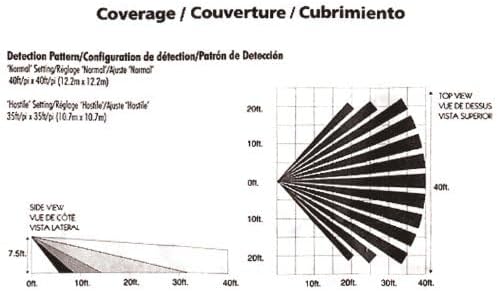
Image 2: Internal view of the DSC BV-300DP Motion Detector. This image displays the circuit board and clearly labeled wiring terminals for power, alarm, and tamper connections.
4.3 Coverage Pattern and Settings
The BV-300DP offers different detection patterns based on its sensitivity settings. The device features patented Multi-Level Signal Processing (MLSP) for accurate detection.

Image 3: Detection Coverage Patterns. This diagram illustrates the top and side views of the detection range for both 'Normal' (40ft x 40ft) and 'Hostile' (35ft x 35ft) sensitivity settings. The side view shows vertical beam shaping for pet immunity.
The detector includes a jumper for sensitivity adjustment, allowing configuration for 'Normal' or 'Hostile' environments. The 'Hostile' setting typically provides a slightly reduced but more focused coverage (e.g., 35ft x 35ft) to minimize false alarms in challenging conditions, while 'Normal' offers broader coverage (e.g., 40ft x 40ft).
Pet Immunity: The Vertical Beam Shaping (VBS) feature provides pet immunity for animals up to 60 lbs (27 kg), reducing false alarms caused by pets moving within the protected area.
5. Operating Instructions
Once properly installed and powered, the DSC BV-300DP operates automatically as part of your security system. When the system is armed, the detector monitors its coverage area for infrared energy changes indicative of human movement.
- Detection: Upon detecting motion, the detector's alarm output will activate, signaling the security panel.
- LED Indicator: A built-in LED typically illuminates during detection, aiding in walk-testing and troubleshooting.
- Digital Signal Analysis: The detector uses digital signal analysis for consistent detection and digital temperature compensation for improved performance across various temperatures.
6. Maintenance
To ensure optimal performance of your motion detector, perform the following maintenance tasks:
- Cleaning: Periodically wipe the detector's lens and casing with a soft, dry cloth to remove dust and debris. Do not use abrasive cleaners or solvents.
- Walk Test: Conduct a walk test annually or after any system changes to confirm the detector's coverage and functionality. Walk through the protected area to ensure the LED indicator illuminates and the alarm is triggered.
- Power Supply: Ensure a stable 12V DC power supply is maintained.
7. Troubleshooting
| Problem | Possible Cause | Solution |
|---|---|---|
| No Detection |
|
|
| False Alarms |
|
|
| Tamper Alert |
|
|
8. Specifications
| Feature | Detail |
|---|---|
| Model | BV-300DP |
| Brand | DSC |
| Detection Technology | Digital Passive Infrared (PIR) |
| Coverage (Normal) | Up to 40ft x 40ft (12.2m x 12.2m) |
| Coverage (Hostile) | Up to 35ft x 35ft (10.7m x 10.7m) |
| Pet Immunity | Up to 60 lbs (27 kg) via Vertical Beam Shaping (VBS) |
| Power Source | Corded Electric (typically 12V DC from security panel) |
| Mounting Type | Wall Mount |
| Color | White |
| Product Dimensions | 3.46 x 14 x 9 inches (approximate, based on packaging) |
| Item Weight | 2.39 ounces |
| Compatible Devices | Security System, Smart Home Hub, Lighting Control |
9. Warranty Information
DSC products typically come with a limited manufacturer's warranty. Please refer to the warranty card included with your product or visit the official DSC website for detailed warranty terms and conditions. Keep your proof of purchase for warranty claims.
10. Technical Support
For technical assistance, troubleshooting beyond this manual, or product inquiries, please contact DSC customer support. Contact information can typically be found on the manufacturer's website or product packaging.
Note: Always consult a qualified security professional for complex installations or system integrations.
Related documentsBV300DP


Ask a question about this manual
Ask about setup, troubleshooting, compatibility, parts, safety, or missing instructions. Manuals+ will review the question and use this page’s manual context to help answer it.