
Leviton 16352-W
Leviton 16352-W 20A Commercial Grade Duplex Receptacle Instruction Manual
1. Introduction
This manual provides detailed instructions for the safe installation, operation, and maintenance of the Leviton 16352-W 20 Amp, 125 Volt commercial grade duplex receptacle. This Decora style receptacle features a self-grounding tab and supports both side and rear wiring methods. It is designed for use with Decora and Decora Plus wallplates (sold separately).

Figure 1: Front view of the Leviton 16352-W 20A Duplex Receptacle, showing two outlets and the Decora style.
2. Safety Information
WARNING: To avoid fire, shock, or death, turn off power at the circuit breaker or fuse box and test that power is off before wiring. Installation should be performed by a qualified electrician or a knowledgeable individual familiar with electrical wiring practices and local electrical codes.
- Always disconnect power before working on electrical circuits.
- Ensure all wiring connections are secure and comply with national and local electrical codes.
- Do not install in wet locations unless specifically rated for such use.
- Use only copper wire for connections.
- This device is rated for 20 Amps and 125 Volts. Do not exceed these ratings.
3. Package Contents
- One (1) Leviton 16352-W 20A Commercial Grade Duplex Receptacle
Note: Wallplate and mounting screws are sold separately.
4. Features
- 20 Amp, 125 Volt rating for commercial applications.
- Decora style design for modern aesthetics.
- Self-grounding tab for simplified installation.
- Versatile wiring options: side and rear wiring terminals.
- Accepts wiring up to #12 AWG (American Wire Gauge); #14 AWG in Canada.
- Constructed from durable, impact-resistant thermoplastic.
5. Installation Instructions
5.1 Tools Required
- Screwdriver (Phillips and/or Flathead)
- Wire Strippers
- Voltage Tester
- Electrical Tape (optional)
5.2 Wiring Steps
- Turn Off Power: Locate the circuit breaker or fuse that supplies power to the outlet box. Turn it OFF. Verify power is off using a voltage tester.
- Remove Old Receptacle (if applicable): Unscrew the wallplate and then the mounting screws holding the old receptacle in the box. Carefully pull the old receptacle out and disconnect the wires.
- Prepare Wires: Strip approximately 1/2 inch (12.7 mm) of insulation from the ends of the circuit wires. Ensure the wire ends are clean and straight.
- Connect Ground Wire: Connect the bare copper or green insulated ground wire from the circuit to the green grounding screw on the receptacle. Tighten securely. The receptacle includes a self-grounding tab for use with grounded metal boxes.
- Connect Neutral Wire: Connect the white (neutral) wire from the circuit to one of the silver-colored terminal screws on the receptacle. For rear wiring, insert the stripped wire end into the appropriate hole next to the silver screw and tighten the screw. For side wiring, loop the wire clockwise around the silver screw and tighten.
- Connect Hot Wire: Connect the black (hot) wire from the circuit to one of the brass-colored terminal screws on the receptacle. For rear wiring, insert the stripped wire end into the appropriate hole next to the brass screw and tighten the screw. For side wiring, loop the wire clockwise around the brass screw and tighten.
- Secure Receptacle: Carefully fold the wires into the electrical box. Insert the new receptacle into the box and secure it with the provided mounting screws.
- Install Wallplate: Attach the Decora or Decora Plus wallplate (sold separately) over the receptacle.
- Restore Power: Turn the power back ON at the circuit breaker or fuse box.
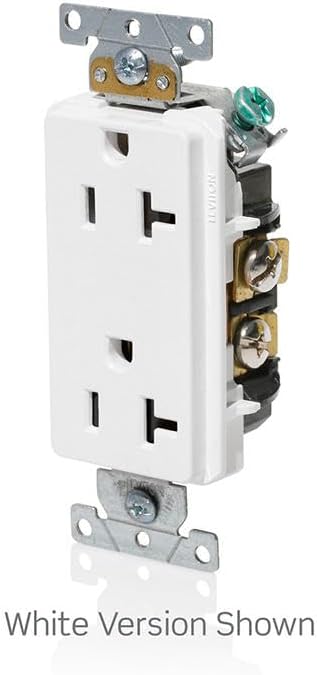
Figure 2: Angled view illustrating the side wiring terminals and overall depth of the receptacle.
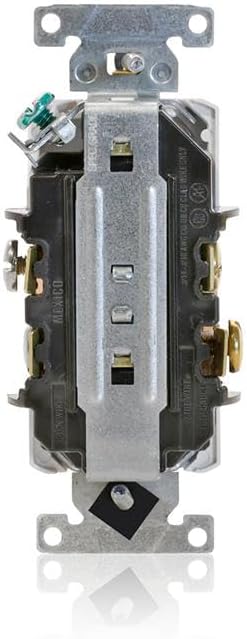
Figure 3: Rear view detailing the terminal screws and holes for both side and rear wiring connections.
6. Operation
Once properly installed and power is restored, the Leviton 16352-W duplex receptacle functions as a standard electrical outlet. Insert compatible electrical plugs into the receptacles to draw power. Ensure that the total current drawn from both outlets does not exceed the 20 Amp rating of the device.
7. Maintenance
- Cleaning: To clean the receptacle, first turn off power at the circuit breaker. Use a soft, damp cloth to wipe the surface. Do not use abrasive cleaners or solvents.
- Inspection: Periodically inspect the receptacle for any signs of damage, such as cracks, discoloration, or loose connections. If damage is observed, turn off power and replace the unit.
8. Troubleshooting
| Problem | Possible Cause | Solution |
|---|---|---|
| No power at the outlet. | Circuit breaker tripped or fuse blown. Loose wiring connection. | Check and reset the circuit breaker or replace the fuse. Turn off power and check all wiring connections for tightness. |
| Receptacle feels warm. | Overload on the circuit. Loose connection. | Reduce the load on the circuit. Turn off power and check wiring connections. If problem persists, consult a qualified electrician. |
| Plug does not fit securely. | Worn out receptacle contacts. | Replace the receptacle. |
9. Specifications
| Brand | Leviton |
| Model Number | 16352-W |
| Type | Duplex Receptacle |
| Amperage | 20 Amps |
| Voltage | 125 Volts |
| Wiring Type | Side and Rear Wiring |
| Grounding | Self-Grounding Tab |
| Material | Impact-Resistant Thermoplastic, Aluminum (mounting strap) |
| Color | White |
| Dimensions (approx.) | 1.31 x 1.31 x 3.81 inches |
| Item Weight | 2.4 ounces |
10. Warranty Information
This Leviton 16352-W Duplex Receptacle is covered by a 2-Year Manufacturer's Warranty. For specific terms, conditions, and to make a warranty claim, please refer to the official Leviton warranty documentation or contact Leviton customer support.
11. Support Information
For further assistance, technical support, or additional product information, please visit the official Leviton website or contact their customer service department.
Official Leviton Store: Leviton Store on Amazon
Related documents16352-W


Ask a question about this manual
Ask about setup, troubleshooting, compatibility, parts, safety, or missing instructions. Manuals+ will review the question and use this page’s manual context to help answer it.