
1. Introduction
This manual provides essential information for the safe and effective use of your APC Surge Protector, Model P11VT3. This device is designed to protect your valuable electronic equipment from damaging power surges and spikes, offering comprehensive protection for power, telephone/DSL, and coaxial lines.
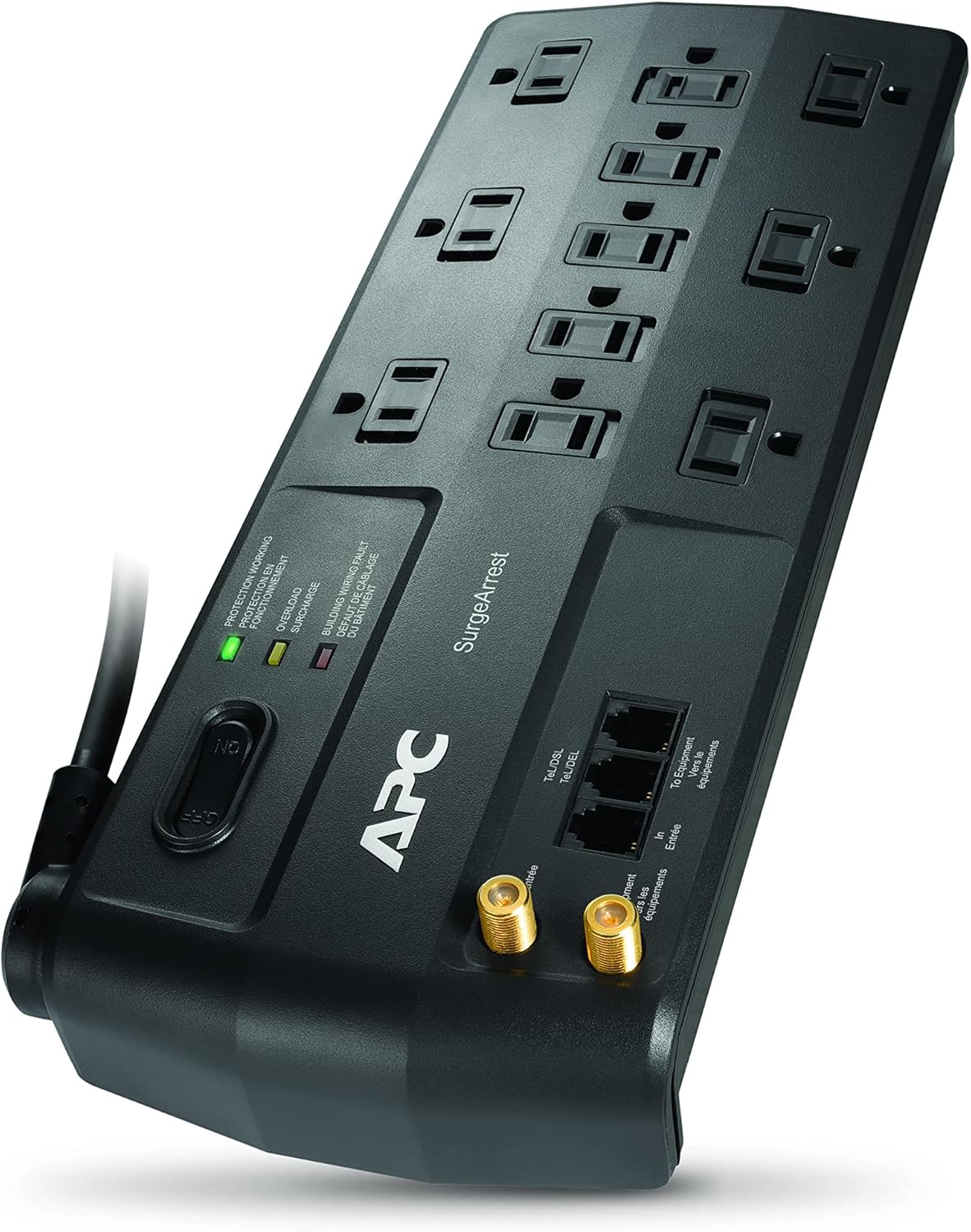
Figure 1: Main view of the APC Surge Protector P11VT3, showcasing its 11 outlets and robust design.
2. Safety Information
Please read and understand all safety instructions before using this product. Failure to follow these instructions may result in electric shock, fire, or serious injury.
- Do not use this surge protector in wet environments or near water.
- Do not connect to an ungrounded outlet.
- Do not use with extension cords. Plug directly into a wall outlet.
- Ensure the total current draw of connected equipment does not exceed the surge protector's maximum rating.
- This product contains chemicals known to the State of California to cause cancer and birth defects or other reproductive harm. Wash hands after handling.
3. Package Contents
Verify that all items are present in your package:
- APC Surge Protector P11VT3 Unit
- Coaxial Cable
- Telephone Cable
- User Manual (this document)
4. Features
The APC Surge Protector P11VT3 offers robust features for comprehensive protection:
- 3020 Joule Rating: Provides high-level surge protection for sensitive electronics.
- 11 Total Outlets: Includes 11 power outlets with sliding safety shutters. Six outlets are block-spaced to accommodate larger adapters without obstructing adjacent outlets.
- Data Line Protection: Integrated telephone/DSL and coaxial protection safeguards against surges traveling through data lines.
- 8-Foot Power Cord: Features an 8-foot cord with a 180-degree rotation capability and a right-angle plug for flexible placement and easy access to wall outlets.
- Safety Shutters: Sliding safety shutters on unused outlets help prevent dust accumulation and accidental contact.
5. Setup
Follow these steps to set up your surge protector:
- Placement: Position the surge protector in a dry indoor location, away from direct sunlight and heat sources. The 8-foot power cord with its 180-degree rotating and right-angle plug allows for flexible placement options, ensuring the cord does not block other outlets.
- Power Connection: Plug the surge protector's power cord directly into a standard, grounded 120V AC wall outlet. Do not use an extension cord.
- Connect Equipment: Plug your electronic devices into the 11 available outlets. Utilize the block-spaced outlets for larger power adapters.
- Telephone/DSL Protection: For telephone or DSL line protection, connect your incoming telephone/DSL line to the 'IN' port on the surge protector using the provided telephone cable. Then, connect the 'OUT' port to your telephone or DSL modem.
- Coaxial Protection: For coaxial line protection, connect your incoming coaxial cable to the 'IN' port on the surge protector using the provided coaxial cable. Then, connect the 'OUT' port to your TV, cable box, or modem.

Figure 2: The 45-degree angled flat plug design allows for easy connection to wall outlets without obstruction.

Figure 3: The rotating power cord provides flexibility for routing the cable in various directions.

Figure 4: Illustration of the widely spaced outlets, measuring approximately 2.24 inches apart, designed to accommodate bulky power adapters.

Figure 5: Close-up view of the Telephone/DSL and Coaxial Ports, indicating the 'IN' and 'OUT' connections for data line protection.
6. Operating Instructions
Once connected, the surge protector operates automatically. The indicator lights provide status information:
- Protection Working (Green LED): Illuminates when the surge protection circuitry is active and functioning correctly.
- Overload (Yellow LED): Indicates that the connected load is approaching or exceeding the unit's capacity. Reduce the number of connected devices or their power consumption.
- Building Wiring Fault (Red LED): Signals an issue with your building's electrical wiring, such as an improper ground. Consult a qualified electrician to resolve this issue.
Ensure all unused outlets have their sliding safety shutters closed to prevent dust ingress and accidental contact.
7. Maintenance
The APC Surge Protector P11VT3 requires minimal maintenance. Keep the unit clean and free of dust. Periodically check the indicator lights to ensure proper operation. If the 'Protection Working' LED is off, the surge protection has been compromised, and the unit should be replaced.
8. Troubleshooting
If you encounter issues with your surge protector, refer to the following common problems and solutions:
| Problem | Possible Cause | Solution |
|---|---|---|
| No power to connected devices | Surge protector is off, circuit breaker tripped, or wall outlet is not functioning. | Ensure the surge protector's power switch is ON. Check and reset the circuit breaker if tripped. Test the wall outlet with another device. |
| Protection Working LED is off | Surge protection has been consumed or damaged by a significant surge. | The unit no longer provides surge protection. Replace the surge protector. |
| Overload LED is illuminated | Too many devices are connected, or devices are drawing too much power. | Unplug some devices to reduce the load. Ensure total wattage does not exceed the unit's rating. |
| Building Wiring Fault LED is illuminated | Issue with the building's electrical grounding or wiring. | This indicates a serious wiring problem. Contact a qualified electrician immediately. |
| Signal degradation on coaxial or telephone lines | Rarely, some older or specific cable/DSL systems may experience minor signal issues. | While uncommon, if signal degradation occurs, try connecting the coaxial/telephone line directly to the device to confirm if the surge protector is the cause. Most modern systems are compatible. |
9. Specifications
| Specification | Value |
|---|---|
| Model Number | P11VT3 |
| Joule Rating | 3020 Joules |
| Total Power Outlets | 11 |
| Voltage | 120 Volts |
| Cord Length | 8 feet |
| Product Dimensions (L x W x H) | 13.7 x 7.5 x 2.4 inches |
| Item Weight | 1 pound |
| Special Feature | Surge Protection for Power, Telephone/DSL, and Coaxial Lines |
10. Warranty and Support
APC stands behind the quality of its products. The P11VT3 Surge Protector comes with a Lifetime Warranty. Additionally, it includes a $100,000 Equipment Protection Policy, providing peace of mind that your connected equipment is protected against surge damage.
To ensure your warranty is active and for full details on the Equipment Protection Policy, it is highly recommended to register your product online with APC.
For further assistance or technical support, please refer to the official APC website or the comprehensive user guide available for download:


