
1. Introduction
This manual provides detailed instructions for the proper use and care of your Tamron Auto Focus 70-300mm f/4.0-5.6 Di LD Macro Zoom Lens (Model A17NII). This lens is designed for Nikon Digital SLR cameras, offering a versatile telephoto zoom range with macro capabilities. Please read this manual thoroughly before using the lens to ensure optimal performance and longevity.

Figure 1.1: Tamron 70-300mm f/4.0-5.6 Di LD Macro Zoom Lens (Model A17NII). This image shows the overall appearance of the lens with its zoom and focus rings, and the Tamron branding.
2. Key Features
- Versatile Telephoto Zoom: Covers a focal length range of 70mm to 300mm, suitable for various photographic situations from portraits to distant subjects.
- Di (Digitally Integrated) Design: Optimized for use with both full-frame and APS-C format digital SLR cameras.
- LD (Low Dispersion) Glass: Incorporates Low Dispersion glass elements to effectively reduce chromatic aberrations, enhancing image sharpness and color fidelity.
- Macro Functionality: Achieves a maximum magnification ratio of 1:2 at focal lengths between 180mm and 300mm, with a minimum focusing distance of 0.95m (3.1 feet).
- Built-in Auto Focus Motor: Ensures fast and accurate autofocus operation with compatible Nikon Digital SLR cameras. Note: For Nikon D40, D40x, and D60 models, the lens operates in manual focus (MF) mode due to specific camera body requirements.
- Lightweight and Portable: Weighs approximately 458g (16.2 oz.), designed for comfortable handheld shooting.
- Lens Hood Included: Provides protection against glare and improves image contrast.
3. Setup
3.1 Attaching the Lens
- Ensure both the camera and lens are powered off.
- Remove the rear lens cap and the camera body cap.
- Align the mounting index mark on the lens barrel with the corresponding mounting index mark on the camera body.
- Insert the lens into the camera's lens mount and rotate it clockwise until it clicks into place. Do not force the lens.
3.2 Detaching the Lens
- Ensure the camera is powered off.
- While pressing the lens release button on the camera body, rotate the lens counter-clockwise until it stops.
- Carefully remove the lens from the camera body.
- Attach the rear lens cap to the lens and the body cap to the camera to protect them from dust and damage.
4. Operating Instructions
4.1 Zooming
To adjust the focal length, rotate the wide zoom ring located on the lens barrel. The lens offers a continuous zoom range from 70mm (wide-angle telephoto) to 300mm (super telephoto). The current focal length is indicated by markings on the lens barrel.
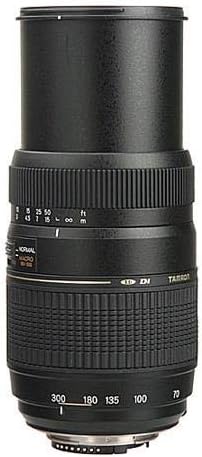
Figure 4.1: The Tamron 70-300mm lens extended to its maximum 300mm focal length. This demonstrates the physical extension of the lens barrel when zooming to telephoto settings.
4.2 Focusing (Auto Focus / Manual Focus)
This lens features a built-in motor for autofocus. To use autofocus, set the AF/MF switch on the lens to "AF" and the camera's focus mode to autofocus. The lens will automatically focus on your subject when the shutter button is half-pressed.
For manual focusing, set the AF/MF switch on the lens to "MF" and the camera's focus mode to manual focus. Rotate the narrower focus ring to achieve sharp focus. The distance scale on the lens barrel provides an indication of the current focus distance.
Important Note for Nikon D40, D40x, and D60 users:
Due to the design of these specific camera models, the Tamron A17NII lens will operate in manual focus (MF) mode only. Ensure the lens switch is set to "MF" and adjust focus manually.

Figure 4.2: A close-up view of the Tamron 70-300mm lens, highlighting the zoom ring, focus ring, and the AF/MF switch. The "NORMAL" and "MACRO 180-300" switch is also visible.
4.3 Macro Mode Operation
The lens offers a macro mode for close-up photography, achieving a 1:2 magnification ratio. To activate macro mode:
- Zoom the lens to a focal length between 180mm and 300mm.
- Slide the "NORMAL / MACRO 180-300" switch on the lens barrel to the "MACRO 180-300" position.
- In macro mode, the minimum focusing distance is reduced to 0.95m (3.1 feet).
To return to normal focusing, slide the switch back to the "NORMAL" position. Note that you cannot zoom below 180mm while in macro mode. If the focus ring is set to a macro distance, you may need to switch to MF, adjust the focus ring to a normal range, then switch out of macro mode.

Figure 4.3: The Tamron 70-300mm lens with its included lens hood attached. The lens hood helps to prevent flare and ghosting by blocking extraneous light.
5. Maintenance
- Cleaning the Lens Surface: Use a soft, clean microfiber cloth specifically designed for optical lenses. For stubborn smudges, use a small amount of lens cleaning fluid applied to the cloth, not directly to the lens.
- Cleaning the Lens Body: Wipe the lens body with a soft, dry cloth. Avoid using organic solvents like paint thinner or benzene.
- Storage: When not in use, attach the front and rear lens caps. Store the lens in a cool, dry place, away from direct sunlight and extreme temperatures. If storing for an extended period, consider using a desiccant to prevent mold and mildew.
- Avoid Impact: Protect the lens from drops or strong impacts, which can damage internal components.
- Dust Prevention: Always keep lens caps on when the lens is not attached to a camera or in use.
6. Troubleshooting
| Problem | Possible Cause | Solution |
|---|---|---|
| Autofocus is slow or hunts excessively. | Low light conditions, low contrast subject, or lens is trying to focus across its entire range. | Ensure adequate lighting. Focus on a high-contrast area. If hunting persists, switch to manual focus (MF) and adjust manually. For macro mode, ensure the lens is within the 180-300mm range before engaging. |
| Lens does not autofocus on Nikon D40, D40x, or D60. | These camera models require manual focus with this lens. | This is normal operation. Set the lens to "MF" and focus manually. |
| Images appear soft, especially at wide apertures. | Camera shake, shooting wide open (e.g., f/4.0-5.6), or subject motion. | Use a faster shutter speed. Stop down the aperture to f/8 or higher for increased sharpness. Use a tripod or monopod to minimize camera shake, especially at longer focal lengths. |
| Purple or green fringing (chromatic aberration) visible in images. | Chromatic aberration can occur, particularly in high-contrast areas. | While the lens uses LD glass to minimize this, some fringing may still appear. This can often be corrected in post-processing software. |
| Cannot engage or disengage macro mode. | Lens not at appropriate focal length (180-300mm) or focus ring is locked in macro range. | Ensure the lens is zoomed to 180mm or beyond to engage macro. If disengaging, switch to MF, rotate the focus ring to a normal distance, then switch out of macro mode. |
7. Specifications
| Model Number | A17NII |
| Focal Length | 70-300mm |
| Maximum Aperture | f/4.0-5.6 |
| Minimum Aperture | Not specified (typically f/32-45) |
| Lens Construction | Not specified (includes LD glass elements) |
| Angle of View | 34° - 8° (for full-frame) |
| Minimum Focus Distance | 0.95m (3.1 feet) in Macro Mode (180-300mm) |
| Maximum Magnification Ratio | 1:2 (in Macro Mode) |
| Filter Size | 62mm |
| Dimensions (Diameter x Length) | Approx. 76.6mm x 116.6mm (3.03 x 4.61 inches) |
| Weight | Approx. 458g (16.2 ounces) |
| Compatible Mountings | Nikon F-mount |

Figure 7.1: Visual representation of the Tamron 70-300mm lens dimensions, showing a length of approximately 5.2 inches (13 cm).
8. Warranty and Support
This Tamron lens comes with a 6-year warranty, providing extensive coverage for manufacturing defects. For warranty claims or technical support, please contact Tamron customer service or visit the official Tamron website. Keep your purchase receipt as proof of purchase.
For further assistance, refer to the official Tamron website or contact their authorized service centers.


