Introduction
This manual provides essential information for the safe and efficient operation, maintenance, and troubleshooting of your Skil 2497 Cordless Impact Drill/Driver. Please read these instructions carefully before using the tool and keep them for future reference.
General Safety Instructions
WARNING: Read all safety warnings, instructions, illustrations, and specifications provided with this power tool. Failure to follow all instructions listed below may result in electric shock, fire, and/or serious injury.
- Work Area Safety: Keep work area clean and well-lit. Do not operate power tools in explosive atmospheres, such as in the presence of flammable liquids, gases, or dust.
- Electrical Safety: Avoid body contact with earthed or grounded surfaces. Do not expose power tools to rain or wet conditions.
- Personal Safety: Always wear eye protection. Use hearing protection when operating impact tools. Dress properly; avoid loose clothing or jewelry.
- Power Tool Use and Care: Do not force the power tool. Use the correct power tool for your application. Disconnect the plug from the power source and/or remove the battery pack before making any adjustments, changing accessories, or storing power tools.
- Battery Tool Use and Care: Recharge only with the charger specified by the manufacturer. Use power tools only with specifically designated battery packs.
Product Overview
The Skil 2497 is a versatile cordless impact drill/driver designed for various drilling and driving tasks. It features a robust metal construction and operates on a 14.4 Volt Nickel-cadmium (NiCd) battery system.
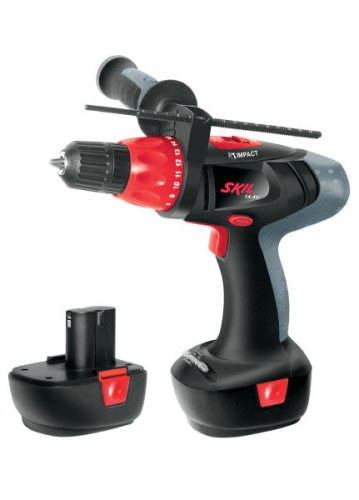
Figure 1: General view of the Skil 2497 Cordless Impact Drill/Driver. This image shows the overall design of the tool, including the handle, trigger, and chuck, ready for operation.
Components
- Chuck: Holds drill bits and driver bits.
- Torque/Mode Selector Ring: Adjusts torque settings for driving screws or selects drill/impact drill mode.
- Speed Selector Switch: Controls the speed range (low/high).
- Forward/Reverse Switch: Changes the rotation direction.
- Trigger Switch: Activates the tool and controls variable speed.
- Battery Pack: Removable 14.4V NiCd battery.
- Auxiliary Handle: Provides additional grip and control, especially for impact drilling.
Setup and Charging
Battery Charging
The Skil 2497 uses a 14.4V Nickel-cadmium (NiCd) battery. Before first use, fully charge the battery pack. Refer to your battery charger's instruction manual for specific charging procedures. Ensure the battery is securely inserted into the charger and the charger is connected to a suitable power outlet.
- Only use the charger specifically designed for Skil 14.4V NiCd battery packs.
- Do not charge damaged battery packs.
- Allow the battery to cool down before charging if it has been recently used.
Attaching the Auxiliary Handle
For improved control, especially during impact drilling or when working with high torque, attach the auxiliary handle. Loosen the handle, slide it over the chuck housing, and tighten it in a comfortable position.
Installing Drill/Driver Bits
- Ensure the tool is switched off and the battery pack is removed.
- Rotate the chuck counter-clockwise to open the jaws.
- Insert the drill bit or driver bit fully into the chuck.
- Rotate the chuck clockwise to tighten the jaws securely around the bit. Hand-tighten firmly.
Operation
Selecting Operating Mode and Speed
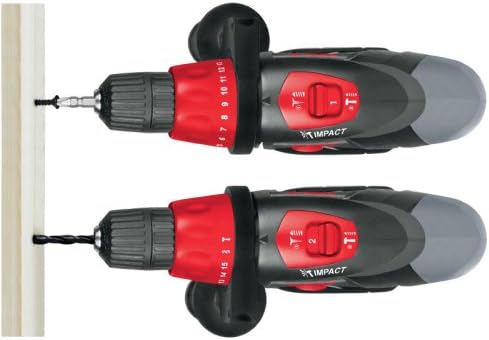
Figure 2: Top-down view illustrating the mode selection on the Skil 2497. The upper image shows the tool configured for driving screws, indicated by the screw icon. The lower image shows the tool configured for drilling, indicated by the drill bit icon, suitable for various materials.
- Driving Screws: Set the torque/mode selector ring to the desired torque setting (1-15) for driving screws. Start with a lower setting and increase as needed to prevent overtightening or stripping.
- Drilling: Set the torque/mode selector ring to the drill icon for general drilling in wood, plastic, or metal.
- Impact Drilling: Set the torque/mode selector ring to the impact drill icon (hammer symbol) for drilling into masonry or brick.
Use the speed selector switch (typically located on top of the tool) to choose between low speed (for high torque applications like driving large screws) and high speed (for faster drilling).
Drilling Procedures
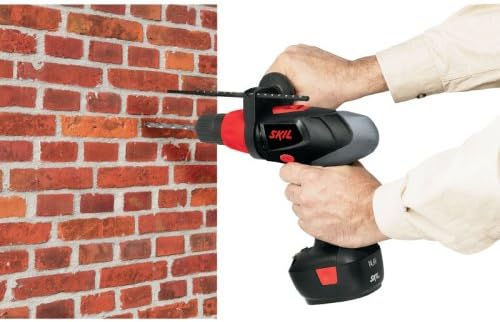
Figure 3: The Skil 2497 Cordless Impact Drill/Driver in use, demonstrating drilling into a brick wall. This highlights the tool's capability for masonry work when set to impact drilling mode.
- Secure the workpiece to prevent movement.
- Mark the drilling location.
- Select the appropriate drill bit and mode (drill or impact drill).
- Hold the tool firmly with both hands, especially when using the auxiliary handle.
- Align the drill bit with the mark and start the tool at a low speed, gradually increasing as the bit engages the material.
- Apply steady, even pressure. Do not force the tool.
Driving Screws

Figure 4: Close-up view of the Skil 2497 driving a screw into a wooden surface. This image demonstrates the precision and control offered by the tool when set to a driving torque setting, preventing over-driving or damage to the material.
- Select the correct driver bit for the screw head.
- Set the torque/mode selector ring to a suitable torque setting.
- Place the screw on the bit and align it with the workpiece.
- Start the tool at a low speed, applying gentle pressure until the screw engages.
- Increase speed and pressure as the screw drives in, releasing the trigger when the desired depth or torque is reached.
Maintenance
Regular maintenance ensures the longevity and optimal performance of your Skil 2497 drill/driver.
- Cleaning: Keep the ventilation openings clean to prevent overheating. Use a soft, damp cloth to clean the tool housing. Do not use solvents.
- Battery Care: Store NiCd batteries in a cool, dry place. Do not store fully discharged batteries for extended periods.
- Chuck Maintenance: Periodically clean the chuck jaws to ensure proper gripping of bits.
- Inspection: Regularly inspect the power tool for any signs of damage, loose screws, or worn parts. Do not use a damaged tool.
Troubleshooting
| Problem | Possible Cause | Solution |
|---|---|---|
| Tool does not start. | Battery discharged or not properly inserted. | Charge battery. Ensure battery is fully seated. |
| Reduced power or speed. | Battery low or tool overloaded. | Recharge battery. Reduce pressure or use a sharper bit. |
| Bit slips in chuck. | Chuck not tightened sufficiently or jaws are dirty. | Retighten chuck firmly. Clean chuck jaws. |
| Excessive vibration. | Damaged bit or loose auxiliary handle. | Replace damaged bit. Tighten auxiliary handle. |
Specifications
| Model: | F.015.249.7AB |
| Brand: | Skil (Manufactured by Bosch) |
| Battery Type: | Nickel-cadmium (NiCd) |
| Voltage: | 14.4 Volts |
| Material: | Metal |
| Color: | Black |
| Included Components: | Carrying case |
| Dimensions (Package): | 42.4 x 33.6 x 10.8 cm |
| Weight (Package): | 6.3 kg |
Warranty and Support
For information regarding warranty coverage, service, or technical support for your Skil 2497 Cordless Impact Drill/Driver, please refer to the warranty card included with your product or visit the official Skil website. Keep your proof of purchase for warranty claims.
Online Resources: www.skil.com


