
1. Introduction
This document provides essential information for the proper use and care of the MGM 'Touch' DVD. It covers basic playback instructions, maintenance guidelines, troubleshooting tips, and product specifications to ensure an optimal viewing experience.
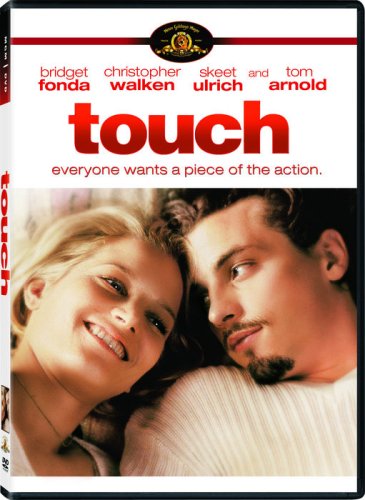
This image displays the official DVD cover for the movie 'Touch'. It features a close-up of actors Bridget Fonda and Skeet Ulrich, with the movie title prominently displayed in red. The cover also lists other key actors such as Christopher Walken and Tom Arnold, and the tagline 'everyone wants a piece of the action'.
2. Setup and Playback
Follow these steps to play your 'Touch' DVD:
- Insert the Disc: Gently place the 'Touch' DVD into the disc tray of your DVD player or computer's DVD drive, label side up.
- Power On: Ensure your DVD player and television/monitor are powered on and correctly connected.
- Select Input: Use your television remote to select the correct input source (e.g., HDMI 1, AV) that corresponds to your DVD player.
- Automatic Playback: Most DVD players will automatically begin playing the movie or display the main menu.
- Menu Navigation: Use the directional buttons on your DVD player remote to navigate the DVD menu. Select 'Play Movie' to start the film.
- Basic Controls:
- Play/Pause: Starts or temporarily stops playback.
- Stop: Halts playback and returns to the beginning or menu.
- Skip/Chapter Select: Moves to the next or previous chapter.
- Fast Forward/Rewind: Scans through the movie at an accelerated speed.
- Audio/Subtitle: Access options to change audio tracks (English, French, Spanish) or display subtitles (English, Spanish).
3. Disc Care and Maintenance
Proper care extends the life of your DVD and ensures consistent playback quality:
- Handling: Always hold the DVD by its edges or by placing a finger through the center hole. Avoid touching the shiny playback surface.
- Cleaning: If the disc becomes dirty or smudged, gently wipe it with a soft, lint-free cloth. Wipe from the center of the disc outwards in a straight line, not in a circular motion. Do not use abrasive cleaners or solvents.
- Storage: Store the DVD in its original case, away from direct sunlight, extreme temperatures, and high humidity. Keep it in a vertical position to prevent warping.
- Avoid Scratches: Do not place the disc on rough surfaces or expose it to objects that could scratch the playback surface.
4. Troubleshooting Common Issues
If you encounter problems while playing your 'Touch' DVD, consider the following solutions:
- Disc Not Playing:
- Ensure the disc is inserted correctly (label side up).
- Check if the DVD player is set to the correct input source on your TV.
- Clean the disc for any smudges or dirt.
- Try playing another DVD to determine if the issue is with the player or the disc.
- Skipping or Freezing:
- Clean the disc thoroughly, as dust or fingerprints are common causes.
- Inspect the disc for deep scratches. Severe scratches may prevent proper playback.
- Ensure the DVD player is on a stable surface to prevent vibrations.
- No Audio or Video:
- Verify all audio/video cables between the DVD player and TV are securely connected.
- Check the TV's volume and mute settings.
- Ensure the correct audio track is selected from the DVD menu if multiple options are available.
5. Product Specifications
| Feature | Specification |
|---|---|
| Title | Touch |
| Media Type | DVD |
| ASIN | B0010KHOQC |
| Studio | MGM |
| Genre | Drama |
| MPAA Rating | R (Restricted) |
| Run Time | 1 hour and 38 minutes |
| Aspect Ratio | 1.85:1 |
| Media Format | Color, DVD, Dolby, Dubbed, Subtitled, Widescreen |
| Audio Language | English |
| Dubbed Languages | French, Spanish |
| Subtitles | English, Spanish |
6. Warranty and Support
This DVD is subject to the standard return and exchange policies of the retailer from which it was purchased. If you receive a defective disc, please contact the seller or retailer directly for assistance.
For purchases made through Amazon, refer to Amazon's return policy for media products. Typically, defective items can be returned for a replacement or refund within a specified period.
For general inquiries about the movie content, please refer to publicly available information from MGM or official movie databases.