
Introduction
Thank you for choosing the RadioShack Lightweight Stereo Headphones, Model 33-1116. These headphones are designed for comfortable listening with clear audio. This manual provides essential information for setting up, operating, maintaining, and troubleshooting your headphones to ensure optimal performance and longevity.
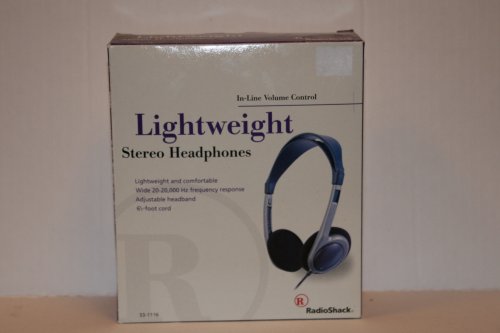
Image: RadioShack Lightweight Stereo Headphones, Model 33-1116. This image displays the headphones with an adjustable headband and a visible audio cable.
Safety Information
- Hearing Protection: Avoid listening at high volume levels for extended periods to prevent hearing damage.
- Environmental Awareness: Do not use headphones in situations where the inability to hear ambient sounds could be dangerous, such as while driving, cycling, or walking in traffic.
- Cleaning: Use a soft, dry cloth for cleaning. Do not use liquid cleaners or aerosols.
- Storage: Store headphones in a clean, dry place away from extreme temperatures.
Package Contents
Please check the package for the following items:
- RadioShack Lightweight Stereo Headphones (Model 33-1116)
Setup
- Connect to Audio Source: Insert the 3.5mm audio jack at the end of the headphone cable into the headphone output port of your audio device (e.g., smartphone, tablet, computer, stereo system).
- Adjust Headband: Place the headphones on your head. Adjust the sliding headband on both sides until the earcups comfortably cover your ears and the headphones feel secure without excessive pressure.
Operating
- Power On Audio Source: Ensure your audio device is powered on and playing audio.
- Adjust Volume: Use the in-line volume control located on the headphone cable to adjust the listening volume to a comfortable level. You may also need to adjust the volume on your audio source.
- Listening: Enjoy your audio.
Maintenance
- Cleaning Earcups and Headband: Use a soft, dry, lint-free cloth to gently wipe the earcups and headband. Do not use abrasive cleaners, solvents, or spray directly onto the headphones.
- Cable Care: Avoid sharply bending or twisting the 6.5-foot cable. Store the cable neatly to prevent tangling and damage.
- Storage: When not in use, store the headphones in a cool, dry place.
Troubleshooting
If you encounter issues with your headphones, refer to the following common problems and solutions:
- No Sound:
- Ensure the 3.5mm audio jack is fully inserted into your audio device.
- Check the volume level on both the in-line control and your audio device. Increase if necessary.
- Test the headphones with a different audio source to rule out a device issue.
- Distorted Sound:
- Lower the volume on both the headphones and your audio device. High volume can cause distortion.
- Ensure the audio jack is clean and free of debris.
- Test with another audio source or audio file.
- Uncomfortable Fit:
- Adjust the headband sliders on both sides to achieve a comfortable and secure fit.
Specifications
| Brand | RadioShack |
| Model Number | 33-1116 |
| Connectivity Technology | Wired |
| Frequency Response | 20 Hz - 20 kHz |
| Cable Length | 6.5 feet (approximately 2 meters) |
| Additional Features | Adjustable Headband, Lightweight Design, In-line Volume Control |
Warranty and Support
For warranty information, please refer to the documentation included with your purchase or the retailer's policy where the product was acquired. For further support or inquiries, please visit the official RadioShack brand store or contact their customer service.
RadioShack Brand Store: https://www.amazon.com/stores/RadioShack/page/428CD7AB-87FF-4B6C-B5C3-96B7B297DFC4