
1. Introduction
Thank you for choosing the Mastrad F76200 Wall-Mounted Kitchen Scale. This digital kitchen scale is designed for precise measurement of ingredients, offering convenience and space-saving benefits with its wall-mounted design. It features a clear display, a maximum capacity of 3 kg (6.6 lbs), and exact graduation in grams. The scale also includes additional functions such as a clock, temperature display, and a timer, making it a versatile tool for your kitchen.
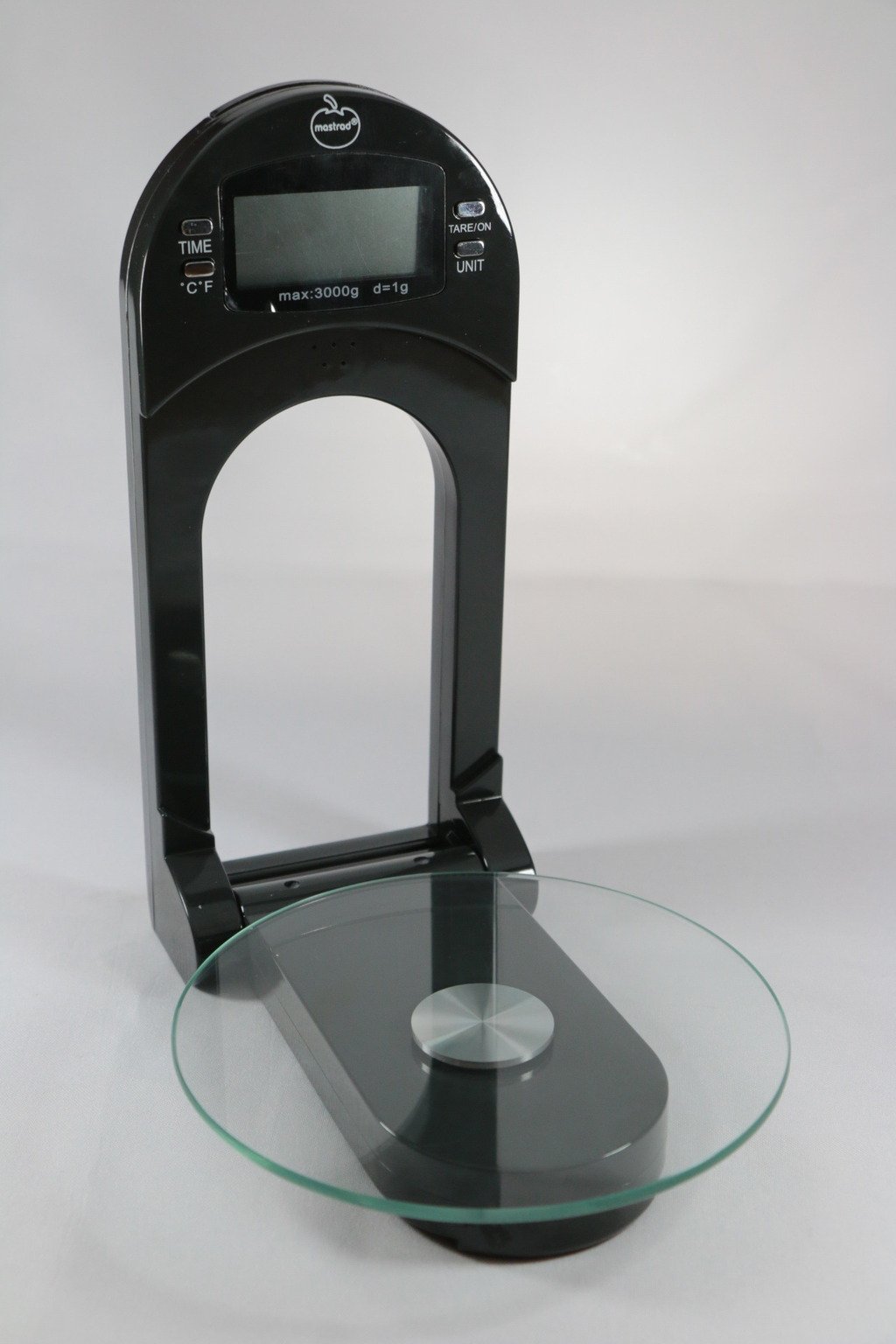
Image 1.1: The Mastrad F76200 Wall-Mounted Kitchen Scale. This image shows the scale in its operational state with the glass weighing tray extended, ready for use. The digital display is visible, indicating its functionality.
2. Safety Instructions
- Read all instructions before using the scale.
- Do not immerse the scale in water or other liquids. Clean with a damp cloth only.
- Do not place the scale near heat sources or in direct sunlight.
- Avoid dropping the scale or subjecting it to strong impacts, as this may damage the internal components.
- Keep batteries out of reach of children. Dispose of used batteries responsibly.
- Do not attempt to repair or disassemble the scale yourself. Contact qualified service personnel for assistance.
3. Package Contents
Please check the package for the following items:
- Mastrad F76200 Wall-Mounted Kitchen Scale unit
- Batteries (1.2V 600mAh AAA NiMH)
- Instruction Manual (this document)
4. Setup and Installation
4.1 Battery Installation
- Locate the battery compartment on the back of the scale.
- Open the battery compartment cover.
- Insert the provided 1.2V 600mAh AAA NiMH batteries, ensuring correct polarity (+/-).
- Close the battery compartment cover securely.
4.2 Wall Mounting
The Mastrad F76200 is designed for wall mounting to save counter space. While specific mounting hardware is not detailed, generally:
- Choose a suitable location on a sturdy wall, away from heat and moisture.
- Mark the desired mounting points using the scale's mounting holes as a template.
- Drill pilot holes if necessary and insert appropriate wall anchors.
- Secure the scale to the wall using screws, ensuring it is level and firmly attached.
5. Operating Instructions
5.1 Powering On/Off
- To power on: Press the ON/OFF button. The display will light up and show '0' or '0.0'.
- To power off: Press and hold the ON/OFF button for a few seconds, or the scale will automatically turn off after a period of inactivity (approximately 30 seconds to 2 minutes, depending on mode).
5.2 Weighing Ingredients (Tare Function)
- Extend the glass weighing tray.
- Press ON/OFF to turn on the scale. Ensure the display shows '0'.
- Place an empty container on the glass tray. The display will show the container's weight.
- Press the TARE button (if available, common function). The display will reset to '0', allowing you to weigh ingredients without including the container's weight.
- Add your ingredients to the container. The display will show the net weight.
- To weigh additional ingredients in the same container, press TARE again after adding each ingredient to reset the display to '0'.
5.3 Changing Units
To switch between measurement units (e.g., grams, pounds, ounces), press the UNIT button (or similar, if available). The display will cycle through the available units.
5.4 Using Clock, Temperature, and Timer Functions
The scale can display the time and temperature, and also functions as a timer. Refer to the specific buttons on your scale for these functions (e.g., MODE or dedicated buttons for clock/timer settings). Typically, you would press a MODE button to cycle through weighing, clock, and timer displays. Use adjustment buttons (e.g., +/- or SET) to set the time or timer duration.
5.5 Storing the Glass Tray
For optimal storage and to save space, the glass weighing tray can be lifted and folded back into the main unit when not in use.
6. Maintenance and Cleaning
6.1 Cleaning the Scale
- Wipe the scale surface and glass tray with a soft, damp cloth.
- Do not use abrasive cleaners or chemical solvents.
- Ensure no water enters the internal components.
- Dry thoroughly after cleaning.
6.2 Battery Replacement
When the display indicates low battery or the scale stops functioning, replace the batteries. Follow the steps in Section 4.1 for battery installation, ensuring to use 1.2V 600mAh AAA NiMH batteries.
7. Troubleshooting
- Display shows 'E' or 'Overload': This indicates the maximum weight capacity (3 kg / 6.6 lbs) has been exceeded. Remove some weight immediately to prevent damage. If this occurs with less weight, try turning the scale off and on again.
- Scale turns off too quickly: The scale has an auto-off feature to conserve battery. If it turns off faster than expected (e.g., 30 seconds), ensure you are actively using it or press a button to keep it active. This behavior is noted in some user experiences.
- Inaccurate readings: Ensure the scale is placed on a flat, stable surface. Avoid placing it near vibrations or drafts. Check if the glass tray is properly extended and level. Recalibrate if your model supports it (refer to specific product documentation if available).
- Display not working: Check battery levels and ensure they are correctly inserted. Replace batteries if necessary. If the issue persists, contact customer support.
8. Specifications
| Model Number | F76200 |
| Brand | Mastrad |
| Maximum Weight Capacity | 3 kg (6.6 lbs) |
| Batteries | 1.2V 600mAh AAA NiMH |
| Product Dimensions | 24.5 x 15 x 5.5 cm |
| Product Weight | 520 g |
| Color | Black |
9. Warranty and Support
Mastrad products are manufactured to high-quality standards. For information regarding warranty coverage, please refer to the warranty card included with your purchase or visit the official Mastrad website. For technical support, troubleshooting assistance, or to inquire about replacement parts, please contact Mastrad customer service through their official channels.