
1. Introduction and Safety Information
This manual provides essential instructions for the safe and efficient operation of your E-flite 1.8A 3S 11.1V LiPo Balancing Charger. Please read this entire manual before using the charger to ensure proper setup and to prevent damage or injury.
Important Safety Precautions for LiPo Batteries:
- Always charge LiPo batteries on a fire-resistant surface, away from flammable materials.
- Never leave charging LiPo batteries unattended.
- Do not charge damaged or swollen LiPo batteries. Dispose of them properly.
- Ensure the charger settings match the battery type and cell count (3S 11.1V LiPo).
- Keep the charger and battery away from moisture and extreme temperatures.
2. Package Contents
Verify that the following item is included in your package:
- E-flite 1.8A 3S 11.1V LiPo Balancing Charger (Model EFLC3115)
Note: A 12V DC power supply (minimum 2A output) is required and sold separately. This charger does not include an AC adapter.
3. Setup
Follow these steps to set up your E-flite LiPo Balancing Charger:
- Connect Power Supply: Connect a 12V DC power supply (minimum 2A output) to the charger's DC input port. Ensure the power supply is capable of providing sufficient current; insufficient current (e.g., less than 2A) may cause the charger to cycle on and off without charging.
- Place Charger: Position the charger on a stable, non-flammable surface, away from any heat sources or flammable materials.
- Prepare Battery: Ensure your 3S 11.1V LiPo battery is in good condition, free from any physical damage or swelling.
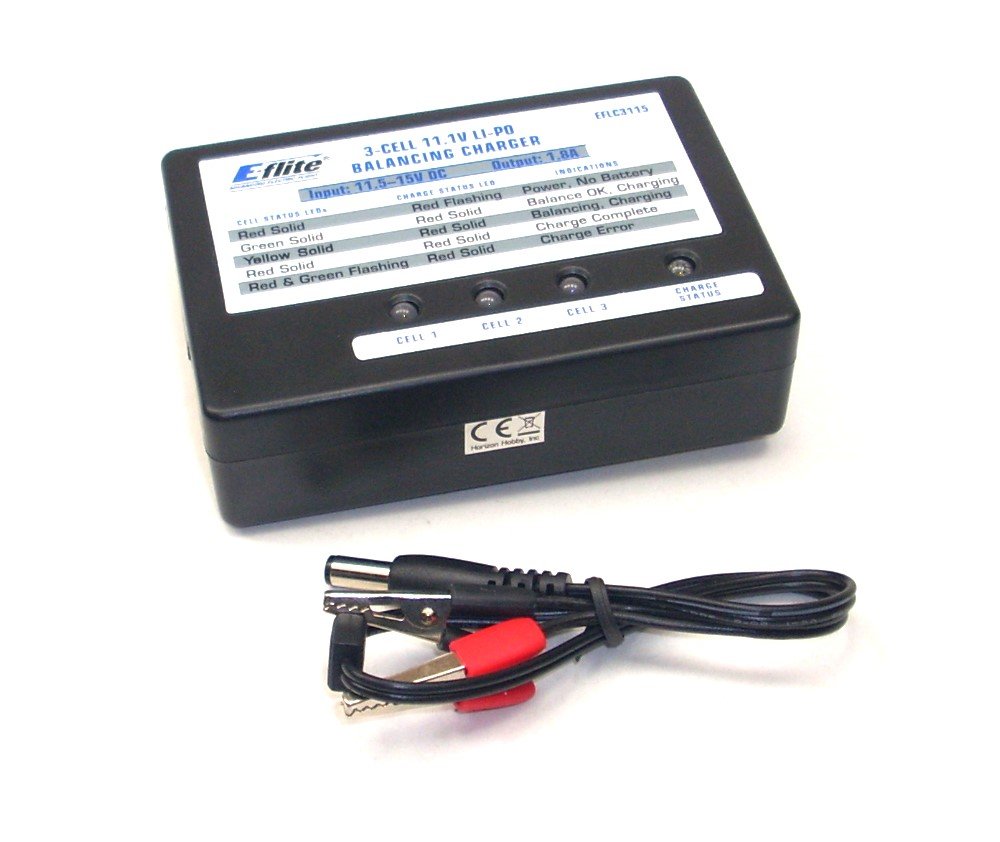
Image: E-flite 1.8A 3S 11.1V LiPo Balancing Charger. This image displays the compact design of the charger, featuring its input and output ports, and indicator lights.
4. Operating Instructions
This charger is designed for 3S (3-cell) 11.1V Lithium-polymer (LiPo) batteries only. Do not attempt to charge other battery types or cell counts.
- Connect Battery: Plug the 3S balance lead of your LiPo battery into the corresponding 3S balance port on the charger. Ensure the connector is fully seated and correctly oriented.
- Initiate Charging: Once the battery is connected, the charger will automatically begin the charging process. The indicator lights will provide feedback on the charging status.
- Monitor Charging: Observe the indicator lights. A solid green light typically indicates charging is in progress. The charger will automatically stop charging when the battery is fully balanced and charged.
- Charging Completion: When charging is complete, the indicator light will change (e.g., turn solid green or off, depending on the specific model's indication). Disconnect the battery from the charger.
Indicator Lights:
- Red/Orange Light: Typically indicates the charger is powered on and ready, or an error condition.
- Green Light (Flashing/Solid): Indicates charging in progress or charging complete. Refer to the specific charger's label for exact light behavior.
5. Maintenance
Proper maintenance ensures the longevity and reliable operation of your charger:
- Cleaning: Keep the charger clean and free from dust and debris. Use a soft, dry cloth for cleaning. Do not use solvents or abrasive cleaners.
- Storage: Store the charger in a cool, dry place when not in use. Avoid exposing it to direct sunlight or extreme temperatures.
- Inspection: Periodically inspect the charger and its cables for any signs of damage, such as frayed wires or cracked casings. Do not use a damaged charger.
6. Troubleshooting
If you encounter issues with your E-flite charger, refer to the following common problems and solutions:
| Problem | Possible Cause | Solution |
|---|---|---|
| Charger cycles on/off, does not charge. | Insufficient power supply current. | Ensure your 12V DC power supply provides at least 2 Amps. A power supply with less than 2A may not provide enough power for stable operation. |
| No indicator lights. | No power to charger or faulty power supply connection. | Check power supply connection. Ensure the power supply is functioning correctly and providing 12V DC. |
| Battery not charging. | Incorrect battery type/cell count, damaged battery, or poor balance lead connection. | Verify battery is a 3S 11.1V LiPo. Inspect battery for damage. Ensure balance lead is fully and correctly inserted. |
| Charger fan is noisy or squealing. | Fan bearing issue. | This may indicate a manufacturing defect. Contact customer support for assistance. |
7. Specifications
Key technical specifications for the E-flite 1.8A 3S 11.1V LiPo Balancing Charger:
- Model: EFLC3115
- Input Voltage: 12V DC (Power supply not included)
- Current Rating: 1.8 Amps
- Battery Type: Lithium-polymer (LiPo)
- Cell Count: 3S (3-Cell)
- Battery Voltage: 11.1V
- Dimensions (Approximate): 6.5 x 3.9 x 1.5 inches
- Item Weight (Approximate): 1.6 ounces
- UPC: 605482787519
8. Warranty and Support
For warranty information and technical support, please refer to the official E-flite website or contact your local dealer. Keep your purchase receipt as proof of purchase for any warranty claims.
For further assistance, you may visit the E-flite Store on Amazon.