
1. Introduction
The ESI 597IR Kit is a comprehensive diagnostic tool designed for automotive and electrical professionals. It combines a CAT III 1000V rated Digital Multimeter (DMM) with an EST-100 Infrared (IR) Thermometer and an inductive RPM pick-up. This kit is engineered for precision, safety, and durability, featuring a waterproof design to IP67 standards. It is ideal for measuring voltage, current, resistance, temperature, and engine RPM, providing essential data for vehicle diagnostics and electrical system analysis.
2. Safety Information
WARNING: Read and understand all safety instructions before operating this device. Failure to follow these instructions may result in electric shock, fire, or serious injury.
- Always adhere to local and national safety codes.
- Do not use the device if it appears damaged or if the test leads are compromised.
- Ensure the device is rated for the voltage and current levels being measured (CAT III 1000V).
- Wear appropriate personal protective equipment (PPE), including safety glasses and insulated gloves.
- Avoid contact with live circuits. Always assume circuits are live until verified otherwise.
- Do not operate the device in explosive atmospheres or near flammable materials.
- Keep the device dry. Although waterproof to IP67, prolonged submersion is not recommended.
- Use only the specified battery type and ensure correct polarity during installation.
3. Components Included
The ESI 597IR Kit comes complete with the following components:
- ESI 597IR Digital Multimeter
- EST-100 Infrared Thermometer Adapter
- Test Leads (Red and Black)
- Inductive RPM Pick-up
- Temperature Probe
- 9-Volt Battery
- Hard Storage Case
- Instruction Manual (this document)

Figure 3.1: Overview of all components included in the ESI 597IR Kit.
4. Setup
4.1 Battery Installation
- Locate the battery compartment cover on the rear of the ESI 597IR DMM.
- Use a screwdriver to remove the screw securing the cover.
- Insert the supplied 9-volt battery, ensuring correct polarity (+ and -).
- Replace the battery compartment cover and secure it with the screw.
4.2 Connecting Test Leads
Insert the red test lead into the VΩmA input jack and the black test lead into the COM input jack on the DMM. Ensure a secure connection.
4.3 Connecting EST-100 IR Thermometer Adapter
The EST-100 IR Thermometer adapter connects to the DMM using its integrated leads. Plug the red lead into the VΩmA input and the black lead into the COM input. The DMM will then display temperature readings from the EST-100.
4.4 Connecting Inductive RPM Pick-up
Connect the inductive RPM pick-up to the designated RPM input on the DMM. The pick-up features a five-position adjustable sensitivity switch to optimize signal detection for various ignition systems.
5. Operating Instructions
5.1 Digital Multimeter (DMM) Functions
The ESI 597IR DMM offers a wide range of measurement capabilities. Use the rotary dial to select the desired function.
- Voltage Measurement (DCV/ACV): Select the appropriate voltage range. Connect test leads in parallel with the circuit or component. The DMM is rated for CAT III 1000V.
- Current Measurement (DCA/ACA): Select the appropriate current range (up to 20A fused). Connect the DMM in series with the circuit. Ensure the circuit is de-energized before connecting.
- Resistance (Ω): Select the resistance range. Ensure the circuit is de-energized before measuring. Connect test leads across the component.
- Continuity: Select the continuity function. The DMM will emit an audible tone if continuity is detected.
- Diode Test: Select the diode test function. Connect test leads across the diode to measure forward voltage drop.
- Frequency/Duty Cycle: Used for measuring signal frequency and duty cycle in various automotive sensors and circuits.
- Peak Min/Max Function: This function captures transient voltages as fast as 1 millisecond, useful for diagnosing intermittent electrical issues. Activate by pressing the 'PEAK' button.
- Ms Pulse Width: Specifically designed for measuring fuel injector on-time, providing critical data for engine performance analysis.
5.2 EST-100 IR Thermometer Operation
Once connected to the DMM, the EST-100 allows for non-contact temperature measurement. Point the IR thermometer at the target surface. The DMM will display the temperature reading. The EST-100 has an 8:1 distance-to-spot ratio, meaning at 8 inches from the target, it measures a 1-inch diameter area. It can measure temperatures up to 1022°F (550°C).
5.3 Inductive RPM Pick-up Operation
Attach the inductive RPM pick-up to an ignition wire or other suitable location to detect engine RPM. Adjust the five-position sensitivity switch on the pick-up to ensure accurate readings for different engine types and ignition systems. The DMM will display the engine revolutions per minute.
6. Maintenance
6.1 Cleaning
To clean the device, wipe the exterior with a damp cloth. Do not use abrasive cleaners or solvents. Ensure the device is powered off and disconnected from all circuits before cleaning.
6.2 Battery Replacement
When the low battery indicator appears on the DMM display, replace the 9-volt battery as described in Section 4.1. Always use a fresh alkaline 9-volt battery.
6.3 Storage
Store the ESI 597IR Kit in its hard storage case when not in use. This protects the instruments and accessories from dust, moisture, and physical damage. Store in a cool, dry place away from direct sunlight and extreme temperatures.
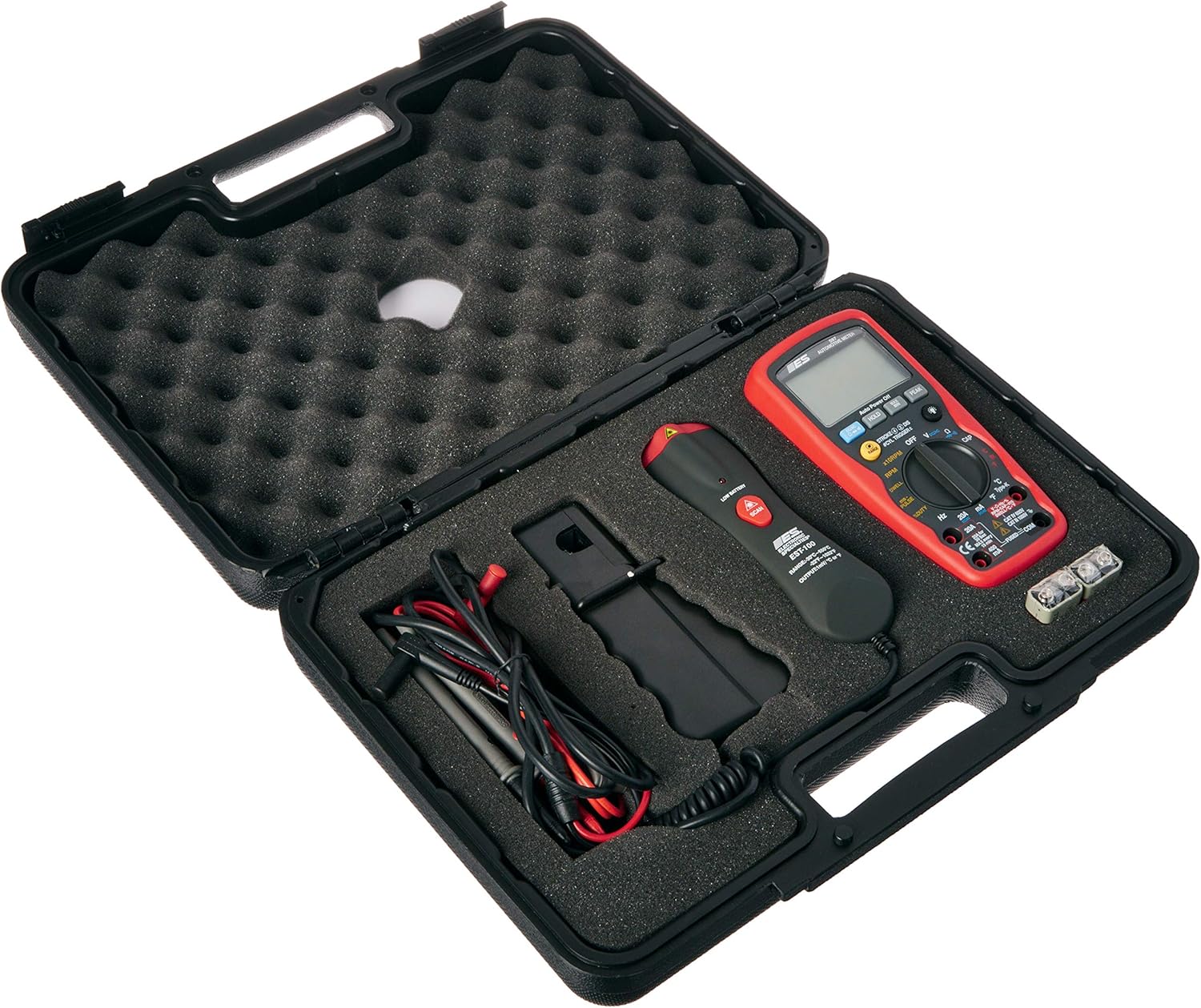
Figure 6.1: The ESI 597IR Kit stored in its hard case.

Figure 6.2: The exterior of the hard storage case.
7. Troubleshooting
- No Display/Power:
- Check battery installation and ensure it is a fresh 9-volt battery.
- Verify the rotary switch is turned to an ON position.
- Incorrect Readings:
- Ensure test leads are fully inserted and not damaged.
- Verify the correct function and range are selected on the DMM.
- For IR thermometer, ensure the target is within the specified distance-to-spot ratio.
- For RPM pick-up, adjust the sensitivity switch.
- Fuses Blown (for current measurements):
- If the DMM does not read current, the internal fuse may be blown. Refer to the DMM's internal diagram for fuse replacement. Always replace with a fuse of the same type and rating (e.g., 20A fused range).
- Intermittent Readings:
- Check for loose connections at the DMM jacks or on the components being tested.
- Ensure the test environment is stable and free from excessive electrical noise.
8. Specifications
| Specification | Value |
|---|---|
| Model | 597IR |
| Safety Rating | CAT III 1000V |
| Waterproof Rating | IP67 |
| IR Thermometer Model | EST-100 |
| IR Temp Range | Up to 1022°F (550°C) |
| IR Distance Ratio | 8:1 |
| Peak Min/Max Capture | 1 millisecond |
| Current Range | 20 Amperes (fused) |
| Power Source | 9-Volt Battery |
| Item Weight | 5.1 Pounds |
| Manufacturer | ELECTRONIC SPECIALTIES |
| UPC | 855174001427 |
9. Warranty Information
This product is covered by a manufacturer's warranty. For specific details regarding warranty coverage, duration, and terms, please refer to the warranty card included with your purchase or contact the manufacturer directly. Keep your proof of purchase for warranty claims.
10. Customer Support
For technical assistance, troubleshooting beyond this manual, or inquiries regarding parts and service, please contact Electronic Specialties customer support. Contact information can typically be found on the manufacturer's official website or on the product packaging.


