
JL Audio 300/4V2
JL Audio 300/4V2 4-Channel Car Audio Amplifier User Manual
Model: 300/4V2
1. Introduction
Thank you for choosing the JL Audio 300/4V2 4-Channel Car Audio Amplifier. This amplifier is designed to deliver high-fidelity sound reproduction for your vehicle's audio system. Featuring a Class A/B full-range design, absolute symmetry Class A/B circuitry, and differential balanced input topology, the 300/4V2 ensures clean and powerful audio output.
Key features include:
- Class A/B full-range four-channel amplifier.
- Absolute Symmetry Class A/B circuit.
- Differential Balanced Input Topology with 2 pairs of inputs.
- On-board Crossover: Fully variable (50 Hz - 5 kHz), selectable slope/mode (12 or 24 dB/octave, LP or HP) for each channel pair.
- Speaker output connections: Accepts up to 8 AWG wire.
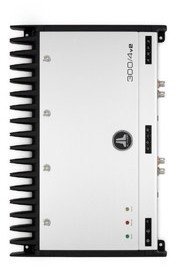
Figure 1.1: Top view of the JL Audio 300/4V2 amplifier, showcasing its sleek design and branding.
2. Safety Information
Please read all instructions carefully before installing and operating your amplifier. Failure to do so may result in personal injury or damage to the amplifier or vehicle.
- Always disconnect the vehicle's battery negative terminal before beginning any installation.
- Ensure proper grounding for the amplifier to prevent electrical hazards and noise.
- Use appropriate wire gauges for power, ground, and speaker connections as specified in the installation section.
- Mount the amplifier securely in a location that allows for adequate ventilation and is protected from moisture and excessive heat.
- Avoid routing wires near sharp edges or moving parts. Use grommets where wires pass through metal.
- Do not operate the amplifier if it is damaged or malfunctioning. Refer to the troubleshooting section or contact support.
- Prolonged exposure to high sound pressure levels can cause permanent hearing damage. Adjust volume responsibly.
3. Setup & Installation
Proper installation is crucial for optimal performance and longevity of your amplifier. If you are unsure about any part of the installation process, it is recommended to seek professional assistance.
3.1 Package Contents
Verify that all items are present in the package:
- JL Audio 300/4V2 Amplifier
- Owner's Manual (this document)
- Mounting Hardware (screws, washers)
- Connector Plugs (if applicable for speaker/power terminals)
3.2 Mounting Location
Choose a mounting location that is dry, well-ventilated, and secure. Common locations include under seats, in the trunk, or behind panels. Ensure there is sufficient space for the amplifier's dimensions (43.69 x 31.5 x 13.72 cm) and for proper air circulation around the heat sinks.
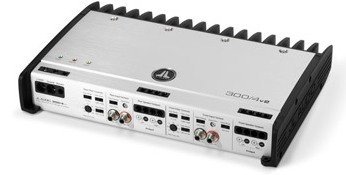
Figure 3.1: Angled view of the JL Audio 300/4V2 amplifier, showing its compact form factor suitable for various mounting locations.
3.3 Wiring Connections
Refer to the rear panel image for connection points. All connections should be made with the vehicle's battery disconnected.
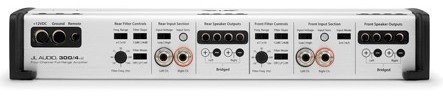
Figure 3.2: Detailed view of the JL Audio 300/4V2 amplifier's rear panel, showing power, ground, remote, input, and output terminals, along with crossover controls.
3.3.1 Power and Ground Connections
- +12V (Power): Connect directly to the positive terminal of the vehicle's battery using a fuse holder within 18 inches of the battery. Use appropriate gauge wire (e.g., 8 AWG or larger for typical installations).
- Ground: Connect to a clean, unpainted metal surface of the vehicle chassis. Ensure a solid electrical connection. The ground wire should be the same gauge and as short as possible, ideally less than 3 feet.
- Remote: Connect to the remote turn-on lead from your head unit. This signal turns the amplifier on and off with your audio system. If using speaker-level inputs without a remote wire, the amplifier's signal sensing technology can automatically turn it on.
3.3.2 Input Connections
The 300/4V2 features differential balanced input topology with two pairs of inputs, allowing for both low-level (RCA) and speaker-level inputs.
- RCA Inputs: Connect RCA cables from your head unit's pre-outs to the amplifier's input jacks.
- Speaker-Level Inputs: If your head unit does not have RCA outputs, you can connect the speaker wires directly to the amplifier's input terminals. The amplifier's balanced inputs are designed to handle this without needing a separate line-output converter.
3.3.3 Speaker Output Connections
Connect your speakers to the amplifier's speaker output terminals. The 300/4V2 is a 4-channel amplifier, allowing for connection of four speakers or two speakers in bridged mode for higher power output to subwoofers or mid-bass drivers. The terminals accept up to 8 AWG wire.
- Ensure correct polarity (+ to + and - to -) for all speaker connections.
- Refer to your speaker's impedance rating and the amplifier's specifications to ensure compatibility.
4. Operation
Once installed, the amplifier requires proper configuration to match your audio system and preferences.
4.1 Gain Adjustment
The gain control (Input Sensitivity) matches the amplifier's input level to the output level of your head unit. This is not a volume control. To set the gain:
- Turn the amplifier's gain control all the way down (counter-clockwise).
- Set your head unit's volume to about 75% of its maximum.
- Play a dynamic piece of music.
- Slowly increase the amplifier's gain control until you hear slight distortion, then back it off slightly until the sound is clean.
4.2 Crossover Settings
The 300/4V2 features a fully variable on-board crossover (50 Hz - 5 kHz) with selectable slope/mode (12 or 24 dB/octave, Low-Pass or High-Pass) for each pair of channels. This allows you to direct specific frequency ranges to your speakers.
- HP (High-Pass): Allows frequencies above the set point to pass through. Typically used for full-range speakers to prevent them from playing low bass.
- LP (Low-Pass): Allows frequencies below the set point to pass through. Typically used for subwoofers.
- Adjust the crossover frequency and slope according to your speaker types and desired sound.
5. Maintenance
The JL Audio 300/4V2 amplifier is designed for reliable operation with minimal maintenance. However, periodic checks can help ensure its longevity.
- Cleaning: Gently wipe the amplifier's exterior with a soft, dry cloth to remove dust. Do not use harsh chemicals or abrasive cleaners. Ensure ventilation fins are clear of obstructions.
- Connection Check: Periodically inspect all power, ground, remote, input, and speaker connections to ensure they are secure and free from corrosion. Loose connections can lead to poor performance or damage.
- Ventilation: Ensure the amplifier's mounting location remains clear and allows for proper airflow. Blocked ventilation can lead to overheating.
6. Troubleshooting
If you experience issues with your amplifier, consult the following table before contacting support.
| Problem | Possible Cause | Solution |
|---|---|---|
| No Power / Amplifier does not turn on |
|
|
| No Sound Output |
|
|
| Distorted Sound |
|
|
| Amplifier Overheating (Protection Mode) |
|
|
7. Specifications
The following are key technical specifications for the JL Audio 300/4V2 amplifier:
| Feature | Detail |
|---|---|
| Model Number | 300/4V2 |
| Brand | JL Audio |
| Amplifier Class | Class A/B |
| Number of Channels | 4 |
| Output Power | 75 Watts per channel (RMS, typical) |
| Voltage | 4 Volts (Input Sensitivity Range) |
| Crossover | Fully variable (50 Hz - 5 kHz), selectable slope (12 or 24 dB/octave), LP or HP |
| Input Topology | Differential Balanced (2 pairs of inputs) |
| Speaker Wire Acceptance | Up to 8 AWG |
| Dimensions (L x W x H) | 43.69 x 31.5 x 13.72 cm (approx. 17.2 x 12.4 x 5.4 inches) |
| Weight | 5.72 kg (approx. 12.6 lbs) |
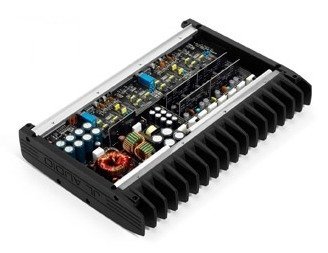
Figure 7.1: Internal view of the JL Audio 300/4V2 amplifier, showing the high-quality components and robust construction.
8. Warranty & Support
JL Audio products are engineered for durability and performance. For specific warranty terms and conditions, please refer to the warranty card included with your product or visit the official JL Audio website. Warranty coverage typically includes defects in materials and workmanship for a specified period from the date of purchase.
For technical support, service, or replacement parts, please contact JL Audio customer service or an authorized JL Audio dealer. Ensure you have your product model number (300/4V2) and proof of purchase available when seeking support.
You can find more information and contact details on the official JL Audio website: www.jlaudio.com
Related documents300/4V2


Ask a question about this manual
Ask about setup, troubleshooting, compatibility, parts, safety, or missing instructions. Manuals+ will review the question and use this page’s manual context to help answer it.