
Introduction
This manual provides detailed instructions for the assembly, operation, maintenance, and troubleshooting of your SEI Furniture Window Pane Media Cabinet. Please read all instructions carefully before beginning assembly and retain this manual for future reference.
Important Safety Information: Items with anti-tipping hardware restraints must be secured to the wall. Please contact the manufacturer immediately if anti-tip hardware is not included. Always ensure the cabinet is stable and properly anchored to prevent tipping, especially given its shallow depth.

Image: The assembled SEI Furniture Window Pane Media Cabinet, showcasing its cherry finish and glass-inlaid doors, used for media storage.
Setup and Assembly
To ensure proper assembly, please follow all steps provided in the installation manual. It is recommended to have two people for assembly. Lay out all parts on a soft, clean surface to prevent scratches.
Assembly Video Guide

Video: A detailed animation demonstrating the step-by-step assembly process for the Window Pane Media Cabinet, Cherry (Model MS1073).
Key Assembly Steps:
- Step 1: Construct the Base Frame. Attach the bottom panel (F) to the side panels (B and C) using the provided cam locks and dowels. Ensure all connections are secure.
- Step 2: Attach the Top Panel. Secure the top panel (A) to the assembled side panels using cam locks and dowels.
- Step 3: Install Back Panels. Slide the back panels (G) into the grooves on the rear of the cabinet and secure them with the small nails or screws provided.
- Step 4: Install Anti-Tipping Hardware. Attach the anti-tipping hardware to the top rear of the cabinet and to a wall stud, following the specific instructions provided with the hardware. This is crucial for stability.
- Step 5: Insert Adjustable Shelves. Place the shelf pins into the desired holes on the side panels, then rest the adjustable shelves (E) on these pins. The cabinet includes 4 fixed shelves and 2 adjustable shelves.
- Step 6: Attach Door Hinges. Secure the hinges (9) to the cabinet doors (K and J) using the provided screws.
- Step 7: Mount Doors. Attach the doors to the cabinet frame by securing the hinges to the pre-drilled holes on the side panels.
- Step 8: Install Door Magnets and Strike Plates. Attach the door magnets (11) to the cabinet frame and the corresponding strike plates (10) to the doors to ensure they close securely.
- Step 9: Attach Door Handles. Fasten the decorative door handles (12) to the front of the doors.
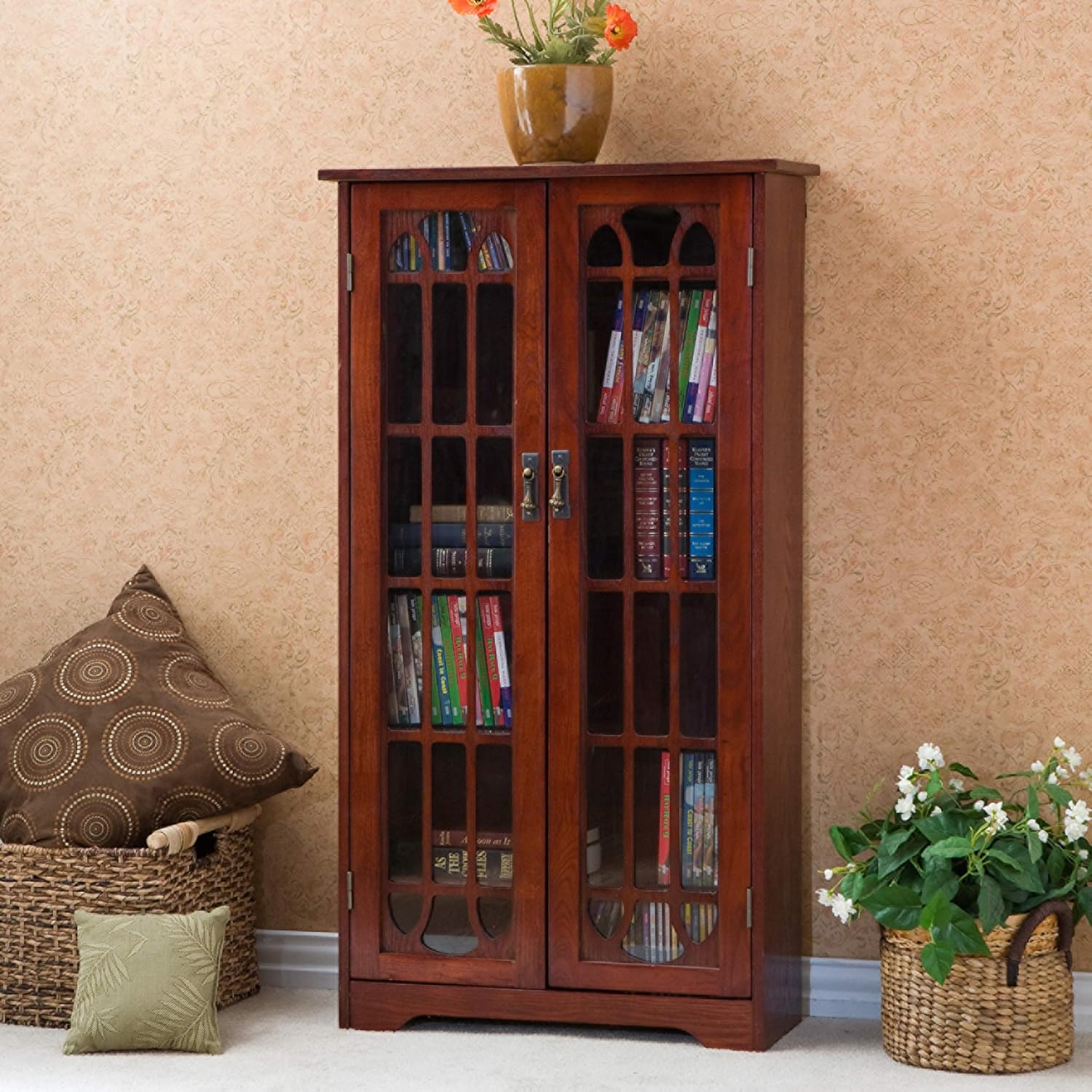
Image: Detail of the cabinet's decorative door handles, which are installed during assembly.
Operating Instructions
The SEI Furniture Window Pane Media Cabinet is designed for organized storage of various media and decorative items. Its double-door design and adjustable shelving offer versatility.
Shelf Adjustment
The cabinet features four fixed shelves and two adjustable shelves. To adjust the height of the adjustable shelves, simply remove the shelf pins from their current holes and reinsert them into the desired new positions. Then, place the shelf back onto the pins. This allows customization for items of different heights, such as CDs, DVDs, or small books.

Image: Interior view of the cabinet, demonstrating how media items can be stored on the shelves.
Care and Maintenance
To maintain the beauty and longevity of your media cabinet, follow these care instructions:
- Cleaning: Wipe surfaces with a soft, dry cloth. Avoid using harsh chemicals or abrasive cleaners, as these can damage the cherry finish.
- Spills: Immediately blot any spills with a clean, dry cloth to prevent staining or water damage.
- Sunlight: Avoid placing the cabinet in direct sunlight for extended periods, as this can cause fading or discoloration of the wood finish.
- Humidity: Maintain a consistent humidity level in the room to prevent wood from warping or cracking.
Troubleshooting
If you encounter any issues with your media cabinet, refer to the following common solutions:
- Cabinet is Wobbly: Ensure all cam locks and screws are fully tightened. Verify that the anti-tipping hardware is securely installed to a wall stud. The cabinet's shallow depth necessitates proper anchoring for stability.
- Doors Not Closing Properly: Check that the hinges are correctly aligned and securely fastened. Adjust the door magnets and strike plates if necessary to ensure a firm closure.
- Missing Parts: If any parts are missing or damaged upon arrival, please contact SEI Furniture customer support immediately for assistance.
- Assembly Difficulties: Review the assembly video and instructions carefully. Sometimes, loosely fitting all components before final tightening can resolve alignment issues.
Product Specifications
| Feature | Detail |
|---|---|
| Brand | SEI Furniture |
| Model Number | MS1073 |
| Color | Cherry |
| Material | Asian Hardwood, veneer |
| Product Dimensions | 9.5"D x 26.25"W x 47.75"H |
| Item Weight | 56 Pounds |
| Weight Limit (each shelf) | 15 lb. |
| Number of Shelves | 5 (1 fixed center, 4 adjustable) |
| Assembly Required | Yes |
| Special Feature | Adjustable shelves, Double-door cabinet |

Image: Dimensional drawing of the cabinet, illustrating its width, depth, and height.
Warranty Information
Specific warranty details for the SEI Furniture Window Pane Media Cabinet are typically provided with your purchase documentation or can be found on the official SEI Furniture website. Please refer to these resources for comprehensive warranty coverage information.
Customer Support
For further assistance, questions regarding assembly, missing parts, or any other product-related inquiries, please contact SEI Furniture customer support. Contact details are usually available on the manufacturer's website or through your retailer.