
Introduction
Thank you for choosing the OXO Good Grips Stainless Steel Food Scale with Pull-Out Display. This digital kitchen scale is designed for precise measurement of ingredients, featuring an 11-pound (5 kg) capacity and a convenient pull-out display to prevent shadowing from larger bowls. This manual provides detailed instructions to help you get the most out of your new scale.
Important Safety Information
- Read all instructions before use.
- Do not immerse the scale base in water or other liquids. The stainless steel platform is removable for hand washing only.
- Use the scale on a flat, stable surface to ensure accurate readings.
- Do not overload the scale beyond its maximum capacity of 11 pounds (5 kg).
- Keep batteries out of reach of children. Dispose of used batteries properly according to local regulations.
- Avoid exposing the scale to extreme temperatures or direct sunlight.
- This product is intended for household use only.
Package Contents
- OXO Good Grips Stainless Steel Food Scale
- 4 AAA Batteries
Product Overview
The OXO Good Grips Food Scale features a sleek design with a durable stainless steel weighing platform and an intuitive control panel. Key components include:
- Stainless Steel Platform: Removable for easy cleaning.
- Pull-Out Display: Extends from the base to prevent shadowing from large items.
- LCD Display: Large, easy-to-read numbers with optional backlight.
- "Zero" Button: Powers the scale on/off and activates the tare function.
- "lb/kg" Button: Switches between imperial (pounds/ounces) and metric (grams) units.
- Backlight Button: Activates or deactivates the display backlight.
- Capacity Indicator: Shows remaining capacity before maximum weight is reached.
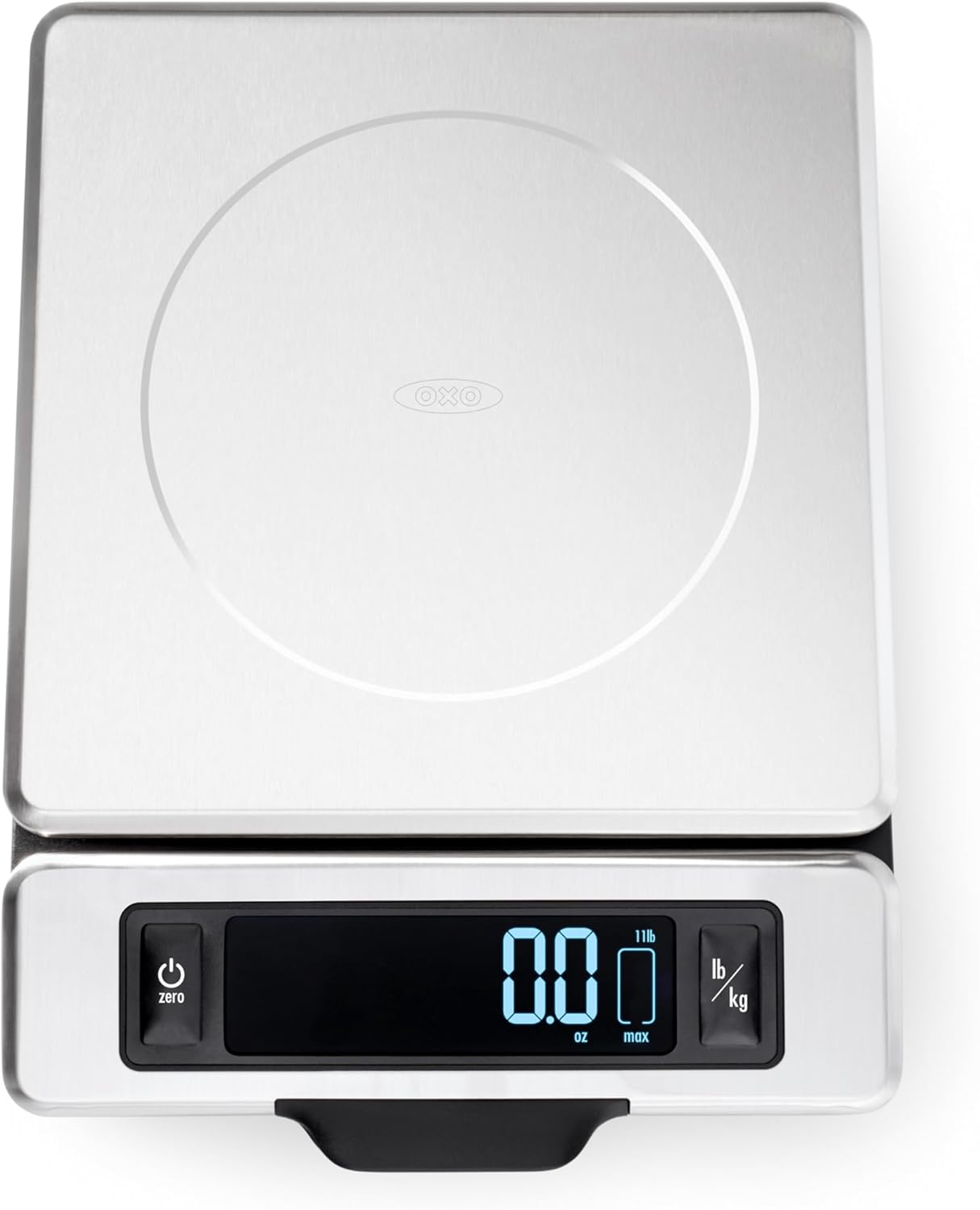
Image 1: Top-down view of the OXO Good Grips Stainless Steel Food Scale, showing the stainless steel platform, the digital display, and the control buttons (Zero, lb/kg, backlight).
Setup
- Battery Installation: Open the battery compartment on the underside of the scale. Insert the 4 AAA batteries, ensuring correct polarity (+/-). Close the compartment securely.
- Placement: Place the scale on a hard, flat, and stable surface. Avoid placing it on soft or uneven surfaces, which can affect accuracy.
Operating Instructions
1. Power On/Off
- To turn on the scale, press the "Zero" button. The display will show "0.00" when ready.
- To turn off the scale, press and hold the "Zero" button for approximately 3 seconds. The scale will also automatically shut off after a period of inactivity to conserve battery life.
2. Weighing Ingredients
- Ensure the scale is on and displaying "0.00".
- Place the item directly onto the stainless steel platform. The weight will be displayed on the LCD screen.

Image 2: The OXO Good Grips Food Scale accurately weighing a piece of salmon placed directly on its stainless steel platform. The digital display shows the weight.
3. Tare/Zero Function
The tare function allows you to weigh multiple ingredients in the same container or to subtract the weight of a container.
- Place an empty container on the scale. The display will show its weight.
- Press the "Zero" button. The display will reset to "0.00", effectively taring out the container's weight.
- Add your first ingredient to the container. The display will show the weight of only the ingredient.
- To add more ingredients, press the "Zero" button again after each ingredient is added to reset the display to "0.00" before adding the next.

Image 3: The OXO Good Grips Food Scale with a bowl of brown sugar on its platform. The display is pulled out, showing the weight clearly, demonstrating the tare function in use.
4. Unit Conversion
To switch between measurement units:
- Press the "lb/kg" button to toggle between pounds/ounces (lb/oz) and grams (g).
- The selected unit will be indicated on the display.

Image 4: The OXO Good Grips Food Scale weighing a bowl of blueberries. The display is extended, showing the weight in a clear, readable format, ready for unit conversion if needed.
5. Pull-Out Display
The display unit can be pulled away from the scale base. This feature is particularly useful when weighing ingredients in large bowls or plates that might otherwise obstruct the view of the display.
- Gently pull the display unit forward from the base until it extends to your desired position.
- Push it back into the base when not needed for compact storage.

Image 5: The OXO Good Grips Food Scale weighing a bowl of grated cheese. The display is fully extended, ensuring visibility even with a wide bowl on the platform.
6. Backlight
The display features an optional backlight for improved readability in various lighting conditions.
- Press the Backlight button (often indicated by a light bulb icon) to turn the backlight on or off.
7. Capacity Indicator
The display includes a "max" indicator that shows the remaining capacity on the scale before reaching its 11-pound (5 kg) limit. This helps prevent overloading.
Maintenance and Cleaning
- Platform Cleaning: The stainless steel weighing platform can be removed for cleaning. Hand wash the platform with warm, soapy water and dry thoroughly. Do not place the platform in a dishwasher.
- Base Cleaning: Wipe the scale base and display with a damp cloth. Do not use abrasive cleaners or immerse the base in water.
- Storage: Store the scale in a dry place. Its thin profile allows for easy storage in drawers or cabinets.
- Battery Replacement: Replace batteries when the low battery indicator appears on the display to ensure continued accuracy.
Troubleshooting
- Scale does not turn on:
- Check if the batteries are inserted correctly with the correct polarity. Replace batteries if they are old or depleted.
- Inaccurate readings:
- Ensure the scale is on a flat, stable surface. Avoid placing it near vibrating appliances or in drafts. Recalibrate by turning the scale off and on again. Ensure no objects are touching the scale or platform during weighing.
- Display shows "EEEE" or "O-Ld":
- This indicates the scale is overloaded. Remove the item immediately to prevent damage. The maximum capacity is 11 pounds (5 kg).
- Display is dim or flickering:
- This usually indicates low battery power. Replace the 4 AAA batteries.
Specifications
| Brand | OXO |
| Model Number | 1130800 |
| Capacity | 11 Pounds (5 kg) |
| Measurement Increments | 1/8-ounce (US) / 1-gram (metric) |
| Units | lb/oz, g |
| Material | Stainless Steel |
| Display Type | LCD with optional backlight |
| Power Source | 4 AAA Batteries (included) |
| Product Dimensions | 28.58 x 21.84 x 5.38 cm |
| Item Weight | 998 g |

Image 6: A diagram illustrating the physical dimensions of the OXO Good Grips Stainless Steel Food Scale, including its length, width, and height in centimeters.
Warranty and Support
OXO products are designed for durability and performance. For warranty information, product support, or to inquire about replacement parts, please visit the official OXO website or contact their customer service department. Keep your purchase receipt for warranty claims.
Website: www.oxo.com