
1. Introduction
Thank you for purchasing the ALINCO AF6200 Aeromagnetic Fitness Bike. This standard model features simple yet effective functions designed to support your fitness journey. It is ideal for aerobic exercise, helping to improve physical fitness and maintain daily health. Please read this manual thoroughly before assembly and use to ensure safe and optimal operation.

Image 1: ALINCO AF6200 Aeromagnetic Fitness Bike, front view.
2. Safety Information
To prevent injury or damage to the product, always adhere to the following safety guidelines:
- Consult a physician before starting any exercise program.
- Ensure the bike is placed on a stable, level surface.
- The maximum user weight capacity for this unit is 90 kg. Do not exceed this limit.
- Keep children and pets away from the equipment during operation.
- Wear appropriate athletic clothing and footwear.
- The meter operates on 110V. Ensure compatibility with your power supply.
- Regularly inspect the bike for loose parts or signs of wear.
3. Package Contents
Upon opening the package, verify that all components are present and undamaged. The package should include:
- Main frame components
- Saddle and seat post
- Handlebar and handlebar post
- Pedals (marked 'L' for Left and 'R' for Right)
- Display meter
- Stabilizer bars
- Assembly hardware (bolts, washers, nuts)
- Necessary assembly tools
- User Manual
4. Setup and Assembly
The ALINCO AF6200 is designed for easy assembly. All required tools are included. Follow these steps for quick setup:
- Unpack Components: Carefully remove all parts from the packaging and lay them out.
- Attach Stabilizer Bars: Secure the front and rear stabilizer bars to the main frame using the provided bolts and tools.
- Install Pedals: Attach the pedals to the crank arms. Note the 'L' and 'R' markings to ensure correct orientation. The left pedal tightens counter-clockwise, and the right pedal tightens clockwise.
- Assemble Seat Post and Saddle: Insert the seat post into the main frame and attach the saddle.
- Install Handlebar Post and Handlebar: Secure the handlebar post to the main frame, then attach the handlebar.
- Connect Display Meter: Connect the sensor cables and attach the display meter to the handlebar post. Insert 2 AA batteries (not included) into the meter.
- Final Check: Ensure all bolts are tightened and the bike is stable before use.

Image 2: Diagram showing ALINCO AF6200 dimensions and key adjustable features.
5. Operating Instructions
5.1 Adjusting the Bike
- Saddle Height: Adjust the saddle height to one of 7 levels (69-85 cm, 3 cm pitch) to ensure a comfortable and effective pedaling position. Your knee should have a slight bend at the bottom of the pedal stroke.
- Handlebar Angle: Adjust the handlebar angle to your preferred position for optimal posture and comfort during exercise.
- Pedal Straps: Use the pedal belts to secure your feet, preventing them from slipping during exercise. Adjust the straps for a snug fit.
5.2 Using the Display Meter
The large 6-segment display meter provides real-time feedback on your workout. It shows:
- Speed: Your current pedaling speed.
- Distance: The total distance covered during your workout.
- Timer: The duration of your exercise session.
- Heart Rate: Your current heart rate, measured via sensors on the handlebars.
- Calories: An estimate of calories burned.
You can enlarge one specific item on the main screen for easier viewing using the large jog dial.
5.3 Adjusting Load (Resistance)
The bike features an 8-level magnetic load adjustment system. Turn the resistance dial located on the main frame to increase or decrease the pedaling resistance. Choose a level that matches your fitness goals and physical strength.
5.4 Fitness Evaluation Function
This function assesses your physical fitness by measuring how quickly your heart rate returns to normal after exercise. Refer to the meter's instructions for detailed steps on using this feature.
5.5 Setting Target Values
You can set target values for time, distance, or calories. Use the large jog dial to easily input your desired targets. An alarm will sound if you exceed your set target, helping you stay motivated and track progress.
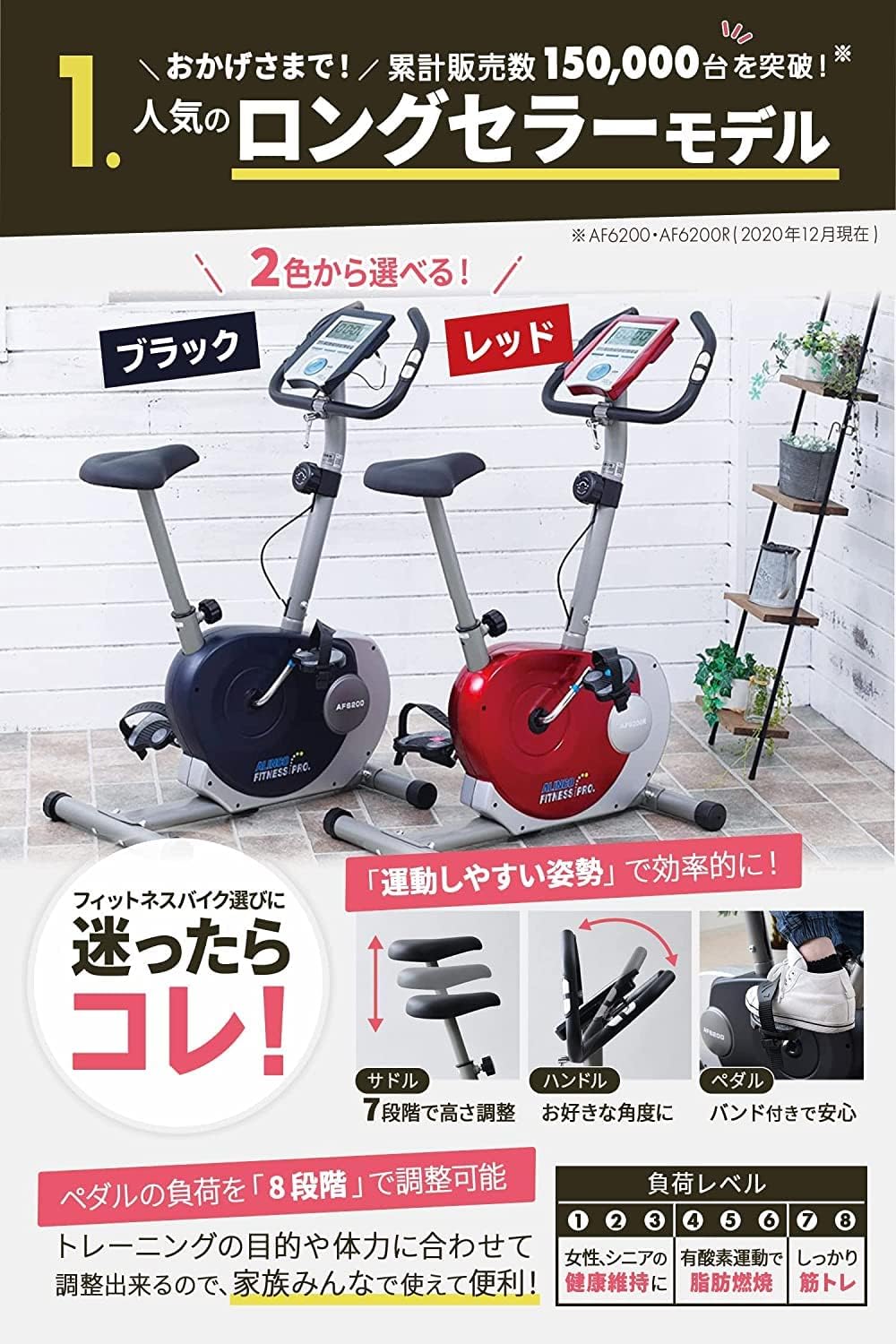
Image 3: ALINCO AF6200 highlighting adjustable saddle, handlebar, and pedal straps, along with 8-level load adjustment.
6. Maintenance
Regular maintenance ensures the longevity and safe operation of your fitness bike.
- Cleaning: Wipe down the bike with a damp cloth after each use to remove sweat and dust. Avoid abrasive cleaners.
- Inspection: Periodically check all bolts and nuts to ensure they are tight. Inspect pedals, straps, and saddle for any signs of wear or damage.
- Lubrication: No specific lubrication is required for the magnetic resistance system.
- Storage: Store the bike in a dry, cool place away from direct sunlight and extreme temperatures. The integrated casters allow for easy movement and storage.
7. Troubleshooting
If you encounter any issues with your ALINCO AF6200, refer to the following common troubleshooting tips:
| Problem | Possible Cause | Solution |
|---|---|---|
| Display not working | Dead batteries; Loose cable connection | Replace AA batteries; Check all cable connections to the meter. |
| Unstable or wobbly bike | Loose bolts; Uneven surface | Tighten all assembly bolts; Adjust the leveling feet on the stabilizer bars. |
| Resistance not changing | Resistance cable issue; Internal mechanism fault | Ensure the resistance dial is properly connected. If the issue persists, contact customer support. |
| Unusual noises during operation | Loose parts; Friction | Check and tighten all bolts. Ensure no parts are rubbing. The magnetic load system is designed for quiet operation. |
For issues not listed here or if solutions do not resolve the problem, please contact ALINCO customer support.
8. Specifications
| Feature | Detail |
|---|---|
| Product Model Number | AF6200 |
| Brand | ALINCO |
| Color | Black (with program function) |
| Materials | Steel, ABS resin, PU, PVC, PP |
| Load Capacity | 90 kg |
| Saddle Height Adjustment | 69-85 cm (7 levels, 3 cm pitch) |
| Load System | Magnetic load, 8 levels |
| Continuous Usage Time | 30 minutes |
| Power Source (Meter) | 2 x AA batteries |
| Recommended Use | Indoor |
| Package Dimensions | 81.5 x 55 x 23.3 cm |
| Package Weight | 22 kg |
| Country of Origin | China |
9. Warranty and Support
ALINCO is a reputable company with over 80 years of experience, committed to providing high-quality products and customer satisfaction.
9.1 Manufacturer's Warranty
Your ALINCO AF6200 Fitness Bike comes with a 1-year manufacturer's warranty from the date of purchase. During this period, repairs and exchanges are generally provided free of charge for manufacturing defects. Please retain your proof of purchase for warranty claims.
9.2 Customer Service
Should you have any questions regarding the product's usage, specifications, or require assistance with malfunctions or purchasing dedicated parts, please contact our dedicated Service Center. Our professional staff are available to provide detailed support.
For warranty claims or technical assistance, please contact ALINCO Customer Service.

Image 4: ALINCO's commitment to quality, warranty, and customer service.
