Introduction
This manual provides essential information for the proper use and care of your BenQ OEM Projector Lamp. This replacement lamp and cage assembly is specifically designed for BenQ DS660, DX660, DS650, and DX650 series projectors, ensuring original factory quality and compatibility. Adhering to these instructions will help maximize the lamp's lifespan and maintain optimal projector performance.
Safety Information
Please read and understand all safety precautions before handling or installing the projector lamp.
- Do Not Drop: The lamp is fragile and can be damaged by impact. Handle with extreme care.
- Fragile Component: The lamp contains delicate components. Avoid touching the glass bulb directly.
- High Temperature: Projector lamps operate at very high temperatures. Allow the projector to cool down completely before attempting lamp replacement.
- Electrical Hazard: Always disconnect the projector from the power source before opening the lamp compartment.
- Proper Disposal: Dispose of old lamps according to local regulations, as they may contain mercury.
Product Overview
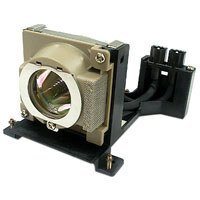
An image showing the BenQ OEM Projector Lamp, which includes the lamp bulb housed within its protective cage, ready for installation into compatible BenQ projectors. The lamp assembly is designed for easy and secure fitting.
The BenQ OEM Projector Lamp is a complete module consisting of the lamp bulb and its housing. This design facilitates safe and straightforward replacement, ensuring proper alignment and electrical connection within your projector.
Setup (Lamp Replacement)
- Power Off and Cool Down: Turn off the projector and unplug the power cord. Allow the projector to cool for at least 30 minutes to prevent burns.
- Locate Lamp Compartment: Refer to your projector's specific user manual to locate the lamp compartment cover. This is typically on the top, side, or bottom of the projector.
- Remove Cover: Unscrew the screw(s) securing the lamp compartment cover and carefully remove it.
- Remove Old Lamp: Loosen the screw(s) holding the lamp module in place. Gently pull the handle on the lamp module to slide it out of the projector. Do not force it.
- Install New Lamp: Carefully insert the new BenQ OEM Projector Lamp module into the slot, ensuring it slides in smoothly and is fully seated.
- Secure Lamp: Tighten the screw(s) to secure the new lamp module.
- Replace Cover: Reattach the lamp compartment cover and tighten its screw(s).
- Reset Lamp Timer: After replacing the lamp, it is crucial to reset the lamp timer in your projector's OSD (On-Screen Display) menu. Consult your projector's manual for specific instructions on how to do this.
Operating Instructions
Once the new lamp is installed and the lamp timer is reset, your projector is ready for operation. The lamp will illuminate when the projector is powered on and initialized. The brightness and color performance will be restored to optimal factory specifications.
- Warm-up Period: Allow the projector a few minutes to warm up after turning it on for the lamp to reach full brightness and stable color output.
- Cool-down Cycle: Always allow the projector to complete its cool-down cycle after turning it off. Do not unplug the projector immediately after powering down, as this can shorten lamp life.
Maintenance
Proper maintenance can extend the life of your projector and its lamp.
- Air Filter Cleaning: Regularly clean or replace the projector's air filter to ensure proper airflow and prevent the lamp from overheating. Refer to your projector's manual for filter maintenance.
- Environmental Conditions: Operate the projector in a clean, dust-free environment with adequate ventilation. Avoid extreme temperatures and humidity.
- Lamp Life: The typical lifespan of a projector lamp is measured in hours. Replace the lamp when the image becomes dim, colors appear faded, or the projector displays a lamp replacement warning.
Troubleshooting
If you encounter issues after lamp replacement, consider the following:
- Lamp Not Lighting:
- Ensure the lamp module is fully seated and secured with its screws.
- Check that the lamp compartment cover is properly closed and secured.
- Verify the projector is receiving power and is turned on.
- Dim Image / Poor Color:
- Confirm the lamp timer was reset after installation.
- Check projector settings for brightness and color modes.
- Ensure the projector lens is clean.
- Lamp Warning Light Still On:
- This typically means the lamp timer was not reset. Follow the instructions in your projector's manual to reset it.
If problems persist, consult your BenQ projector's specific user manual or contact BenQ customer support.
Specifications
| Feature | Specification |
|---|---|
| Brand | BenQ |
| Model Number | 60.J3416.CB1 |
| Compatible Projector Series | DS660, DX660, DS650, DX650 |
| Wattage | 210 Watts |
| Item Weight | 8 Ounces |
| Product Dimensions | 5 x 5 x 4.88 inches |
| Light Source Type | Projector lamps |
| Color | Silver |
| Manufacturer | BenQ |
Warranty and Support
This BenQ OEM Projector Lamp is covered by a manufacturer's warranty. For specific warranty terms and conditions, please refer to the documentation included with your purchase or visit the official BenQ website. For technical support, troubleshooting assistance, or to inquire about warranty claims, please contact BenQ customer service through their official support channels.
You can find more information and support resources by visiting the BenQ Store on Amazon.