Introduction
This manual provides detailed instructions for the setup, operation, maintenance, and troubleshooting of your Master Lock M176XDLH Heavy Duty Outdoor Combination Padlock. Please read these instructions carefully before using your new padlock to ensure proper function and security.

Image: Master Lock M176XDLH Heavy Duty Outdoor Combination Padlock.
The Master Lock M176XDLH features a 2-inch (51mm) wide zinc die-cast body, a 3/8-inch (10mm) diameter octagonal shackle made of Tough-Cut boron-carbide, and a roller pin cylinder for enhanced security. It is designed for outdoor use with superior weather protection.
Key Features
- Resettable 4-Digit Combination: Allows you to set your own personalized code.
- Backup Key: Provides an alternative method to open the lock if the combination is forgotten.
- Tough-Cut Boron Carbide Shackle: Offers maximum resistance against cutting and sawing, 50% harder than hardened steel.
- Weather Resistant: Features covered dials and a reinforced body bumper for superior outdoor performance and protection against scratches.
- Zinc Die-Cast Body: Ensures strength and reliability for various applications including gates, sheds, and storage lockers.
- Roller Pin Cylinder: Designed for maximum pick and pry resistance.
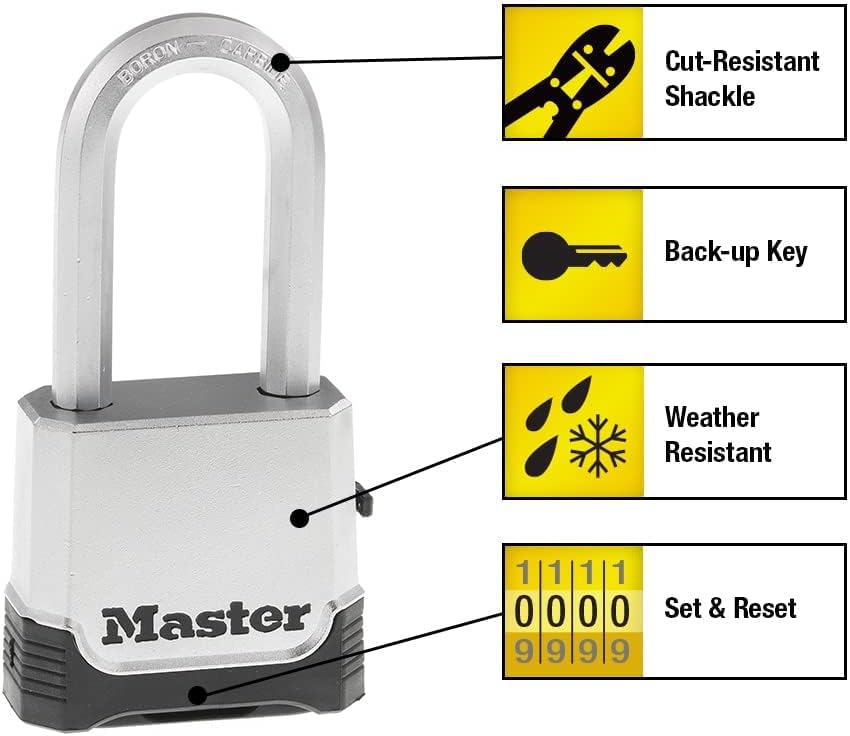
Image: Diagram highlighting the cut-resistant shackle, backup key, weather resistance, and set & reset combination features of the Master Lock M176XDLH.
Setup: Setting Your Combination
Your Master Lock M176XDLH padlock comes with a preset combination. This preset code is typically found on a sticker on the back of the packaging. You will also find a small reset key. Follow these steps to set your own combination:
- Open the Lock: Enter the preset combination (found on the packaging) and pull the shackle open.
- Insert Reset Key: Locate the small keyhole on the side of the lock body. Insert the provided reset key into this keyhole.
- Turn Reset Key: Turn the reset key 90 degrees clockwise. You may feel a slight click.
- Set New Combination: While the reset key is turned, rotate the four combination wheels to your desired new combination. Ensure the numbers align perfectly with the indicator line.
- Remove Reset Key: Turn the reset key 90 degrees counter-clockwise back to its original position and remove it.
- Test New Combination: Scramble the dials, then enter your new combination and push down on the shackle to ensure it opens.
Important: Record your new combination in a safe place. If you forget your combination, the backup key can be used to open the lock, but you will need the reset key to change the combination again.

Image: Visual guide demonstrating the six steps to set or reset the combination on the Master Lock M176XDLH padlock.
Operating Your Padlock
Opening the Lock with Combination:
- Rotate the combination wheels to align your correct 4-digit code with the indicator line.
- Firmly push down on the shackle. The shackle will release and spring open.
Closing and Securing the Lock:
- Align the shackle with the lock body and push it down until it clicks securely into place.
- Scramble the combination wheels to lock the mechanism and prevent unauthorized opening.
Using the Backup Key:
- Insert the backup key into the keyhole on the side of the lock.
- Turn the key clockwise and simultaneously pull up on the shackle. The lock will open regardless of the combination set on the dials.
- Remove the key and close the lock as described above.
Maintenance
To ensure the longevity and smooth operation of your Master Lock M176XDLH padlock, especially in outdoor environments, consider the following maintenance tips:
- Lubrication: Periodically apply a silicone-based lubricant or graphite powder to the shackle mechanism and the combination wheels. This helps prevent corrosion and ensures smooth movement, particularly in cold or wet conditions. Avoid oil-based lubricants as they can attract dirt.
- Cleaning: Wipe down the lock body and shackle with a damp cloth to remove dirt, dust, and grime. For stubborn dirt, a mild soap solution can be used. Ensure the lock is thoroughly dried afterward.
- Weather Protection: While the lock is weather-resistant, extreme conditions can still affect its performance. If possible, position the lock to minimize direct exposure to heavy rain, snow, or prolonged sunlight. The dial cover provides additional protection.

Image: The Master Lock M176XDLH padlock shown in various outdoor settings, demonstrating its weather-resistant design with shackle seal and dial cover.
Troubleshooting
- Lock is Stiff or Hard to Open:
- Ensure the combination wheels are perfectly aligned with the indicator line.
- Apply a silicone-based lubricant or graphite powder to the shackle and combination wheels. Work the shackle and dials to distribute the lubricant.
- Check for any debris obstructing the shackle or dials.
- Forgotten Combination:
- Use the provided backup key to open the lock.
- Refer to the "Setup: Setting Your Combination" section to reset the code using the reset key.
- Shackle Does Not Close Properly:
- Ensure no foreign objects are obstructing the shackle's path into the lock body.
- Apply lubricant to the shackle and the internal locking mechanism.
Specifications
| Feature | Detail |
|---|---|
| Model Number | M176XDLH |
| Lock Type | Combination Lock with Backup Key |
| Body Material | Zinc Die-Cast |
| Shackle Material | Tough-Cut Boron Carbide |
| Shackle Diameter | 3/8 inch (10 mm) |
| Shackle Length | 2 inches (51 mm) |
| Body Width | 2 inches (51 mm) |
| Product Dimensions (L x W x H) | 1.3 x 2 x 4.38 inches |
| Weight | 12.6 ounces |
| Special Features | Heavy Duty, Resettable, Weather Resistant |

Image: Detailed diagram showing the dimensions of the Master Lock M176XDLH padlock, including body width, shackle diameter, and shackle length.
Warranty and Support
The Master Lock M176XDLH padlock comes with a Lifetime Guarantee, providing peace of mind regarding its quality and durability. For any questions, support, or warranty claims, please refer to the official Master Lock website or contact their customer service directly.
Visit the Master Lock Store for more information and product support.


