Introduction
This manual provides comprehensive instructions for the assembly, operation, and maintenance of your Bush Furniture Quest TV Stand and Video Game Station (Model VS96432-03). This unit is designed to provide a functional and organized space for your television and gaming equipment. Please read this manual thoroughly before beginning assembly or use to ensure proper setup and safe operation.
Safety Information
Your safety is paramount. Please observe the following safety guidelines:
- This product has been tested for tip-free safety when assembled and used according to instructions.
- Do not exceed the maximum weight capacities: most 32-inch conventional TVs (up to 176 pounds) and most 42-inch flat-panel TVs (up to 100 pounds).
- Keep small parts and packaging materials away from children to prevent choking hazards.
- Ensure all connections are securely fastened during assembly. Periodically check all fasteners for tightness.
- Place the TV stand on a level, stable surface to prevent tipping.
- Do not allow children to climb on the unit.
Package Contents
Before beginning assembly, carefully unpack all components and verify that all parts are present and undamaged. Refer to the detailed parts list included in your product packaging. If any parts are missing or damaged, do not proceed with assembly; contact customer service immediately.
Assembly Instructions
Assembly of the Bush Furniture Quest TV Stand is required. Please follow these general guidelines:
- Preparation: Clear a spacious area for assembly. It is recommended to assemble the unit on a soft, clean surface to prevent scratches.
- Tools: Gather any necessary tools as indicated in the separate assembly manual (e.g., screwdriver, hammer).
- Step-by-Step: Refer to the detailed, step-by-step assembly instructions and diagrams provided in the separate instruction manual included with your purchase. Follow each step carefully.
- Fasteners: Ensure all screws, bolts, and other fasteners are tightened securely. Do not overtighten.
- Stability Check: Once assembled, gently test the unit for stability before placing any items on it.
Description: This image shows the fully assembled Bush Furniture Quest TV Stand in a room. A television is placed on top, and a gaming console is visible in the central compartment. The stand features multiple storage bins on the sides.
Operating Instructions
Once assembled, your TV stand is ready for use. Follow these guidelines for optimal organization and functionality:
- TV Placement: Carefully place your television on the top surface of the stand, ensuring it is centered and stable. Adhere to the maximum weight and size limits.
- Gaming Console & Media Devices: Utilize the open compartment with adjustable shelves to house your DVD player, Blu-ray player, or gaming consoles. Adjust shelves as needed for proper fit and ventilation.
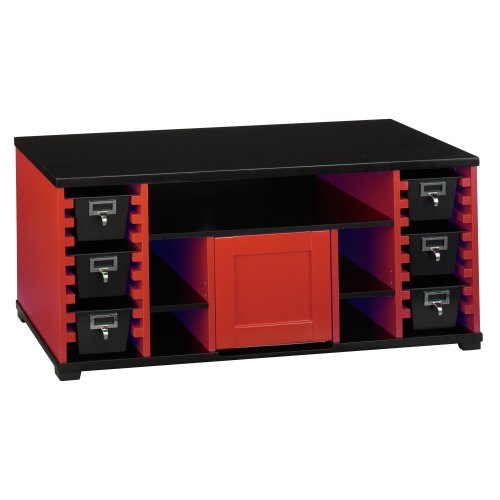
- Storage Bins: The six molded plastic storage bins are ideal for organizing video games, DVDs, or other small accessories.
- Center Cabinet: The large center cabinet provides additional enclosed storage for joysticks, remotes, and other gaming accessories, keeping them out of sight.
- Wire Management: The back of the unit features strategically placed cutouts to allow wires and cords to pass through discreetly, helping to maintain a tidy appearance and prevent tangles.

Description: This image provides a closer look at the Bush Furniture Quest TV Stand, highlighting the various storage options. It shows the open central compartment, the enclosed red cabinet, and the black plastic storage bins on the sides.

Description: This image displays the back of the Bush Furniture Quest TV Stand with a television placed on it. It clearly shows the cutouts designed for routing and managing cables and wires from the TV and other devices, contributing to a neat setup.
Maintenance
Proper care will extend the life and appearance of your TV stand:
- Cleaning: For general cleaning, wipe the surfaces with a dry cloth. For more thorough cleaning, use a damp cloth. Avoid harsh chemicals or abrasive cleaners that may damage the finish.
- Inspection: Periodically inspect all hardware and connections to ensure they remain tight. Retighten if necessary.
- Avoid Moisture: Protect the unit from excessive moisture and direct sunlight to prevent warping or fading.
Troubleshooting
If you encounter any issues with your Bush Furniture Quest TV Stand, consider the following:
- Instability: If the stand feels wobbly or unstable, recheck all assembly connections to ensure they are fully tightened. Ensure the unit is on a level surface.
- Missing Parts: If you discover missing parts during assembly, do not attempt to substitute. Contact customer service for replacements.
- Damage: If any part is damaged, do not proceed with assembly or use. Contact customer service.
Specifications
| Model Number | VS96432-03 |
| Dimensions (W x D x H) | 47.52 x 19.35 x 20.98 inches (120.7 x 49.1 x 53.3 cm) |
| Item Weight | 52.2 pounds (23.68 kg) |
| TV Capacity (Conventional) | Up to 32 inches, 176 pounds (79.8 kg) |
| TV Capacity (Flat-Panel) | Up to 42 inches, 100 pounds (45.3 kg) |
| Color | High Gloss Black/Red |
| Assembly Required | Yes |
Warranty and Support
Warranty Information: Refer to your product packaging or included documentation for specific warranty details, as information may vary. The product description mentions a six-year warranty, while specifications list a one-year warranty. Please consult the documentation provided with your purchase for the definitive warranty period.
Customer Support: For assembly assistance, missing parts, or any other inquiries, please contact Bush Furniture customer service at 800-950-4782. Have your model number (VS96432-03) and purchase information ready when you call.


