
Introduction
This manual provides comprehensive instructions for the Kinyo Super Slim VHS Rewinder, model UV-413. Designed to efficiently rewind VHS tapes, this device helps preserve the lifespan of your VCR by reducing wear and tear on its internal mechanisms. Please read this manual thoroughly before operating the unit to ensure proper use and optimal performance.
Setup
- Unpacking: Carefully remove the Kinyo Super Slim VHS Rewinder from its packaging. Retain all packaging materials for future transport or storage.
- Placement: Place the rewinder on a stable, flat surface away from direct sunlight, heat sources, and excessive dust. Ensure adequate ventilation around the unit.
- Power Connection: Connect the power adapter (if external) to the rewinder and then plug it into a standard electrical outlet. Ensure the power indicator light (if present) illuminates, indicating the unit is receiving power.
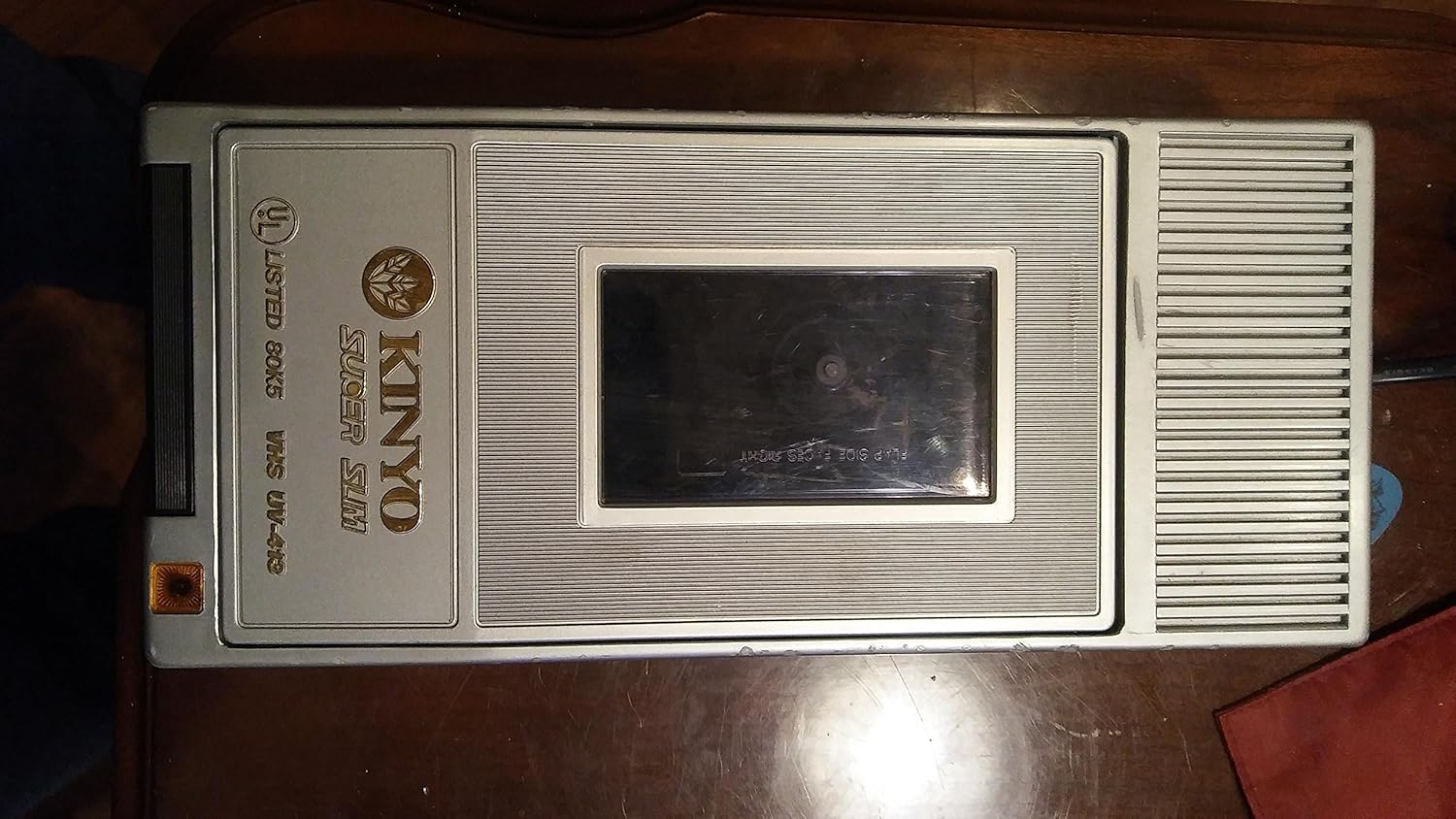
Figure 1: Top view of the Kinyo Super Slim VHS Rewinder UV-413. This image displays the Kinyo Super Slim VHS Rewinder from a top-down perspective. The main features visible are the Kinyo brand logo, 'Super Slim' text, 'VHS UV-413' model number, and the tape insertion slot with the instruction 'FLAP SIDE FACES RIGHT' printed on it. The unit has a silver-grey finish with ribbed textures on the surface.
Operating Instructions
- Insert VHS Tape: Open the tape compartment lid. Gently insert a VHS tape into the slot, ensuring the tape's flap side faces right, as indicated on the unit. Close the lid securely.
- Initiate Rewind: The rewinder should automatically begin the rewinding process once the tape is correctly inserted and the lid is closed. A status indicator light (if available) may illuminate or change color during operation.
- Automatic Ejection: Once the tape is fully rewound, the unit is designed to automatically stop and eject the tape. Wait for the tape to be fully ejected before removing it.
- Manual Removal (if needed): If the tape does not eject automatically, gently open the lid and carefully remove the tape. Do not force the tape out.
Important Note: Always ensure the tape is inserted with the flap side facing right to prevent damage to the tape or the rewinder.
Maintenance
- Cleaning: Disconnect the power before cleaning. Use a soft, dry cloth to wipe the exterior of the unit. Do not use liquid cleaners, solvents, or abrasive materials.
- Storage: When not in use for extended periods, store the rewinder in a cool, dry place, away from direct sunlight and extreme temperatures.
- Tape Care: Ensure VHS tapes are free from dust and debris before inserting them into the rewinder to prevent internal contamination.
Troubleshooting
- Unit does not power on:
- Ensure the power cord is securely plugged into both the rewinder and a working electrical outlet. Check if the outlet is functional by plugging in another device.
- Tape does not rewind:
- Verify that the VHS tape is inserted correctly with the flap side facing right and the compartment lid is fully closed. Ensure the tape is not damaged or jammed.
- Tape does not eject automatically:
- After rewinding is complete, if the tape does not eject, gently open the lid and manually remove the tape. If this issue persists, ensure the lid mechanism is not obstructed.
- Unusual noise during operation:
- A slight whirring sound is normal during rewinding. However, if you hear loud grinding or squealing, ensure the tape is inserted correctly and the lid is fully closed. If the noise persists, discontinue use and contact support.
Specifications
| Model Number: | UV-413 |
| Product Dimensions: | 11.9 x 5.7 x 3.3 inches |
| Item Weight: | 1.7 pounds |
| Manufacturer: | Kinyo |
| Date First Available: | September 16, 2007 |
Warranty and Support
For information regarding warranty coverage, please refer to the documentation provided at the time of purchase or contact your retailer. For technical support or further assistance, please reach out to Kinyo customer service through their official channels.
Note: Product specifications and features are subject to change without notice.