
1. Introduction and Product Overview
The HM Digital TDS-3 is a handheld Total Dissolved Solids (TDS) meter designed for quickly and conveniently checking water quality. TDS refers to any salt, metal, or mineral dissolved in water. This device measures the overall purity level of water, displaying the result in parts per million (ppm).
A lower TDS level indicates purer water, with 0 ppm representing pure H2O. The TDS-3 is suitable for various applications including testing tap water, monitoring water filtration and purification systems, colloidal silver production, hydroponics (for nutrient testing), aquariums, RO/DI systems, pools, spas, and other commercial and industrial uses. It is a robust model that includes a protective carrying case.
2. Key Features
- Hold Function: Saves measurements for convenient reading and recording.
- Auto-off Function: Automatically turns off after 10 minutes of inactivity to conserve battery life.
- Built-in Digital Thermometer: Measures water temperature.
- Carrying Case: Includes a protective carrying case with a belt clip for portability.
- Factory Calibrated: Calibrated with a 342 ppm NaCl solution for accuracy.
- High Accuracy: Utilizes advanced microprocessor technology for efficient and accurate readings.
- Easy-to-read Display: Features a large and clear LCD screen.
3. Setup
- Battery Installation: The TDS-3 meter requires 2 LR44 batteries, which are included. Ensure they are correctly inserted into the battery compartment, observing polarity.
- Initial Inspection: Before first use, inspect the meter for any visible damage. Ensure the electrodes at the bottom are clean.
4. Operating Instructions
- Power On/Off: Press the ON/OFF button to turn the meter on or off.
- Taking a Measurement:
- Remove the protective cap from the bottom of the meter.
- Immerse the meter's electrodes into the water sample up to the maximum immersion level (usually indicated by a line on the casing).
- Gently stir the meter to dislodge any air bubbles.
- Wait for the reading to stabilize on the LCD screen. The reading will be displayed in ppm.
- Using the Hold Function: While the meter is immersed and displaying a reading, press the HOLD button to freeze the displayed value. This allows you to remove the meter from the water and record the reading. Press HOLD again to release the reading.
- Using the Temperature Function: Press the TEMP button to switch between TDS reading and temperature reading (in Celsius). Press it again to return to TDS mode.
5. Maintenance
- Cleaning: After each use, rinse the electrodes with distilled water to prevent mineral buildup. Wipe the meter body clean with a soft, dry cloth. Do not use abrasive cleaners or immerse the entire meter in water.
- Storage: Always replace the protective cap after use. Store the meter in its carrying case in a cool, dry place, away from direct sunlight and extreme temperatures.
- Battery Replacement: If the display becomes dim or the meter does not turn on, replace the LR44 batteries. Ensure proper polarity.
- Calibration: While factory calibrated, periodic re-calibration with a known TDS solution may be necessary for optimal accuracy, especially after prolonged use or if readings appear inconsistent. Refer to the manufacturer's website for detailed calibration instructions if needed.
6. Troubleshooting
| Problem | Possible Cause | Solution |
|---|---|---|
| No display / Meter won't turn on | Dead or incorrectly installed batteries. | Replace batteries, ensuring correct polarity. |
| Inaccurate or inconsistent readings | Dirty electrodes; air bubbles on electrodes; meter needs calibration; water temperature outside range. | Clean electrodes; gently stir meter in water; recalibrate if necessary; ensure water is within 0-80°C. |
| "Err" or "E" on display | Measurement range exceeded or sensor error. | Ensure TDS level is within 0-9990 ppm. If problem persists, contact support. |
7. Specifications
| Feature | Detail |
|---|---|
| Brand | HM Digital |
| Model Name | TDS-3 |
| Measurement Range | 0 - 9990 ppm (parts per million) |
| Resolution | 1 ppm |
| Readout Accuracy | +/- 2% |
| Temperature Range | 0 - 80 Degrees Celsius (32 - 176 Fahrenheit) |
| Display Type | LCD |
| Power Source | Battery Powered (2 x LR44 batteries included) |
| Auto-off | 10 minutes |
| Dimensions (approx.) | 6.1 x 1.25 inches (from image) |
| Weight | 0.007 ounces |
| Outer Material | Metal |
| Included Components | TDS-3 Meter, Carrying Case |
8. Product Visuals

Figure 8.1: Front view of the HM Digital TDS-3 meter, showing the display and control buttons (HOLD, TEMP, ON/OFF).

Figure 8.2: The TDS-3 meter presented on a display stand, highlighting its compact design.
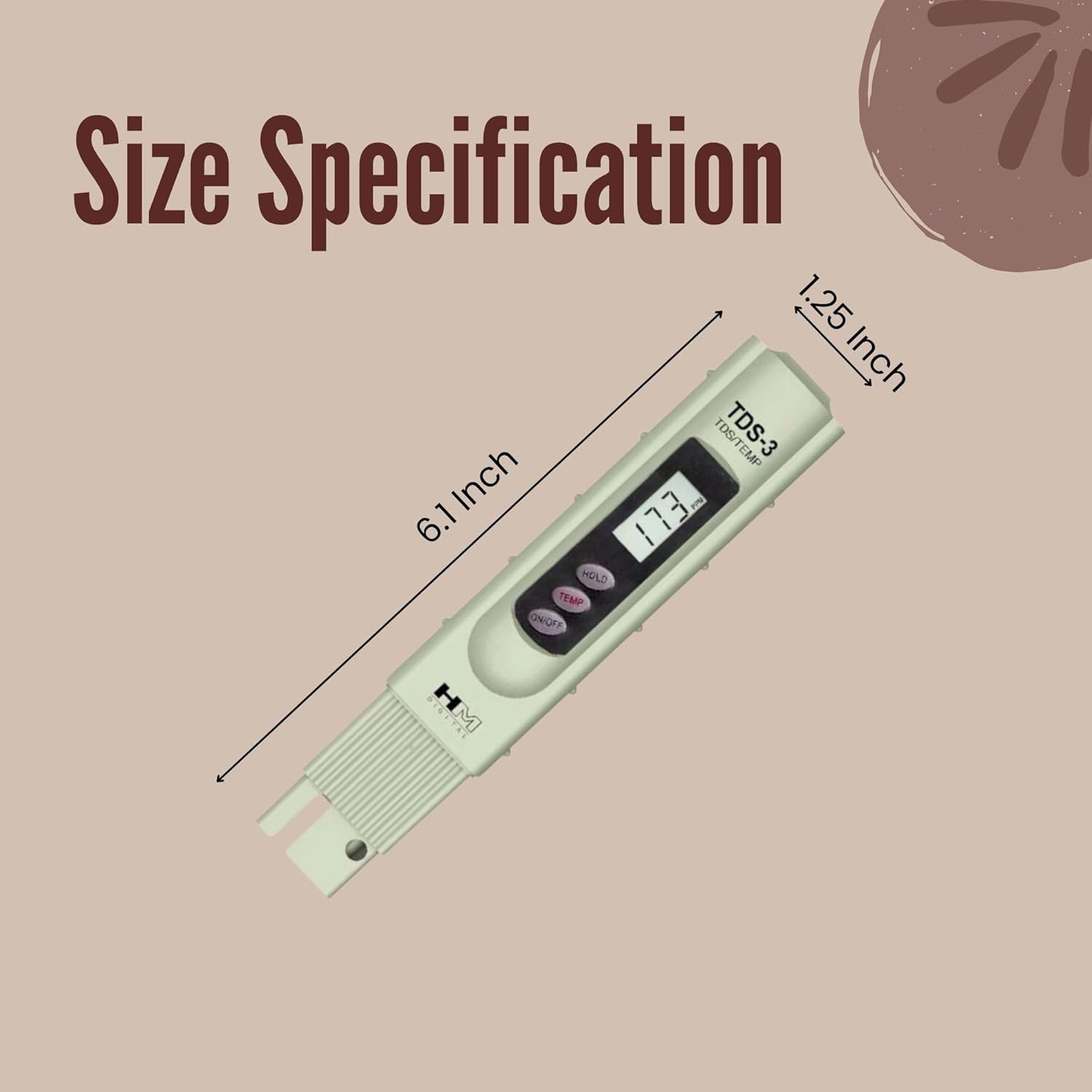
Figure 8.3: Diagram illustrating the dimensions of the TDS-3 meter, showing a length of 6.1 inches and a width of 1.25 inches.

Figure 8.4: Visual summary of key specifications and features of the TDS-3 meter, including Hold Function, Auto-off, built-in thermometer, carrying case, and factory calibration.

Figure 8.5: The TDS-3 meter shown immersed in water, with water splashes, demonstrating its intended use for liquid measurement.

Figure 8.6: The TDS-3 meter securely stored within its black protective carrying case, front view, showing the meter through a clear window.

Figure 8.7: The back view of the TDS-3 meter's black protective carrying case, featuring the HM Digital logo and a belt clip for easy transport.
Note: No official product videos from the seller were available for embedding.
9. Warranty and Support
For warranty information, technical support, or service inquiries, please refer to the official HM Digital website or contact their customer service department. Keep your purchase receipt as proof of purchase for any warranty claims.


